How to troubleshoot 502 and 504 starts at the hop that produced the status. Both codes come from a gateway or reverse proxy: 502 Bad Gateway means that hop did not get a usable response from upstream; 504 Gateway Timeout means it waited past its limit. Keep the headers, then reach the upstream from that hop’s network.
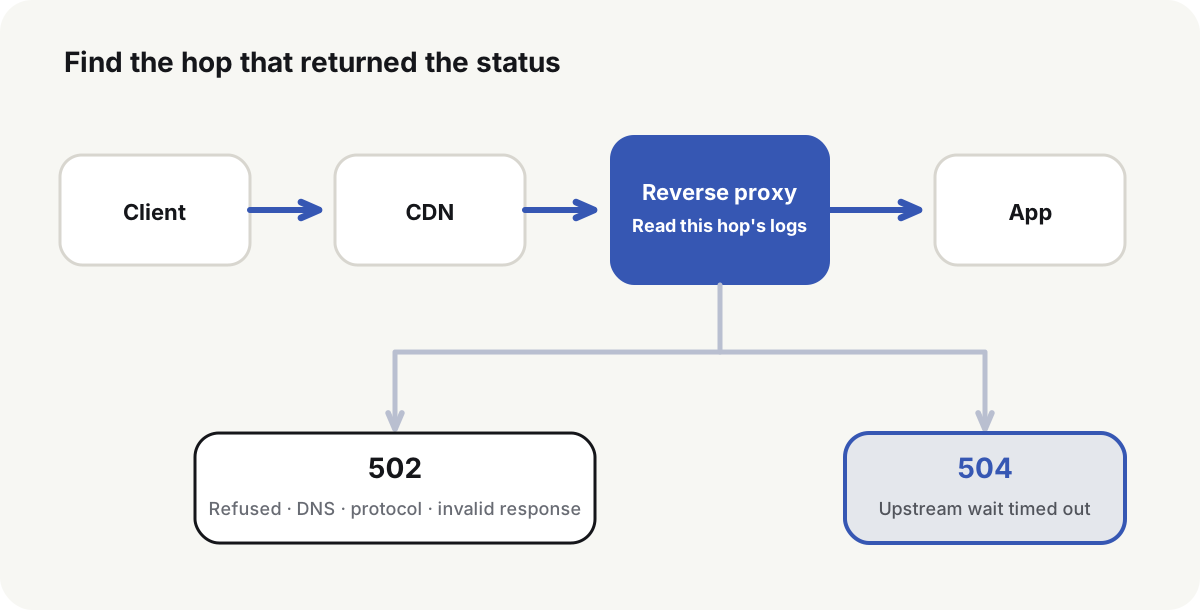
How to troubleshoot 502 and 504 at the hop that returned the status
A browser may sit behind Cloudflare or another CDN, a cloud load balancer, and Caddy or Nginx. Save the status, headers, time, and request ID:
curl -sS -o /dev/null -D - \
  -w 'remote=%{remote_ip} code=%{http_code} ttfb=%{time_starttransfer} total=%{time_total}\n' \
  https://example.com/path
Server, Via, CDN feature headers, and a custom request ID narrow the hop. They do not name the root cause. Align CDN, entry, and application logs for the same timestamp. If the CDN log shows an origin 502 and the origin entry has no matching request, check the address, port, and TLS between those two hops.
RFC 9110(opens in a new tab) defines the two statuses as:
502 Bad Gateway: the server, acting as a gateway or proxy, received an invalid response from an inbound server it accessed to fulfill the request;504 Gateway Timeout: the server, acting as a gateway or proxy, did not receive a timely response from an upstream server it needed to complete the request.
Software logs connection refused, connection reset, handshake failure, and response parse failure in different words. The status only gives the range. The producing proxy’s log still names the cause.
Test whether the proxy can reach the upstream
docker compose ps
docker compose logs --since 10m proxy app
docker compose exec proxy getent hosts app
docker compose exec proxy curl -sv http://app:8080/healthz
The last command must run in the proxy container. It checks service-name DNS, the Compose network, the container port, the protocol, and the application response together. curl localhost:8080 on the host only proves the published host port. If the proxy image has no getent or curl, run the same request from another container on that network. A host shell is still the wrong namespace.
On the default Compose network, use the service name and the container port:
example.com {
    reverse_proxy app:8080
}
location / {
    proxy_pass http://app:8080;
    proxy_set_header Host $host;
    proxy_set_header X-Forwarded-Proto $scheme;
    proxy_set_header X-Forwarded-For $proxy_add_x_forwarded_for;
}
Docker Compose networking(opens in a new tab) assigns a new IP when a container is recreated. The service name stays. Writing a container IP into the proxy config produces a 502 after a normal recreate.
Caddy dials app:8080 with current DNS. Nginx with a static proxy_pass http://app:8080; resolves the name at start or reload, so a recreated app container can still 502 until Nginx reloads.
Map a 502 from the proxy log line
| Proxy log | Common cause | Check |
|---|---|---|
| connection refused | App not listening, wrong port, startup not finished | ss -lntp, container logs, healthcheck |
| host not found / no such host | Wrong service name, different network, DNS failure | getent hosts app, docker inspect networks |
| connection reset by peer | App crash, deliberate close, protocol mismatch | App error logs, OOM, HTTP versus HTTPS |
| TLS handshake failed | Upstream protocol, SNI, or trust error | curl -vk only to locate, then fix the trust chain |
| invalid header / upstream sent invalid response | Upstream is not HTTP, or the response is malformed | Connect to the port directly, then read app logs |
The app must listen on an address other containers can reach, commonly 0.0.0.0:8080. Listening on 127.0.0.1:8080 accepts connections only inside that app container. Limit public exposure with host port publishing and a firewall, not by binding the in-container service to loopback.
Find what the 504 is waiting on
When the upstream accepts the connection but does not return in time, the proxy ends with 504. Measure TTFB and total time from the proxy container:
docker compose exec proxy curl -sS \
  -o /dev/null \
  -w 'code=%{http_code} ttfb=%{time_starttransfer} total=%{time_total}\n' \
  http://app:8080/slow-path

docker stats --no-stream
Align the request time with application logs, slow queries, pool waits, and external API calls. Check these waits first:
- SQL queries, lock waits, or an exhausted connection pool;
- an external API with no useful timeout, plus stacked retries;
- CPU, memory, or disk staying saturated;
- a large file generated or forwarded synchronously by the app;
- a client that already cancelled while the upstream keeps working;
- stacked proxies whose timeouts run in the wrong order, so the outer hop disconnects first.
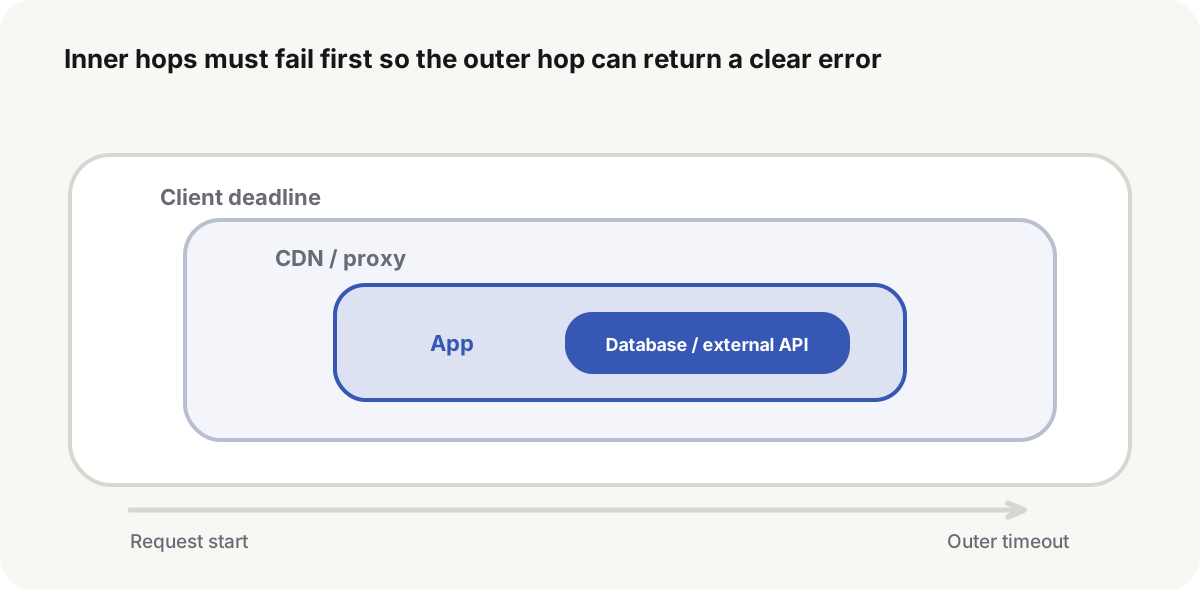
Design timeouts across the whole call chain
If the outer hop allows 30 seconds, the app cannot give the database 30 seconds and an external API another 30 seconds. Inner timeouts, retries, and cleanup have to finish before the outer deadline, with time left to return an error.
Nginx proxy_read_timeout(opens in a new tab) is the gap allowed between two successive reads, not a budget for the whole response. Default is 60s. Caddy reverse_proxy(opens in a new tab) has separate dial, response-header, read, and write timeouts; dial defaults to 3s, and the read and response-header timeouts have no default limit. Confirm which stage is stuck before changing them. If Caddy has no read timeout, a 504 in front of it often came from Cloudflare or the load balancer, not from Caddy.
Raise timeouts only when the work is genuinely long:
- return a task ID and run the work asynchronously;
- expose progress, cancellation, and an idempotent status query;
- move the gateway, application, and dependency budgets together;
- limit concurrency so long requests do not stall ordinary ones.
Changing a proxy timeout from 30 seconds to 10 minutes holds connections longer and can hide a database or third-party failure for longer.
A healthcheck has to prove the app can take a request
running is not request-ready. The probe has to show the app can accept a request. A check that touches the database can confirm a critical dependency, but an expensive query does not belong on a high-frequency probe. Compose can wait until a dependency is healthy before starting a consumer:
services:
  app:
    image: example/app:1.4.2
    healthcheck:
      test: ["CMD", "wget", "-qO-", "http://127.0.0.1:8080/healthz"]
      interval: 10s
      timeout: 3s
      retries: 6
running only means the main process has not exited. It does not prove the port is listening, the route works, or a dependency is ready.
After recovery, check the app, the proxy, and the public URL
docker compose exec app wget -qO- http://127.0.0.1:8080/healthz
docker compose exec proxy curl -fsS http://app:8080/healthz
curl -fsS https://example.com/healthz
Confirm proxy error logs stop growing, application error rate returns, and request time is back at baseline, then recreate the app once. Access through the service name after that recreate proves the setup does not depend on an old container IP or a one-off network state.
The same health URL should succeed inside the app container, from the proxy container, and on the public hostname. That is the recovery check for how to troubleshoot 502 and 504. Whether the app port should bind to loopback, the host’s public address, or stay only on the Compose network is the next boundary to set.
Common questions
What is the difference between 502 and 504?
502 means the proxy did not get a usable upstream response. 504 means it waited past its limit. Confirm the cause from the producing proxy’s logs and a direct request on the same network.
Should I raise the proxy timeout when I see 504?
Not first. Check the application, database, external API, and resource contention. Convert genuine long work to an asynchronous task before stretching the gateway.
Why is the proxy still 502 when curl on the host works?
The proxy container uses a different network namespace. Request the service name and container port from that container. Host localhost cannot replace that check.
Should a reverse proxy in Docker Compose use a container IP?
No. Use the service name and container port, and put the proxy and the app on the same network. Container IPs can change after a recreate.
How do I confirm 502 or 504 has recovered?
Check the same health URL from the app container, the proxy container, and the public hostname. Confirm recreate, real traffic, and log metrics have recovered as well.