Automatic rollback for a failed deployment is not docker compose down after the script dies. Recovery depends on three facts: whether the candidate already took public traffic, whether the previous upstream can still be restored, and whether business checks finished. If the previous version is still serving, stop only this candidate. If the traffic switch may be half-done, restore the previous upstream. If the new version is still in the observation window, switch back. Recovery should finish the commit records only when the release has already entered the commit phase.
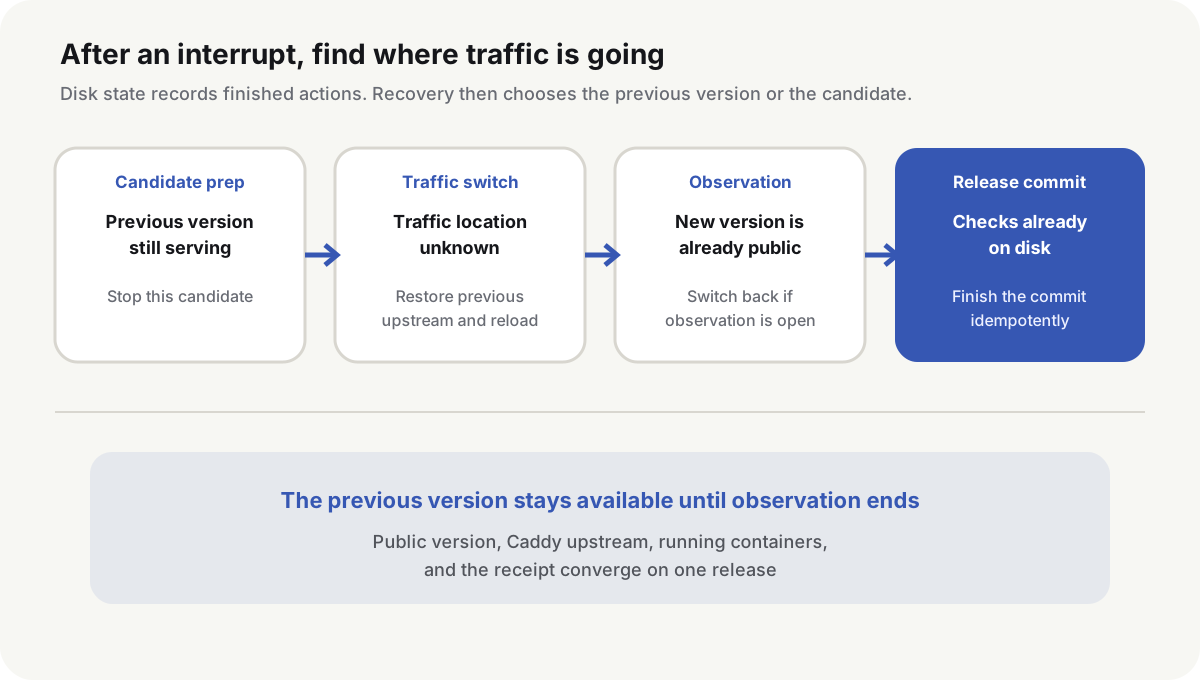
Keep the previous version until observation ends
A candidate can fail to start, and an upstream file can fail validation, without touching the live previous version. After a release starts, keep the previous containers, image, and upstream. Start the candidate under a second Compose project name and a loopback port.
Previous  127.0.0.1:18080  ← Caddy current upstream
Candidate 127.0.0.1:18081  ← loopback checks only
The candidate may take the public entry only after it returns the expected readiness and release ID. Until public checks, business smoke tests, and the observation window finish, do not delete the previous containers or prune the previous image.
Release state lives in a durable directory, for example /var/lib/webapp-deploy/active.json:
{
  "token": "deploy-20260903-201500-a1b2c3d",
  "phase": "prepared",
  "previous_release": "20260902-184000-91e0f2a",
  "candidate_release": "20260903-201500-a1b2c3d",
  "previous_upstream": "127.0.0.1:18080",
  "public_verified": false,
  "business_verified": false,
  "observation_complete": false
}
This file does not store passwords. It records only the facts recovery needs, and it is limited to read/write for the deploy account. Updates write a temporary file in the same directory, fsync it, then rename over the live file. Linux rename(2)(opens in a new tab) replaces a target on the same filesystem without a window where the live file is missing.
A host lock and a transaction token solve different problems. flock stops two deploy processes from changing the entry at once, and the lock is released when the process exits. The token written to active.json remains, so a late CI retry or an old SSH session can be rejected. Stopping the candidate, restoring the upstream, and writing the receipt all check the token, so the previous request cannot touch the next release.
If the candidate never took traffic, stop only the candidate
Start the candidate on the spare port:
docker compose --env-file candidate.env config --quiet
docker compose --env-file candidate.env pull
docker compose --env-file candidate.env up -d --wait --wait-timeout 120

curl -fsS http://127.0.0.1:18081/readyz
curl -fsS http://127.0.0.1:18081/version
The /version value must match candidate_release. HTTP 200 is not enough: a leftover process on the spare port can pass a loose health check.
If image pull fails, the container times out, or the loopback checks fail, Caddy still points at 18080. Recovery stops only the candidate containers for the current token, then confirms the previous release ID on the public hostname. It does not change the entry, and it does not stop the whole Compose project.
Candidate containers need a transaction token or release ID label. Recovery can then find the instances this release created, instead of deleting other services on the same host.
Save the previous upstream before switching traffic
Before switching Caddy, copy the previous upstream file and its digest, then write phase switching:
state_dir=/var/lib/webapp-deploy
upstream=/etc/caddy/sites/webapp-upstream.caddy

cp -- "$upstream" "$state_dir/previous-upstream.caddy"
sha256sum "$state_dir/previous-upstream.caddy" \
  > "$state_dir/previous-upstream.sha256"

write_phase switching
switching is written before the entry is replaced. If the host loses power between those commands, recovery restores the previous upstream. If the entry is changed first and the state still says the candidate has not taken traffic, recovery may stop a candidate that is already serving.
The candidate upstream is also written as a temporary file in the target directory. After the config validates, replace the live file atomically, then reload Caddy:
sudo caddy validate \
  --config /etc/caddy/Caddyfile \
  --adapter caddyfile
sudo systemctl reload caddy

curl -fsS https://example.com/readyz
curl -fsS https://example.com/version
Caddy reload(opens in a new tab) uses the admin API to load a new config. If that load fails, Caddy keeps the last working config(opens in a new tab) in memory with no downtime. The on-disk upstream still has to be restored, or the next service restart can load the wrong file.
When the public checks fail, recovery copies back the validated previous upstream, runs validate and reload again, and continues until the public hostname returns previous_release. The transaction is not recorded as rolled back until that release ID is visible.
After the new version is public, keep watching business results
A public hostname that returns the candidate release ID only proves DNS, TLS, Caddy, and Host routing reached the new version. Login, writes, queue consumers, or third-party callbacks can still fail.
After the switch, run smoke requests that match the service. A typical web app checks an anonymous page, session read, a read-only API, and one identifiable, reversible write. After those requests pass, watch error rate, latency, dependency errors, and queue depth. Observation length and stop thresholds are chosen before the release, not during the incident.
Google SRE on canarying releases(opens in a new tab) compares key metrics between the new version and the control. A single-server entry cannot split traffic in batches, but it can still watch the candidate while the previous version remains restorable.
Recovery chooses an action from these four on-disk states:
| State at interrupt | Where public traffic may be | Recovery action |
|---|---|---|
| Candidate is not ready | Previous version | Stop this candidate, confirm the previous release ID |
| Entry is switching | Either version | Restore the previous upstream, reload, confirm the previous release ID |
| New version is under observation | Candidate | Switch back to the previous upstream, keep candidate logs |
| Release is committing | Candidate that already passed every check | Finish the commit after the durable evidence still matches |
The first three states end with the previous version serving again. If the candidate is already public and observation is not finished, recovery does not guess that business traffic is healthy, and it does not keep the new version because /readyz succeeded once.
Write the release result after observation completes
After public checks, business smoke tests, and the observation window each finish, write those three results back into the transaction state. Recovery confirms they belong to the same candidate_release, checks the public release ID again, then sets phase to committing.
The commit phase writes in a fixed order:
current-releasepoints at the candidate.- The receipt records the token, previous version, candidate, finish time, and a digest of the check results.
- The token moves into the used set.
- The active transaction is deleted.
Each of those writes must be safe to repeat. If SSH drops after the receipt is written, CI can query the same token and stop. It does not switch the entry again, and it does not create a second release record. If the host reboots in committing, recovery finishes the missing steps only while the three check results and the public release ID still match.
If committing is missing a business check or an observation result, the durable state already contradicts itself. Keep the scene and block the next release. Guessing whether to commit or roll back is worse.
Traps are not enough for automatic rollback after a failed deployment
Ordinary command failures can go to a shell trap:
set -euo pipefail

recover_on_exit() {
  status=$?
  trap - EXIT
  if [ "$status" -ne 0 ]; then
    /usr/local/sbin/recover-webapp-deploy --token "$transaction_token"
  fi
}
trap recover_on_exit EXIT
Power loss, a kernel panic, and SIGKILL do not run an EXIT trap. Linux signal(7)(opens in a new tab) states that SIGKILL cannot be caught, blocked, or ignored. On host boot, run the same recovery program before Caddy reads the entry config:
[Unit]
Description=Recover interrupted webapp deployment
Requires=docker.service
After=docker.service
Before=caddy.service

[Service]
Type=oneshot
ExecStart=/usr/local/sbin/recover-webapp-deploy --boot

[Install]
WantedBy=multi-user.target
Type=oneshot makes follow-up units wait until recovery exits, so Caddy does not load an upstream that the interrupted release left behind.
Run the same recovery program once more before the next release starts. Even without a reboot, an active transaction left by the previous SSH session is not overwritten.
A database change can make the previous version unrestorable
Restoring the previous container does not mean the app can keep working. After a column is dropped, a field changes meaning, or data is rewritten in a way that cannot be reversed, the previous app may not read the current schema.
With Expand, Migrate, Contract, an entry rollback is allowed only for a version that still matches the current schema. After Contract removes the old structure, the rollback target moves with it. A migration that cannot serve both apps needs a maintenance window and a database restore plan. An upstream script cannot reverse it.
Interrupt the release on purpose outside production
A clean release does not prove automatic rollback. In a non-production environment, kill the deploy process after the candidate starts, after the entry file is replaced, after Caddy reloads, after business smoke tests, and after the receipt is written. Then reboot the host and check that the public release ID, Caddy upstream, running containers, current-release, and receipt converge on one result.
If the candidate has not passed observation, the previous version should be public again. After the transaction enters committing, the same candidate and the same receipt should remain. A systemd unit that reports success only means the recovery command exited zero. It does not replace those state checks.
Keep one previous version that still matches the database. Automatic rollback for a failed deployment cannot recreate that image after Contract has removed the old schema. A migration that cannot serve both apps belongs in a maintenance window, not in the next traffic switch.
Common questions
Are set -e and a trap enough for automatic rollback?
No. A trap can handle most errors while the script is still running. Power loss, SIGKILL, and a host reboot need on-disk release state and a separate recovery program.
Why persist deployment state to disk?
Recovery has to know the previous version, the candidate, whether the traffic switch started, and whether business observation finished. Memory variables disappear with the deploy process.
Why roll back after the public hostname already shows the new version?
A correct public version only proves the traffic switch succeeded. Until login, writes, queues, and key metrics are confirmed, the previous version is still the safer restore target.
When can recovery finish the commit after an interrupt?
When public checks, business smoke tests, and the observation window have all passed, and the transaction is already in the commit phase, recovery can idempotently write the current-release pointer and the receipt.
Why can automatic rollback for a failed deployment still fail?
Rollback loses its premise if the previous image or config was deleted, the database no longer matches the previous app, or Caddy cannot load the previous upstream. Confirm those materials still exist before a release.
When can the previous version be cleaned up?
After the receipt, current-release, and the used token agree, a separate cleanup job can remove older artifacts. Keep the current version and one rollback version that still matches the database.