Caddy vs Nginx is decided by where the reverse-proxy config lives and how certificates are renewed, not by a public request-per-second ranking. A small site with files in Git and default automatic HTTPS usually belongs on Caddy. Working Nginx configs, modules, or operator muscle stay on Nginx. A web UI for a handful of hosts is Nginx Proxy Manager, and that choice also means backing up an application, a database, and generated Nginx files.
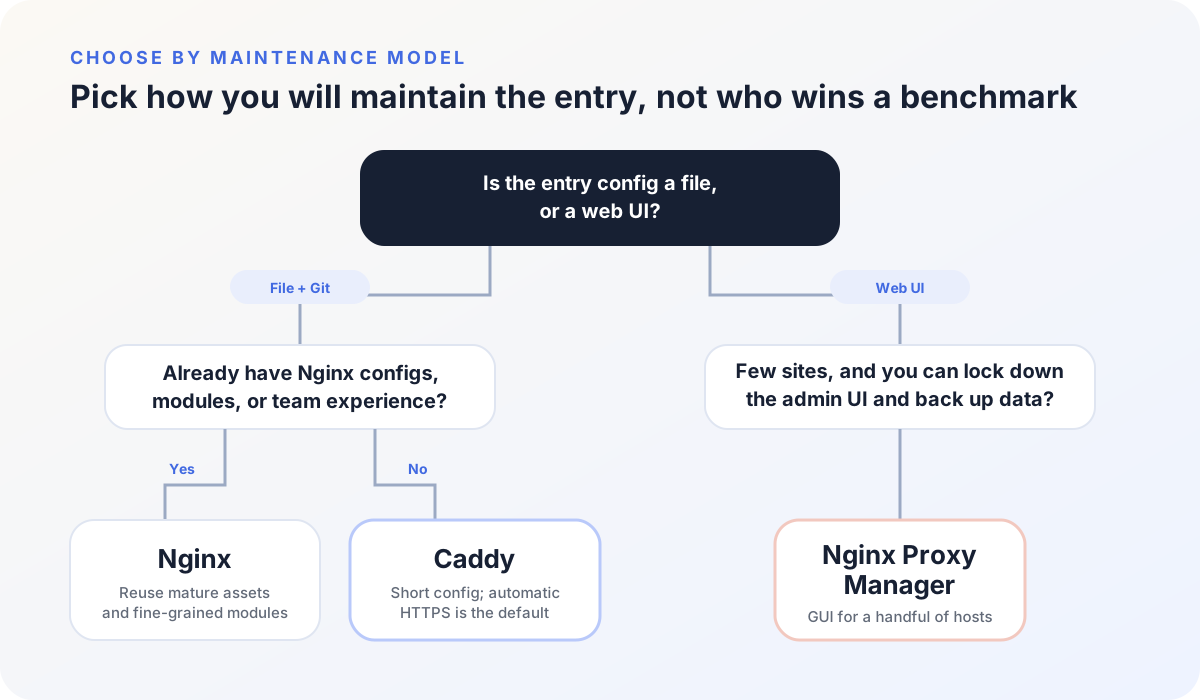
Caddy vs Nginx is decided by the config source of truth
| Axis | Caddy | Nginx | Nginx Proxy Manager |
|---|---|---|---|
| Daily config | Caddyfile or JSON | Nginx config files | Web admin UI |
| HTTPS | Certificate issue and renewal are default | Usually Certbot, acme.sh, or a cloud certificate | Common certificate actions in the UI |
| Git | Reviewed as files | Reviewed as files | Main state lives in a database |
| WebSocket | HTTP reverse proxy handles the usual upgrade | Upgrade-related headers must be set correctly | Follows the generated Nginx config |
| Cache and limits | Configurable | Mature and fine-grained | Bounded by the UI and Advanced config |
| Extra state | Config plus certificate storage | Config, certificates, and related scripts | App, database, certificates, and generated config |
Files are easy to review and roll back. A database is easy to click through, and a restore has to cover that database together with the certificates.
Traefik is a different job: it discovers backends from Docker labels or Kubernetes. This page compares Caddy, Nginx, and Nginx Proxy Manager as entries you configure yourself.
Caddy: a short Caddyfile and automatic HTTPS
A Caddyfile can be this short:
example.com {
    reverse_proxy 127.0.0.1:8080
}
When the hostname is in the config, DNS already points at the server, and ports 80 and 443 reach Caddy, automatic HTTPS(opens in a new tab) obtains a certificate, redirects HTTP to HTTPS, and keeps the certificate renewed. The same page also requires a writable, persistent data directory. Check the file before it replaces a running process:
caddy validate --config /etc/caddy/Caddyfile
caddy reload --config /etc/caddy/Caddyfile
The Caddy command-line docs(opens in a new tab) separate validate, adapt, and reload. Proxy behavior follows the reverse_proxy directive(opens in a new tab). That handler sets X-Forwarded-For, X-Forwarded-Proto, and X-Forwarded-Host by default and ignores those incoming headers unless the client is in trusted_proxies. The short Caddyfile is not missing those hops; Nginx has to write them.
Caddy fits when the site is new, automatic HTTPS is the default requirement, the config should live in Git, and the setup does not depend on an Nginx-only module.
Nginx: reuse the configs and modules you already have
Nginx keeps proxying, caching, rate limits, and modules under one mature config language:
server {
    listen 80;
    server_name example.com;

    location / {
        proxy_set_header Host $host;
        proxy_set_header X-Forwarded-For $proxy_add_x_forwarded_for;
        proxy_set_header X-Forwarded-Proto $scheme;
        proxy_pass http://127.0.0.1:8080;
    }
}
Certificates usually come from Certbot, acme.sh, or a cloud platform. Test, then reload:
sudo nginx -t
sudo nginx -s reload
nginx -s reload(opens in a new tab) checks the new file first. If the new config is invalid, the old workers keep serving. There is no reason to migrate a working Nginx estate to save a few lines of syntax. Read ngx_http_proxy_module(opens in a new tab) for the proxy directives instead of pasting an unscoped snippet.
Keep Nginx when cache, a specific module, a large template set, or existing team knowledge already owns the entry.
Nginx Proxy Manager adds an app and a database
Nginx Proxy Manager still uses Nginx to proxy. In front of that engine it adds a web admin app and a database, so adding a proxy host, requesting a certificate, or setting access control does not start in a text file.
The official guide(opens in a new tab) ships it as a Docker image. On 2026-09-11 the documented example is jc21/nginx-proxy-manager:2.15.1. The quick Compose file publishes 80, 443, and admin port 81, and mounts ./data plus ./letsencrypt. Login is shown as http://127.0.0.1:81. Treat port 81 as a management plane, not a public site.
Choosing Nginx Proxy Manager also means operating:
- access to the admin UI
- administrator accounts
- the database, certificates, and application data
- version upgrades of Nginx Proxy Manager itself
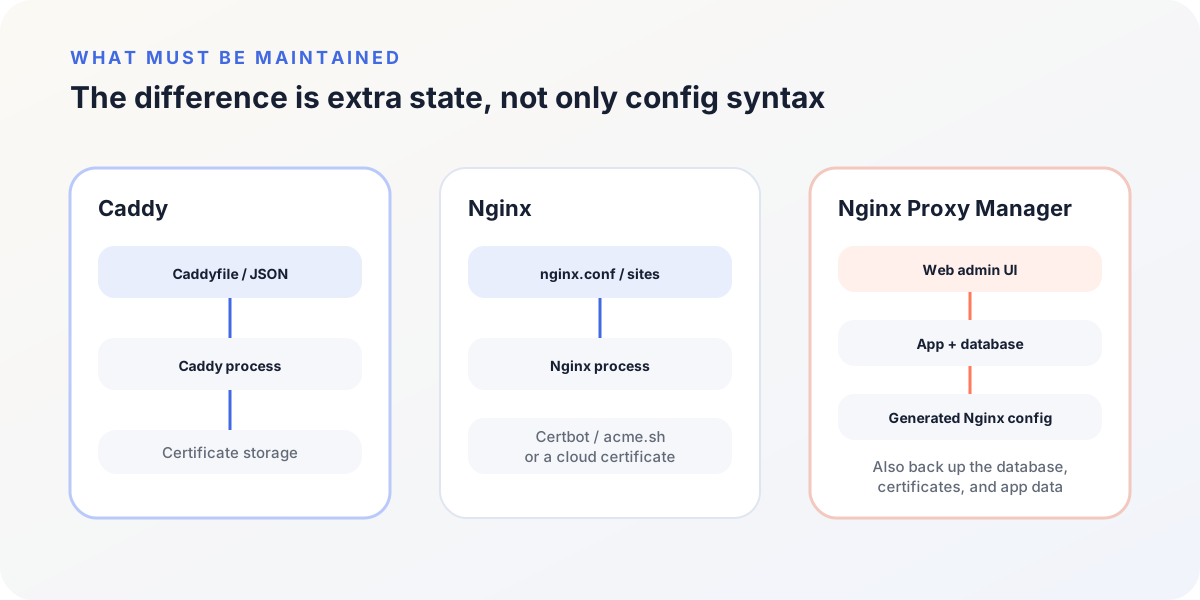
If the admin UI is on the public internet and the volumes are never backed up, the GUI is a new failure domain. Upgrading(opens in a new tab) is docker compose pull then docker compose up -d. That recreates containers; it does not replace a backup of ./data and ./letsencrypt. Custom Nginx snippets, when needed, live under /data/nginx/custom as documented in advanced configuration(opens in a new tab).
Automatic HTTPS still needs DNS, ACME, and storage
Caddy activates automatic HTTPS when it knows a hostname. For a public name, Caddy’s automatic HTTPS overview(opens in a new tab) still requires:
- A or AAAA records pointing at this entry
- port 80 reachable for the HTTP challenge, or port 443 for TLS-ALPN, or a DNS API for the DNS challenge
- a writable, persistent certificate storage directory
- correct host time
- CAA records that do not forbid the CA in use
Wildcard names need the DNS challenge. Tests should use an ACME staging directory such as Let’s Encrypt’s https://acme-staging-v02.api.letsencrypt.org/directory, or production rate limits can block issuance.
Caddy and Nginx Proxy Manager remove manual copy-paste. Renewal can still fail, and that failure has to be visible. Nginx reaches the same automation with Certbot or acme.sh; those tools are not part of Nginx itself.
A homepage 200 does not prove WebSocket, SSE, or uploads
A browser 200 on / does not prove every protocol the app uses.
| How the app talks | Where proxies usually break it |
|---|---|
| WebSocket | Missing upgrade headers, proxy timeouts, idle connections |
| SSE | Response buffering, timeouts, the connection closing early |
| Streaming responses | Proxy buffers and upstream read timeouts |
| Large uploads | Request body size and upload timeouts |
Caddy’s HTTP reverse proxy performs the WebSocket upgrade and then tunnels. By default it closes those tunnels on config reload, which the reverse_proxy docs(opens in a new tab) explain; stream_timeout and stream_close_delay change that. SSE and other low-latency streams often need flush_interval -1 so the proxy does not sit on the buffer.
Nginx does not forward hop-by-hop Upgrade and Connection unless you set them. The WebSocket proxying guide(opens in a new tab) sets those headers explicitly, and on versions before 1.29.7 the same location also needed proxy_http_version 1.1. Idle WebSocket connections follow proxy_read_timeout, which defaults to 60 seconds.
Nginx Proxy Manager inherits whatever the generated Nginx config and the Advanced tab actually emit. A live WebSocket, SSE, or upload through that host is the check; the UI label is not.
Recovery cost beats a borrowed benchmark
Public “Caddy vs Nginx” speed posts rarely share the TLS version, HTTP protocol, cache hit rate, log volume, compression, modules, upstream network, and request mix that produced the number. Those knobs move the result.
For a personal site or a small service, an entry the team can read, back up, and restore beats an unscoped ranking. When performance is a real bottleneck, compare tail latency, error rate, CPU, and memory on the same host, certificate, upstream, and request model.
Choose the source of truth you can restore
When files are the source of truth, Caddy vs Nginx is the remaining pair: Caddy if the site is new and certificates should ride along with the Caddyfile; Nginx if the estate, modules, or operators already exist. When the source of truth is allowed to live in a management database, Nginx Proxy Manager is in play, and the restore includes the admin app, the database, and the certificate volume.
Confirm HTTP redirects to HTTPS, the certificate covers the names you serve, the proxy can reach the upstream from its own network, and a bad config cannot replace a working entry without a check. Then prove issuance and renewal on that tool: HTTP-01, TLS-ALPN-01, or DNS-01 has to succeed twice—once for the first certificate, and again before expiry.