How to use Claude Code hooks is not about memorizing every event. It is about whether the action has a clear trigger and a unique result. A project config check belongs in a hook: after the file is written, run the same command. Valid config exits success. Invalid config returns a determined error. The model does not choose the standard.
Project rules name the config path and the fixed command. The prompt describes this change. A skill handles live judgment. The hook only calls the project command on a matching event. Claude Code and Codex keep their own event config and share the same check.
Which actions belong in a hook
An action belongs in a hook when four things are true together: the client can express the trigger as an event; the same project state yields the same result; repeating the run does not keep mutating state; and failure produces a clear diagnosis.
“Find the module that owns this change,” “decide whether a database migration is required,” and “decide which consumers are affected” still need code and a requirement. They belong in the current task, project rules, or a skill. A hook can run a deterministic check after those judgments. It cannot replace them.
The sample below assumes the project already validates config/runtime.json with npm run check:runtime-config. The parser can only read the complete file after it is written, so the check uses PostToolUse. It does not guess what the model will write.
Do not put project facts or the full workflow in a hook
| Layer | Responsibility on a config change | What it must not own |
|---|---|---|
| Project rules | Config location, project commands, and hard bounds | A one-off requirement or a copied hook script |
| Current prompt | This field change, present state, range, and target | Long-lived commands and a generic flow |
| Skill | Read the scene, find config consumers, handle judgment branches | Guarantee a mechanical action after every write |
| Hook | Run a deterministic action on a matching event and return the result | Business rules or whether the whole task is done |
| Permissions and sandbox | Limit tools, paths, network, and commands | Whether the software result is correct |
| CI and server authorization | Allow merge, deploy, or a business action outside the client | Instant local-edit context |
Project rules keep npm run check:runtime-config as a long-lived fact. The prompt writes this field change. The skill finds consumers and handles branches. The hook runs the command after a write. If the command lives only in a skill, it is skipped whenever that skill is not loaded.
Assume the current prompt changes the port from 3000 to 3100. The skill reads config consumers, confirms the port still comes from config/runtime.json, then lets a file tool finish the edit. PostToolUse then calls the adapter. The project command reads the complete file: an integer port passes; the string "3100" fails and the error returns to the client so the agent can fix it. Whether the port should change, and whether the service is reachable, still come from the task and the running result. The hook only owns this config check.
Keep the check in the project toolchain
The check must run without any coding agent. This sample needs Git, Node.js, npm, and Bash. A Windows project can swap the adapter to PowerShell; the npm command stays. On failure the project script exits non-zero as an ordinary CLI. It does not parse client events.
Six files live in the existing project. Each has one job:
.
├── config/runtime.json
├── package.json
├── scripts/check-runtime-config.mjs
├── scripts/agent-hooks/check-runtime-config.sh
├── .claude/settings.json
└── .codex/hooks.json
runtime.json holds config. The Node.js script owns the rules. The shell script only inspects Git state and maps failure to the client exit code. The two settings files only describe each client’s event. A separate config repository is not required.
If package.json already exists, merge check:runtime-config into the existing scripts:
{
  "private": true,
  "scripts": {
    "check:runtime-config": "node scripts/check-runtime-config.mjs"
  }
}
scripts/check-runtime-config.mjs parses the project config and checks the two fields this sample actually depends on:
#!/usr/bin/env node

import { readFileSync } from "node:fs";

try {
  const config = JSON.parse(
    readFileSync(new URL("../config/runtime.json", import.meta.url), "utf8"),
  );

  if (!["development", "production"].includes(config.mode)) {
    throw new Error("mode must be development or production");
  }
  if (!Number.isInteger(config.port) || config.port < 1 || config.port > 65535) {
    throw new Error("port must be an integer between 1 and 65535");
  }
} catch (error) {
  console.error(`config/runtime.json: ${error.message}`);
  process.exit(1);
}
Start from parseable contents:
{
  "mode": "development",
  "port": 3000
}
Run it from the project root first:
npm run check:runtime-config
A valid file should exit 0. A string port or a trailing comma should exit non-zero and name config/runtime.json. The first case proves field rules. The second proves JSON syntax. If the command cannot stably tell success from failure, wiring a hook only automates a fuzzy result. Fix the project command first.
Tests, CI, and a developer running the check by hand all call this npm command. “Return immediately when the target file is unchanged” and “turn a failed check into client-recognizable feedback” stay in the adapter. They do not change the project command’s ordinary exit contract.
The project command must cover constraints that actually affect runtime. JSON.parse alone would accept {"mode":"unknown","port":"3100"} and fail later at process start. This sample checks mode and port. A real project should reuse the config module’s existing schema. Do not copy enums, ranges, and cross-field rules into the hook. Checks that need the network, credentials, or a long run belong in integration tests or CI, not in a fast check that fires on every write.
The Node.js script uses exit 1 for a failed check so CI can see it. The adapter then maps that same failure to exit 2 for both clients on PostToolUse. The two layers only differ in exit codes. Rules and error text still come from one project command.
Scope decides who will run the hook
A config check the team depends on should ship with the project. Claude Code’s project file is .claude/settings.json. Machine-local settings can live in ~/.claude/settings.json or .claude/settings.local.json. Scope is documented in the Claude Code hooks reference(opens in a new tab).
Codex reads hooks from ~/.codex/hooks.json, ~/.codex/config.toml, and the project files .codex/hooks.json and .codex/config.toml. Matching hooks from every source run. A higher layer does not replace a lower one. Using JSON and inline TOML in the same layer produces a merge warning, so keep one form per layer (Codex hooks(opens in a new tab)).
| Client and location | Actual scope | What belongs there |
|---|---|---|
Claude Code ~/.claude/settings.json | All of this user’s projects | Personal notifications, machine commands, personal preference |
Claude Code .claude/settings.json | Team members who trust this project | Shared format, test, and config checks |
Claude Code .claude/settings.local.json | This project on this machine | Local paths or temporary settings that must not be committed |
Codex ~/.codex/hooks.json or config.toml | This user’s Codex sessions | Personal notifications, machine commands, personal preference |
Codex .codex/hooks.json or config.toml | Members who have trusted the project layer and the current definition | Shared deterministic checks |
This config check should run for every teammate, so both entries sit in the project directory. Personal notifications, private logs, and machine paths stay at the user layer. Wiring this check does not require a separate config repository first.
A project hook runs commands from the repo. Codex loads project hooks only after the project .codex/ layer is trusted, and it records trust by the current definition hash; a command change needs another review (Codex hooks(opens in a new tab)). Claude Code interactive sessions follow workspace trust; -p and SDK sessions differ (Claude Code hooks(opens in a new tab)). Read .claude/ and .codex/ before trusting an unfamiliar repository.
Choose the event from when the action happens
The event follows when the action happens. A syntax check reads the complete file after the write, so it uses PostToolUse. Blocking a class of dangerous calls before they run is PreToolUse. Swapping them changes the result: a pre-event can stop an action that has not happened; a post-event can only report what already happened.
A PostToolUse matcher filters tool names, not file paths. Write|Edit covers Claude Code’s matching file tools. Codex also lets those names match apply_patch. Bash, another specialized tool, or an external process write does not automatically hit this matcher (Claude Code(opens in a new tab); Codex(opens in a new tab)).
The adapter still checks whether the target file is dirty. The matcher only coarsely filters by tool name. If the project allows several write paths, add the matching tool events, and keep pre-commit checks and CI as backstops.
This hook must return failure before the next model call. Slow tests should shrink, or move to stop, pre-commit, and CI. An async job cannot block the next model call.
How Claude Code wires the check
Add PostToolUse in the project’s .claude/settings.json. If settings already exist, merge the matching item into the existing hooks object. Do not overwrite the whole file with the sample. Merge Codex config the same way. ${CLAUDE_PROJECT_DIR} still finds the project script when the session starts in a subdirectory.
{
  "hooks": {
    "PostToolUse": [
      {
        "matcher": "Write|Edit",
        "hooks": [
          {
            "type": "command",
            "command": "bash \"${CLAUDE_PROJECT_DIR}/scripts/agent-hooks/check-runtime-config.sh\"",
            "timeout": 10
          }
        ]
      }
    ]
  }
}
Claude Code writes hook input as JSON on stdin. This adapter uses Git status for the target file, so it does not read tool arguments. If a check must read this tool’s arguments, parse that event’s structure and error when a required field is missing.
/hooks shows source, event, matcher, and the full command. If the config is missing, check JSON and the settings source. If it appears but nothing runs, confirm the edit used Write or Edit. Stdout, stderr, and timeouts can be traced with Claude Code config debugging(opens in a new tab).
Matching Claude Code hooks run in parallel (hooks reference(opens in a new tab)). One hook must not depend on another creating a file first. The adapter only reads the target config and does not change the workspace.
On failure the adapter writes a diagnosis to stderr and exits 2. Claude Code shows PostToolUse feedback and does not roll back the write. Exit 1 is a non-blocking error on most events (hooks reference(opens in a new tab)).
How Codex wires the same check
Codex’s project entry is .codex/hooks.json. This sample uses PostToolUse and a nearby matcher on both sides, but the config shape is still Codex’s. The project root comes from Git. The session is not assumed to start at the repo root.
{
  "hooks": {
    "PostToolUse": [
      {
        "matcher": "Edit|Write",
        "hooks": [
          {
            "type": "command",
            "command": "bash \"$(git rev-parse --show-toplevel)/scripts/agent-hooks/check-runtime-config.sh\"",
            "timeout": 10,
            "statusMessage": "Checking runtime configuration"
          }
        ]
      }
    ]
  }
}
Codex apply_patch currently supports PreToolUse and PostToolUse. The matcher can be apply_patch, Edit, or Write. The real tool_name in event input may still be apply_patch. Matcher aliases do not mean both clients share the same event payload (Codex hooks(opens in a new tab)).
After the project config is added, open /hooks. If the project layer is untrusted or the definition just changed, Codex skips the hook until the current definition is reviewed. That state is not the same as “the script is executable.” A successful manual run only proves the project command chain. It does not prove Codex loaded and trusted the hook.
Codex runs matching hooks from every source. Multiple command hooks on the same event start concurrently (Codex hooks(opens in a new tab)). If the user layer already has the same check, adding it again at the project layer runs it twice. Remove the duplicate source from /hooks.
Exit 2 on PostToolUse lets Codex treat stderr as feedback. It cannot undo a write that already finished. Current PreToolUse can block or rewrite input on supported calls (Codex hooks(opens in a new tab)). This check reads the file after the write, so it stays on the post-event.
One script, two client configs
Both configs call scripts/agent-hooks/check-runtime-config.sh. It finds the current Git project, confirms the target config actually changed, then runs the project’s own npm command. When that command fails, the adapter writes the diagnosis to stderr and exits 2 so both clients can take PostToolUse feedback.
#!/usr/bin/env bash
set -euo pipefail

target="config/runtime.json"

if ! project_root="$(git rev-parse --show-toplevel 2>/dev/null)"; then
  printf '%s\n' "runtime-config hook must run inside the project worktree" >&2
  exit 2
fi

if ! changed="$(git -C "${project_root}" status --porcelain=v1 -- "${target}")"; then
  printf '%s\n' "runtime-config hook could not inspect ${target}" >&2
  exit 2
fi

if [[ -z "${changed}" ]]; then
  exit 0
fi

if ! output="$(npm --prefix "${project_root}" run --silent check:runtime-config 2>&1)"; then
  printf '%s\n' "${output}" >&2
  exit 2
fi
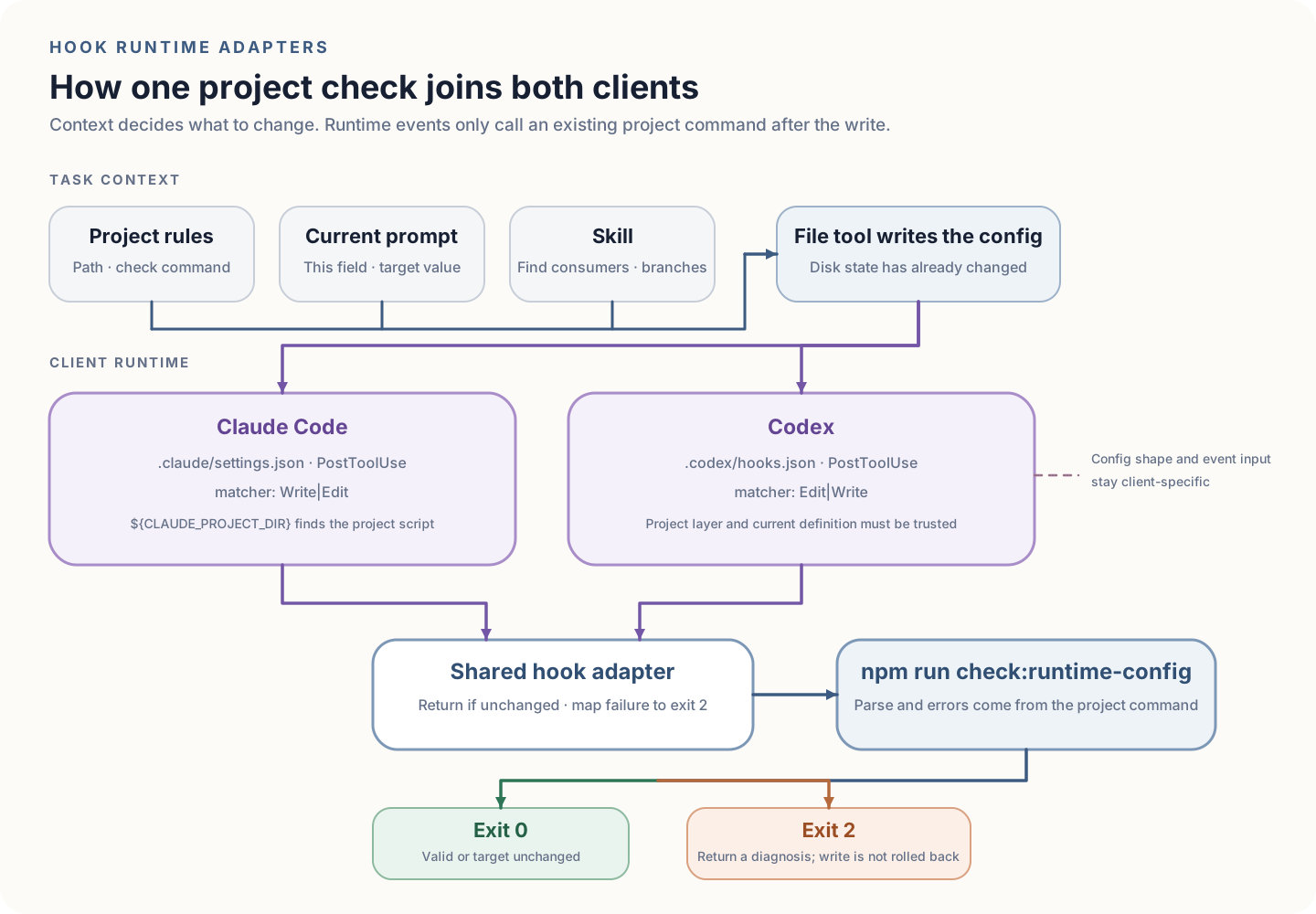
The script does not guess a path from event input and does not rewrite JSON. It only checks whether the target file changed and maps a failed check to exit 2. JSON syntax, file location, and error text still come from the project command.
As long as config/runtime.json stays an uncommitted change, every matching Write or Edit runs the check again, even if that tool call edited another file. The script therefore does not depend on each client’s file-parameter shape. The check must be read-only and fast. If the cost is too high, read each runtime’s event input separately and test the fields you depend on, so a client upgrade cannot silently change the payload.
Prove the hook with controlled input
Prove the project command and the adapter first, then prove client load and event feedback. “No message” can come from the parser, the shell, the settings source, the matcher, or trust. Numbers in the table are process exit status.
| Input state | Action | Adapter result | What the client should show |
|---|---|---|---|
| Target config unchanged | Edit an unrelated file | Exit 0; parser does not run | The matcher can fire without a config diagnosis |
| Target config valid and dirty | Write legal JSON | Exit 0 | The tool result stays; the agent continues |
| JSON legal, field invalid | Write port as a string | Exit 2; stderr names the port rule | The agent gets a field error it can fix; the value stays on disk |
| Target config invalid and dirty | Add a trailing comma | Exit 2; stderr names the file and parse error | The agent gets failure feedback; the bad write stays in the workspace |
| Same invalid state, unchanged | Run the adapter again | Still exit 2, same diagnosis | Repeating does not append the file or change the error |
| Start in a project subdirectory | Edit the target config | Return to the Git root and check the same file | The session directory does not send the script or config to the wrong place |
In a temporary Git directory that only contains these sample files, a legal change exits 0 twice. A string port exits 2 twice with the same field error. A trailing comma exits 2 twice with the same parse error. Restore the target file, edit only README, and both the root and a subdirectory exit 0. Those exits cover the adapter. Whether the client loaded the config is a separate observation.
Client proof needs a new project session. Confirm source, event, matcher, command, and trust in /hooks. Let the matching file tool write a legal value and watch the tool result and the next action. Then add a recoverable syntax error. Confirm feedback appears and the bad file is not auto-reverted. Restore valid contents and run the project command so a constructed failure does not stay in the workspace.
Trigger an unrelated path through the client too. With a clean target config, editing README should return immediately. With a dirty target config, editing README runs the check again. “The hook was invoked” and “the project parser ran” are two states. Git-status filtering is not the matcher’s file filter.
Hooks have their own failure model
Hook config and scripts fail too. Invalid JSON blocks load. A bad command path blocks the handler. Multiple sources run the same action concurrently. A timeout can drop output. Use /hooks, debug logs, the script exit, and whether the file is already written to locate the layer.
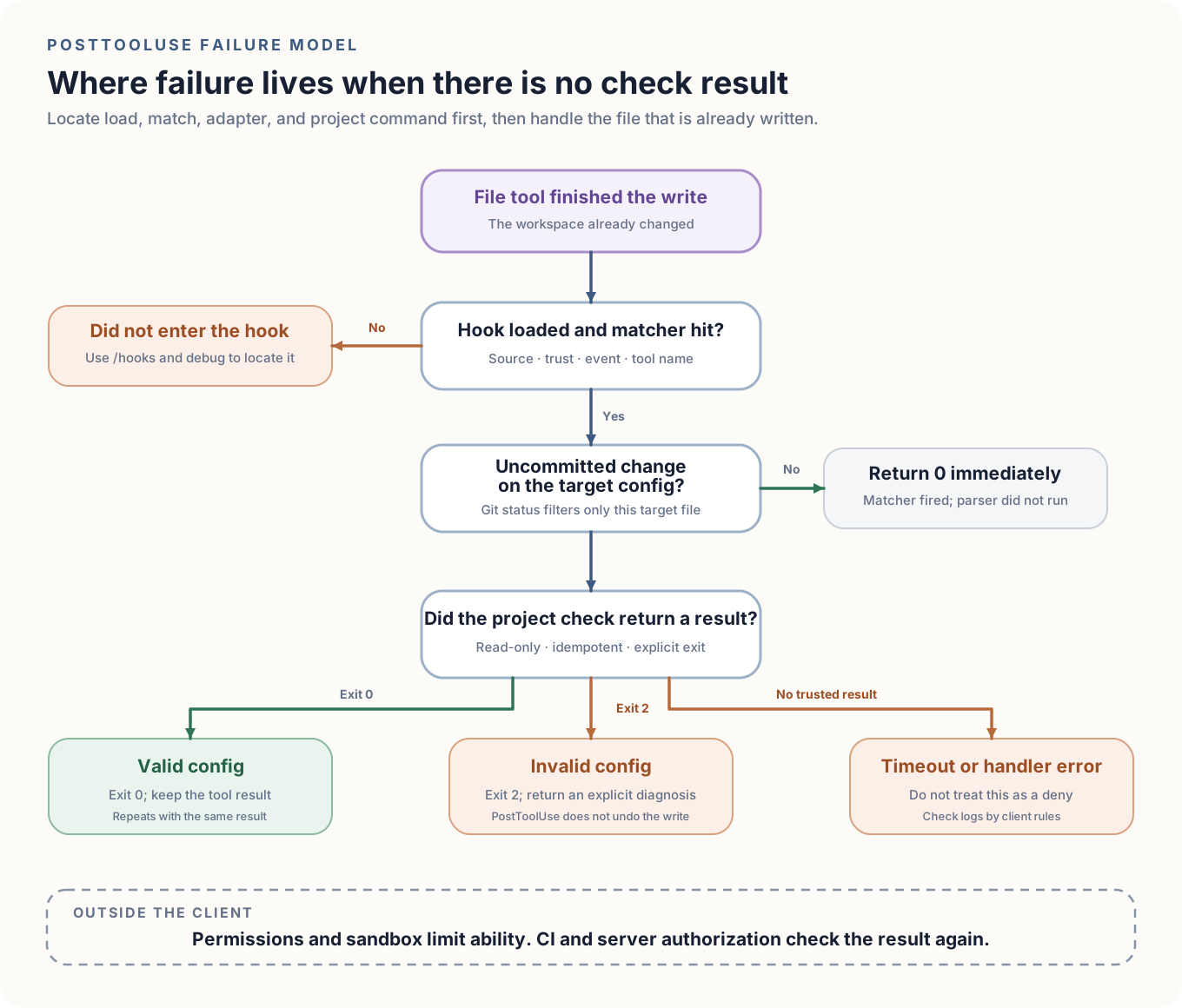
A timeout is not a deny. Claude Code’s ordinary command hook continues into the permission flow after a PreToolUse timeout. Codex waits 600 seconds by default when timeout is unset (Claude Code(opens in a new tab); Codex(opens in a new tab)). The sample uses 10 seconds. If the check often times out, shrink it, or move it to stop, pre-commit, and CI.
Concurrency requires the script to stay idempotent. Two matching hooks may read the same file at once, so the script must not auto-format, overwrite config, or write shared temp state. If a file must be generated, one project command should generate and check in a fixed order. Do not treat hook-array order as execution order.
PostToolUse is for immediate feedback, not rollback. Invalid JSON is already on disk. The next model call can fix it from the error, and other processes can also read it in that window. If an invalid intermediate state is unacceptable, let the write command build a temp file, check it, then replace atomically, or use a transactional interface from the service that owns the config. A louder hook warning does not provide atomicity.
A hook cannot replace permissions, the sandbox, and CI
The hook and the tool it watches run inside the same client. Config can be disabled. A matcher can miss a write path. A command can time out. A script can become an execution entry. Permissions and the sandbox limit tools, paths, and network. Server authorization decides business actions. CI uses the same project command and rejects invalid config in a separate environment.
A pre-hook can only stop supported tool calls. An attacker or another process does not have to go through this client, and a malicious hook in the repo can gain execution. Project hooks need code review. Trust an unfamiliar project only after reading it. High-risk operations still need least privilege and server authorization outside the client.
What is the difference between a Claude Code hook and a skill? A skill stores a reusable flow that still needs the model to read the scene. A hook runs a deterministic action on a named event. Put judgment in a skill. Put a mechanical action that must run regardless of the model’s choice in a hook.
What should I check first when a Claude Code hook does not fire? Use /hooks to confirm the source, event, matcher, and full command, then confirm the write used a tool the matcher covers. Write or Edit does not automatically cover Bash or an external process.
Why did a Codex hook stop running after I changed it? Open /hooks and check trust for the project .codex layer and the current definition. Codex records trust by the current definition hash and skips a hook that has not been re-trusted after the command changed.
Can a hook replace permissions, the sandbox, and CI? No. A hook can feed back or locally block around a tool call. Permissions and the sandbox limit ability. CI and server-side authorization decide whether to accept the result outside the client.
When how to use Claude Code hooks in this repository is stable, let the project command run on its own first, then choose the event and prove failure and repeat paths. Long-lived facts stay in project rules. This change stays in the task prompt. Judgment stays in a skill. The hook only takes actions with a clear event. A later client only needs its own hook config. The project command and the standard stay.