When to run database migrations depends on whether the current schema can serve both the old and the new application. Add compatible structure first, ship the new app, then backfill data. Drop columns, finish renames, and tighten constraints in a later release after the old version has left.
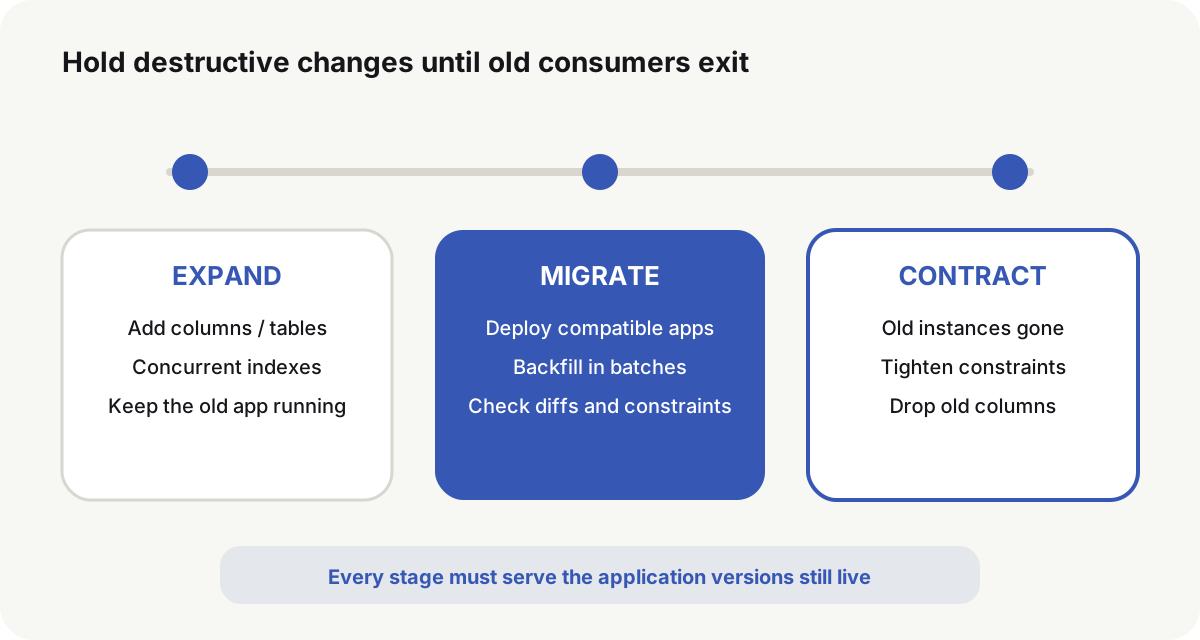
When to run database migrations depends on compatibility
The same DDL can wait on a lock for seconds or for minutes depending on table size, PostgreSQL major version, and live writes. Confirm those facts, plus how old and new code touch the table, before choosing a stage.
| Change | Usual stage | Main risk | Release requirement |
|---|---|---|---|
| Nullable column | Expand | Old code using SELECT * or ordinal scans | Migrate first; confirm both versions can read and write |
| New table | Expand | Grants, foreign keys, seed data | Migrate first, then deploy the app that uses it |
| New index | Expand | Write blocks, disk, leftover invalid indexes | Use CONCURRENTLY on large tables; run it alone |
| Large backfill | Migrate | Locks, WAL, replica lag, live writes | Batches, resumable, rate-limited |
Add NOT NULL | Contract | Remaining NULLs, full scans, locks | Backfill and prove, then tighten |
| Rename column | Expand → Contract | Old and new apps use different names | New column and dual writes first; drop the old name later |
| Drop column or table | Contract | Old instances, jobs, and reports still reading | Wait until every consumer has left |
| Change column type | Split as needed | Table rewrite, long locks, semantic change | Prefer a new column, backfill, switch reads, drop the old column |
PostgreSQL ALTER TABLE(opens in a new tab) takes ACCESS EXCLUSIVE unless a subcommand documents a weaker lock. That is the strongest table lock: ordinary reads and writes wait. A short statement is not a short wait.
Expand: add structure the old app will not reject
New columns stay nullable, or take a default that does not change old behavior:
SET lock_timeout = '3s';
SET statement_timeout = '30s';

ALTER TABLE accounts
    ADD COLUMN billing_email text;
lock_timeout stops the job from waiting forever behind a busy transaction. statement_timeout caps execution. On timeout the release job fails, an operator inspects the blocker, and the new app does not start.
On a live large table, build indexes with:
CREATE INDEX CONCURRENTLY idx_orders_created_at
    ON orders (created_at);
PostgreSQL CREATE INDEX(opens in a new tab) says a concurrent build does not lock out writes the way an ordinary build does. It still runs two table scans, waits for related transactions to finish, and uses extra CPU, I/O, and time. It cannot run inside a transaction block. After a failure, check the index:
SELECT indexrelid::regclass AS index_name,
       indisvalid,
       indisready
FROM pg_index
WHERE indexrelid = 'idx_orders_created_at'::regclass;
When indisvalid is false, confirm no query depends on that index, then drop it and rebuild. The migration runner must support a non-transactional step. Do not force CREATE INDEX CONCURRENTLY into a default transaction.
Deploy the new app against old rows
After Expand, the new version may start writing the new column. While old instances still take traffic, the new version cannot assume every row already has a value.
A rename needs a deadline:
- Add the new column.
- Deploy a version that writes both names.
- Backfill history and compare diffs.
- Switch reads to the new column.
- Confirm old versions, scheduled jobs, and reports have left.
- Drop the old column and the dual-write path on the agreed version.
That dual-write path is part of the production data move. Bind it to a deletion version or date, and keep a test that fails if the expired path is still present. Dual writes with no exit keep both columns, both code paths, and both failure modes in production.
GitLab’s multi-version compatibility guide(opens in a new tab) uses expand, migrate, and contract, and splits a breaking change across releases. Each intermediate schema has to serve the application versions still running.
Migrate: backfill independently of DDL and app start
The example assumes accounts.email is already NOT NULL. Backfill a large table by a stable primary key. Do not wrap the whole table in one long transaction:
WITH batch AS (
    SELECT id
    FROM accounts
    WHERE billing_email IS NULL
    ORDER BY id
    LIMIT 1000
    FOR UPDATE SKIP LOCKED
)
UPDATE accounts AS a
SET billing_email = lower(a.email)
FROM batch
WHERE a.id = batch.id;
After each commit, record rows processed, duration, and errors. billing_email IS NULL is also the resume condition: a restarted job keeps selecting unfinished rows, and rows already written stay unchanged. When the target value may stay NULL, or the conversion is not idempotent, that predicate cannot represent progress. Persist the last stable primary key and the job state in a task table instead.
After the backfill, check volume and a sample of mismatches:
SELECT count(*) AS missing
FROM accounts
WHERE billing_email IS NULL;

SELECT id, email, billing_email
FROM accounts
WHERE billing_email IS DISTINCT FROM lower(email)
ORDER BY id
LIMIT 20;
Contract starts only when missing = 0 and remaining diffs match the intended conversion. Application metrics still have to show stable reads and writes on the new column. SQL counts are not enough.
Validate the constraint before tightening it
Foreign keys, CHECK constraints, and, on PostgreSQL 18, not-null constraints can be added as NOT VALID. The add step still takes ACCESS EXCLUSIVE, but it skips the historical scan and starts enforcing new writes immediately. VALIDATE CONSTRAINT later checks old rows and takes SHARE UPDATE EXCLUSIVE.
PostgreSQL 18 can add not-null directly:
ALTER TABLE accounts
    ADD CONSTRAINT accounts_billing_email_not_null
    NOT NULL billing_email NOT VALID;

ALTER TABLE accounts
    VALIDATE CONSTRAINT accounts_billing_email_not_null;
On PostgreSQL 17 and earlier, native NOT NULL cannot use NOT VALID. A portable path that still works on 18 is a proving CHECK, then SET NOT NULL:
ALTER TABLE accounts
    ADD CONSTRAINT accounts_billing_email_present
    CHECK (billing_email IS NOT NULL) NOT VALID;

ALTER TABLE accounts
    VALIDATE CONSTRAINT accounts_billing_email_present;

ALTER TABLE accounts
    ALTER COLUMN billing_email SET NOT NULL;

ALTER TABLE accounts
    DROP CONSTRAINT accounts_billing_email_present;
A valid CHECK that proves the column has no NULL lets PostgreSQL skip another full-table scan during SET NOT NULL. Drop that CHECK in a later command. PostgreSQL 18 ALTER TABLE(opens in a new tab) documents that the scan skip fails if the proving CHECK is dropped in the same statement.
SET NOT NULL still takes a table lock. Wait time depends on major version, concurrent transactions, and table state. Rehearse on the same major version with similar data volume before production.
Contract: drop old structure after old consumers exit
Do not drop the old column while old application instances still exist, or while queue consumers, scheduled jobs, scripts, or reports still read it. The new column must already be backfilled and constrained, a recent backup must meet the recovery-time need, and rolling the application back must not require the structure about to disappear.
Use a short lock wait:
SET lock_timeout = '3s';
ALTER TABLE accounts DROP COLUMN email;
If the lock is not acquired, fail the migration and retry in a quieter window. Do not cancel long business transactions or wait without a timeout just to keep the release moving. That turns a controlled migration failure into a pile of blocked requests.
Run migrations from one controlled job
A release-pipeline job runs migrations. Application replicas do not migrate on startup. Versions are unique and monotonic. Applied files record their name, checksum, and completion time, and cannot be silently edited afterward. Only one migrator may run on a given database. A failed version is marked dirty or explicitly unfinished. The job stops when a prior version is missing, a checksum changed, or the PostgreSQL major version does not match.
A PostgreSQL advisory lock(opens in a new tab) can stop two pipelines from migrating at once. The lock has to belong to the same database session that runs the DDL. A CI setting of “one job at a time” does not cover a manual run or a second deploy system.
SELECT pg_advisory_lock(861204);
-- Verify versions and checksums, then apply migrations in order
SELECT pg_advisory_unlock(861204);
If a connection pool swaps sessions between the lock and the DDL, a session-level advisory lock no longer protects the work. Pin one connection, or take a transaction-level advisory lock in the same transaction as the migration.
Recover from the stage that actually failed
| Failure | Usual handling | Do not do this |
|---|---|---|
| Expand not finished | Stop the app release; repair or retry the compatible migration | Start an app that needs the new structure |
| New app not taking traffic | Delete candidate instances; keep the compatible structure | Send traffic to an unverified version |
| Backfill interrupted | Resume from the data predicate or a persisted key cursor; check repeated execution | Rerun one full-table long transaction |
| New app already taking traffic | Keep old and new schema compatible; restore the app or fix forward | Restore an old database snapshot blindly |
| Contract failed | Keep the old structure; inspect consumers and locks | Force the drop without evidence |
Restoring a snapshot overwrites legitimate writes after the backup, and it needs downtime, reconciliation, and an explicit recovery-point objective. Ordinary releases keep both applications working on a transitional schema. Truly irreversible changes run in a maintenance window.
Keep the facts a later rollback needs
| Fact to keep | Why a later release needs it |
|---|---|
| Application commit and image digest | Shows which code the current schema must still serve |
| Migration versions, file checksums, and apply order | Detects edited files and missing predecessors |
| PostgreSQL major version | Lock and NOT NULL behavior change across majors |
| Start and end times for Expand, backfill, validation, and Contract | Locates the stage that failed |
| Row counts, lock waits, durations, and failures | Distinguishes a short wait from a rewrite |
| Pre-release restore point and the date it was actually restored in rehearsal | Shows the restore was rehearsed; it does not authorize Contract |
Before rolling the application back, confirm the current schema still serves that old version. After a column is gone or its meaning has changed, restore compatible structure or fix forward first.
When to run database migrations follows the change type: Expand, Migrate, or Contract. Keep the unique runner. Treat image rollback as an application move, not a database move.
Common questions
Should database migrations run before or after the application deploy?
Compatible additive migrations usually run first. Data backfill runs after compatible apps are live. Drops and tighter constraints wait until old consumers have left. The change type decides, not one fixed rule.
Why not let the application migrate on startup?
Replicas race for the same DDL, and a failed statement mixes with readiness. One locked job is easier to record, stop, and retry.
Does CREATE INDEX block writes?
An ordinary build blocks writes. CREATE INDEX CONCURRENTLY reduces that blocking. It cannot run in a transaction block, and a failure still needs an invalid-index cleanup.
Can the image be rolled back after a failed migration?
Yes, only while the current schema still serves the old image. After a drop or a semantic change, restore compatible structure or fix forward first.
Can a backup replace migration rollback?
No. Restoring a backup can drop later writes. It is disaster recovery. Ordinary releases use compatible migrations, checksums, idempotent backfill, and fail-stop.