Docker Compose production on one host is a pinned image, durable data, a private app port, resource caps, and a stack that returns after a container or host restart. docker compose up -d only reports that the containers started.
When Docker Compose production is the right fit
Compose can run production when the whole stack lives on one machine, the service graph is small, and a host failure is recovered by a person or a script on another machine:
- the app and its database mainly run on one server
- capacity is a larger disk or a larger instance, not another availability zone
- logs, metrics, and backups already have a destination
When you need multi-node scheduling, cross-zone failover, autoscaling, or large rolling updates, use Kubernetes, Nomad, or the orchestrator your cloud already runs. Do not keep stretching one Compose file until it pretends to be those platforms.
Docker’s production notes(opens in a new tab) start from the same single-server case. They tell you to drop development source mounts, debug ports, and debug settings, then set production variables, a restart policy, and a logging path. One official pattern is a second file such as compose.production.yaml merged with -f. A dedicated directory such as /opt/webapp/ is the other pattern: the production file never contains a source mount, so those mounts cannot leak back in.
Keep deploy parameters, app config, and secrets apart
/opt/webapp/
├── compose.yaml
├── .env
├── app.env
└── secrets/
    └── app_secret
.env holds values Compose interpolates: image reference, host port, data directory. app.env holds values the process should see: log level, public URL, feature flags. Neither file holds a password. Passwords, private keys, and access tokens go in secrets/, readable only by the accounts that mount them.
Compose secrets(opens in a new tab) bind-mount that host file at /run/secrets/<secret_name> inside the container, read-only. The file is not encrypted at rest, rotated, or audited. Use a secrets manager when you need those jobs. Images that follow the Docker Official Image _FILE convention, such as MySQL and Postgres, read MYSQL_PASSWORD_FILE=/run/secrets/... instead of the password environment variable. Point APP_SECRET_FILE at the same path when the app can open a file.
sudo install -d -m 700 -o root -g root /opt/webapp/secrets
sudo install -m 600 -o root -g root /dev/null /opt/webapp/secrets/app_secret
sudoedit /opt/webapp/secrets/app_secret
A single-host Compose file that can stay running
name: ${COMPOSE_PROJECT_NAME:-webapp}

services:
  app:
    image: ${APP_IMAGE:?APP_IMAGE must be a version tag plus digest}
    init: true
    restart: unless-stopped
    ports:
      - "127.0.0.1:${APP_HOST_PORT:-8080}:${APP_CONTAINER_PORT:-8080}"
    env_file:
      - ./app.env
    environment:
      APP_SECRET_FILE: /run/secrets/app_secret
    secrets:
      - app_secret
    volumes:
      - app_data:${APP_DATA_DIR:-/var/lib/webapp}
    networks:
      - edge
    healthcheck:
      test: ["CMD", "/usr/local/bin/healthcheck"]
      interval: 30s
      timeout: 5s
      retries: 3
      start_period: 30s
    cpus: "1.00"
    mem_limit: 1g
    security_opt:
      - no-new-privileges:true
    logging:
      driver: local
      options:
        max-size: "10m"
        max-file: "5"

secrets:
  app_secret:
    file: ./secrets/app_secret

volumes:
  app_data:

networks:
  edge:
    driver: bridge
Replace the container port, data directory, and healthcheck command with the values the image actually ships. If /usr/local/bin/healthcheck is missing, the healthcheck fails on every probe.
init: true runs an init process as PID 1 so signals are forwarded and zombies are reaped. restart: unless-stopped brings the container back after a crash or a Docker daemon restart, and it stays down after docker compose stop. Docker’s production page shows restart: always; that policy also restarts a container you stopped by hand once the daemon itself restarts. Use always only when that extra bounce is what you want.
Pin the image with a digest, not only a tag
A moving tag can point at different bytes between two deploys. Production config should store a full reference:
COMPOSE_PROJECT_NAME=webapp
APP_IMAGE=registry.example.com/webapp:2026.09.02@sha256:replace-with-the-full-digest
APP_HOST_PORT=8080
APP_CONTAINER_PORT=8080
APP_DATA_DIR=/var/lib/webapp
The Compose image field accepts a tag, a digest, or both. The tag is for people. The digest is the artifact. Keep the previous digest in the deploy record so rollback can pull the same bytes again.
docker compose --env-file .env config
docker compose --env-file .env pull
docker compose --env-file .env images
config fails if APP_IMAGE is empty. The :? interpolation refuses a production start that has no pinned image.
Do not publish the app port on the public internet
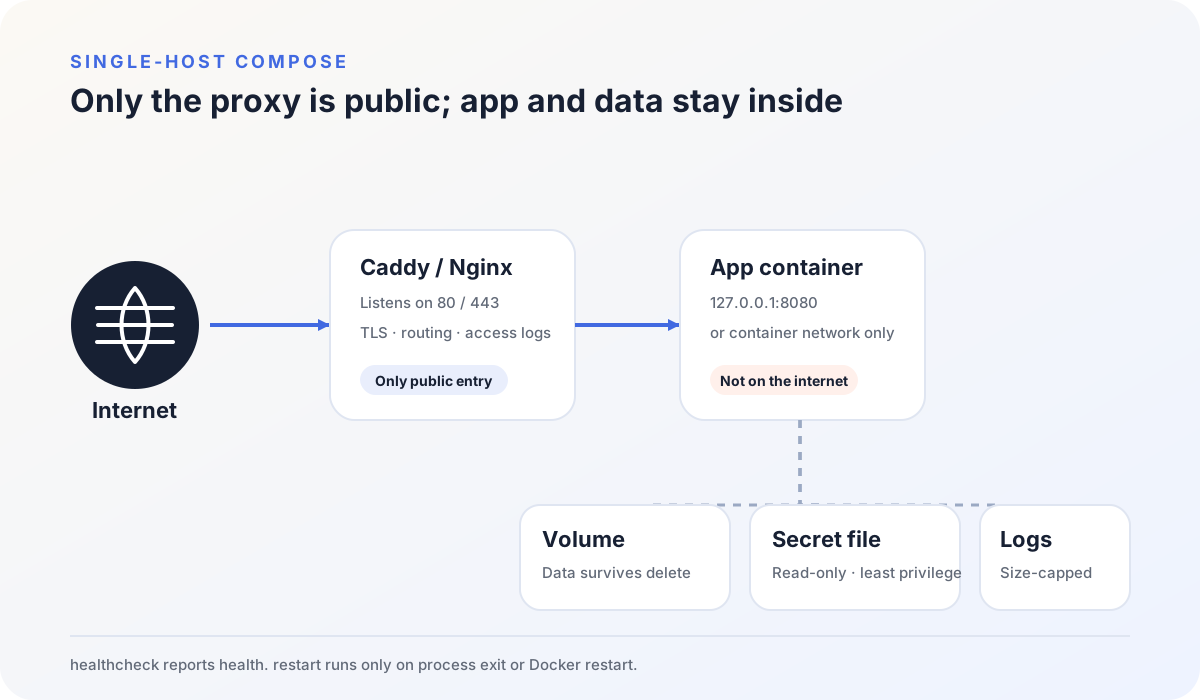
When the reverse proxy and the app share a host, bind the app to loopback:
ports:
  - "127.0.0.1:8080:8080"
Compose short syntax(opens in a new tab) binds 0.0.0.0 when the host IP is omitted, which publishes past many host firewalls. Spell 127.0.0.1 if that is the intended listener.
When the proxy is already on the same Compose network, skip host publishing:
expose:
  - "8080"
expose documents an in-network port. It is not a firewall. Check the Compose publish, the host firewall, and the cloud security group together:
docker compose ps
docker port webapp-app-1
sudo ss -lntp
The public listeners that should remain are 80 and 443 on the proxy. An app or database port on 0.0.0.0 is a mispublish, even if Compose started cleanly.
Keep durable data off the container writable layer
Deleting a container deletes its writable layer. Databases, uploads, and app state belong on a named volume or an explicit bind mount.
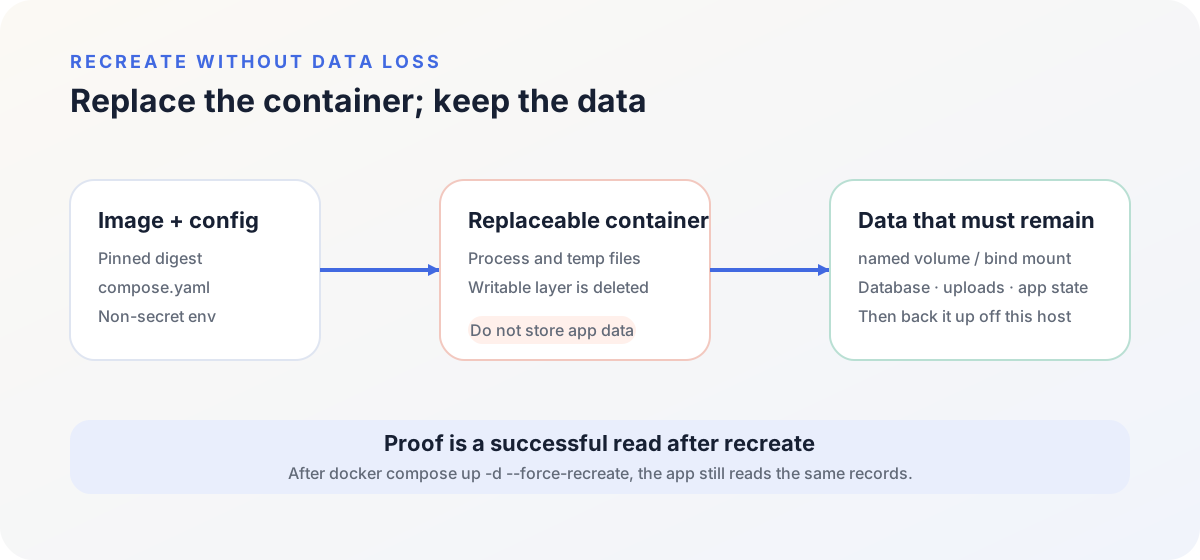
Docker manages the host path for a named volume. A bind mount makes that path obvious, and then you own UID, GID, and directory mode. Neither one is a backup.
To prove data survives recreate, run the whole loop in an isolated environment:
- Write a record you can recognize later.
- Back up the data and the config needed to restore it.
- Run
docker compose up -d --force-recreate. - Confirm the app still reads the original record.
- Restore that backup onto an empty volume or a second empty instance.
A backup file on disk is not restore. Restore is a second process reading the data after the first container is gone.
A healthcheck does not trigger restart
healthcheck tells Docker whether the app is healthy. Probe a ready endpoint, or run a binary that actually exists in the image.
Restart policies(opens in a new tab) watch process exit and Docker daemon restart. restart: unless-stopped does not read unhealthy. If the main process stays up while /healthz fails, the container stays running and the health field is the only change.
A lasting unhealthy state belongs on a monitor. The app still needs timeouts, reconnects, and bounded retries for the database and any other HTTP API. Infinite restart is not a substitute for those timeouts.
depends_on only orders startup
When the stack also runs a database service, wait for that service to become healthy before the first app start:
services:
  app:
    depends_on:
      database:
        condition: service_healthy
        restart: true
Compose startup order(opens in a new tab) distinguishes service_started, service_healthy, and service_completed_successfully. restart: true on that dependency, added in Compose 2.17, restarts app when you restart database with a Compose command such as docker compose restart. It does not restart app because the database process died on its own.
That block solves boot timing. A later database restart, a dropped network, or a full disk still needs the app’s own reconnect path.
Cap CPU, memory, and log growth
cpus: "1.00"
mem_limit: 1g
logging:
  driver: local
  options:
    max-size: "10m"
    max-file: "5"
cpus and mem_limit are Compose service fields for a non-Swarm host. Size them from real load, and leave headroom for the kernel, Docker, the reverse proxy, and a traffic spike. One service without a memory ceiling can trip the host OOM killer; the process that dies is not always the one that leaked.
The local logging driver(opens in a new tab) writes an internal log file and rotates it. max-size and max-file stop unbounded growth on this disk. They do not index logs or page anyone. Ship structured logs to a collector when you need search and alerts.
Inspect config, health, and mounts after start
# Rendered Compose file
docker compose --env-file .env config --quiet

# Running containers and published ports
docker compose ps

# App response on loopback
curl -fsS http://127.0.0.1:8080/healthz

# Startup errors
docker compose logs --tail 100 app
Then confirm the image, restart policy, health object, and mounts:
app_container_id="$(docker compose ps -q app)"
docker inspect "$app_container_id" --format 'ref={{.Config.Image}} id={{.Image}}'
docker inspect "$app_container_id" --format '{{json .State.Health}}'
docker inspect "$app_container_id" --format '{{.HostConfig.RestartPolicy.Name}}'
docker inspect "$app_container_id" --format '{{json .Mounts}}'
If the app has no /healthz, do not copy that path into the probe. Add a cheap, side-effect-free ready endpoint first, then point Compose, the reverse proxy, and the monitor at it.
Config.Image should still show the tag-plus-digest reference. .Image is the image ID actually running. .Mounts should include app_data and the secret file, not a leftover source directory from development.
Prove recreate, host reboot, and restore before traffic
Run these recoveries on an isolated host before the stack takes public traffic.
Force-recreate the app container with docker compose up -d --force-recreate. The image reference, volume, secret file, and health object should match the values from docker inspect before the recreate.
Restart the Docker daemon, then the host. The app should listen again on 127.0.0.1, and ss should still show no app port on 0.0.0.0.
Restore the backup onto an empty volume or directory, start the current image against that data, and read the record you wrote before the backup. A file named backup.tar is not this result.
Docker Compose production is that return, not the first green ps line. After recreate and restore both succeed, put HTTPS and the hostname on a reverse proxy in front of 127.0.0.1. Caddy, Nginx, and Nginx Proxy Manager all forward a hostname to this loopback port; they differ in where configuration lives and how certificates renew.