Pin a Docker image digest by writing the production image as repository:tag@sha256:digest. The version tag shows which release you planned. The digest is the content Docker must pull. latest, stable, or a movable version tag cannot guarantee that a rebuild or rollback returns the original image.
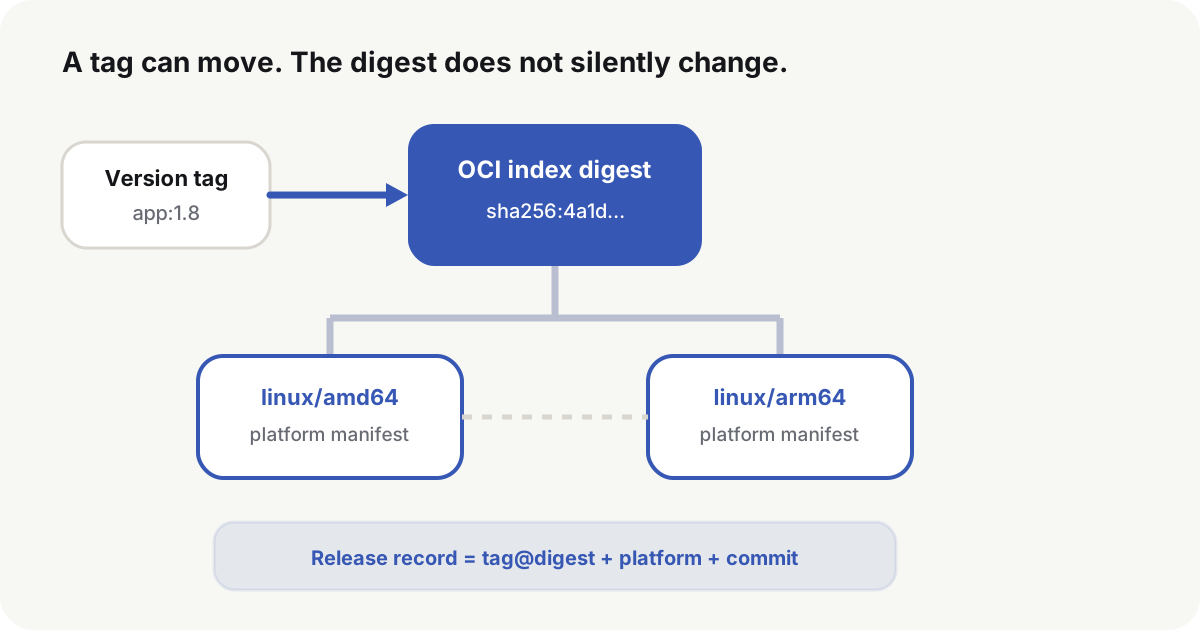
Why pin a Docker image digest instead of a moving tag
Docker’s image digest documentation(opens in a new tab) defines a digest as a SHA-256 identifier of image content. A registry maintainer can retarget the same tag to a patched image. The original digest does not move with the tag.
registry.example.com/app:1.8
registry.example.com/app:1.8@sha256:<64-character-digest>
The first line names a tag and pulls whatever that tag currently points to. The second line names both the tag and the digest. The registry must return that digest. If the old content has been deleted, the pull fails instead of silently substituting a newer image.
Docker’s pull reference(opens in a new tab) also accepts repository@sha256:digest without a tag. That form is immutable, but people reading Compose still need the version name. Production config keeps both. Docker fetches by digest; the tag is for operators.
After the digest is pinned, the same commit uses the same artifact in test, staging, and production. A rebuilt host or a new replica does not follow a moved tag. A rollback record names the previous artifact instead of a label that may have been retargeted.
Publisher identity, build provenance, and known CVEs still need their own checks. A digest sits beside image signatures, SLSA provenance(opens in a new tab), an SBOM, and vulnerability scan results. It does not replace them.
Multi-platform images have two digest layers
An image that supports both amd64 and arm64 is usually published as an OCI image index or a Docker manifest list. The top-level digest identifies that platform index. Each platform manifest has its own digest.
docker buildx imagetools inspect registry.example.com/app:1.8
The top-level Digest is the value to write when Compose must deploy across architectures. Expanding Manifests shows the linux/amd64 and linux/arm64 digests. The same inspect can also list unknown/unknown attestation manifests; those are not runtime platforms and must not be pinned as the deploy digest. When Docker pulls the index, it selects the manifest that matches the target node. Do not record the index digest and a platform digest as if they were the same object.
Pinning the index digest freezes the platform set and the manifest each platform points to. An amd64 node and an arm64 node still run their own binary layers. OneDev 16.4.2 is a multi-platform index; if only amd64 is allowed, declare the platform as well:
services:
  app:
    image: 1dev/server:16.4.2@sha256:ddb7e414e2e3038ab522ab4e517a95a5580cac0177ef5ee171fe37e4f209a34b
    platform: linux/amd64
The deploy record should keep the full image reference, the target platform, and the node architecture. When two hosts follow the same config but behave differently, check whether they selected different platform manifests.
Pin a Docker image digest before the upgrade
Pull the candidate tag, then read the registry references Docker stored on the local image:
image="registry.example.com/app:1.8"
docker pull "$image"
docker image inspect "$image" \
  --format '{{range .RepoDigests}}{{println .}}{{end}}'
RepoDigests uses repository@digest. One local image can list several registry-qualified lines after a push, pull, or retag. Choose the line whose repository matches the candidate reference, then confirm with docker buildx imagetools inspect whether that digest is the top-level index or a platform manifest. Do not take the first line by default. If RepoDigests is empty, the image was built locally or loaded from a tar; there is no registry digest to pin until the image is pushed and inspected on the registry.
A private registry needs a read-only login first. Do not print the registry password in ordinary CI logs. Pass a platform secret or standard input to docker login --password-stdin.
Write the reviewed reference into the environment file or deploy config:
APP_IMAGE=1dev/server:16.4.2@sha256:ddb7e414e2e3038ab522ab4e517a95a5580cac0177ef5ee171fe37e4f209a34b
PREVIOUS_APP_IMAGE=1dev/server:16.3.4@sha256:c6e8192063e7edd26b4bcde30407215d46e8d3b5583701c0d8249a4a2a897582
PREVIOUS_APP_IMAGE is not guessed at release time. After each successful release, write the reference that actually ran into a controlled record. That record is the rollback target when the next release starts.
Build once and promote the same artifact
Do not rebuild a tested image for production. The same digest moves through environments in this order:
- CI builds the image for a source commit.
- The pipeline scans the image and produces an SBOM, a signature, or provenance.
- The candidate digest is written into the release record.
- Test uses that digest.
- After test passes, production keeps using the same digest.
- The release result records the commit, image reference, config version, and time.
Docker build best practices(opens in a new tab) also pin base images by digest so an upstream tag cannot change build inputs without review. Base images still need updates, so a dependency updater should propose a new digest and let the normal test and review decide whether to take it. SLSA provenance(opens in a new tab) then ties the artifact to the builder, inputs, and build process. A digest does not carry that evidence by itself.
Rebuilding a “production” image from the same Dockerfile in the test environment can still produce different content when the base image, package mirrors, or build args change. That path cannot prove production is running the artifact that was tested.
After deploy, check Config.Image and RepoDigests
After Compose starts, read the image reference the container stored:
container_id="$(docker compose ps -q app)"
docker inspect "$container_id" \
  --format 'configured={{.Config.Image}} image_id={{.Image}}'
configured should include the planned tag@digest. image_id is the local image configuration ID. It is not a substitute for a registry manifest or index digest. Continue with RepoDigests:
image_id="$(docker inspect "$container_id" --format '{{.Image}}')"
docker image inspect "$image_id" \
  --format '{{range .RepoDigests}}{{println .}}{{end}}'
The output can list several registry-qualified references, including both the index digest and the platform digest after a multi-platform pull. Match the line for the deploy repository, and keep the index or platform digest declared in Compose. Multi-platform deploys also record the node platform. Do not require the local image ID, the top-level index digest, and the platform manifest digest to be identical.
The deploy record should keep the planned image reference, the Compose-rendered image, the container Config.Image, a matching RepoDigest, plus service health and the version identifier returned by a public request. Those values together show that config, container, and the external service point at the same release.
running from docker compose ps does not prove the container used the planned image. An application version string does not distinguish two rebuilds that share a version number.
Updating a digest is still a full release
After a digest is pinned, docker compose pull does not follow the tag past that digest. An upgrade changes the recorded digest:
-APP_IMAGE=1dev/server:16.3.4@sha256:c6e8192063e7edd26b4bcde30407215d46e8d3b5583701c0d8249a4a2a897582
+APP_IMAGE=1dev/server:16.4.2@sha256:ddb7e414e2e3038ab522ab4e517a95a5580cac0177ef5ee171fe37e4f209a34b
Confirm the target digest exists and matches the platform before cutover:
docker buildx imagetools inspect \
  1dev/server:16.4.2@sha256:ddb7e414e2e3038ab522ab4e517a95a5580cac0177ef5ee171fe37e4f209a34b
docker compose --env-file .env config --quiet
docker compose --env-file .env pull
Shift traffic only after the candidate container passes health checks. Update the “current version” record after public verification succeeds. On failure, restore the old reference and the old entrypoint. Rolling the image back is safe only while the database and external state still match the old application. Schema changes have their own Expand / Migrate / Contract order; a digest revert is not a schema revert.
A pinned digest still needs scheduled security review
Upstream updates do not enter production by themselves. Check new security releases, scan results on the current digest, and whether signatures, provenance, and the SBOM are still complete. If the registry deletes old manifests by retention policy, pull the rollback digest again from the production network and confirm the old artifact still exists.
When a high-severity CVE appears, produce and review a new digest, run the minimum necessary tests, and ship it. Leaving a movable tag in production so a host can pick up updates on any restart mixes a security fix with an untested runtime change.
Pin the next Docker image digest as a normal release: new digest, test, cutover, and a recorded previous reference.
Common questions
What is the difference between a Docker tag and a digest?
A tag is readable and may move. A digest is content-addressed. Production config keeps both so people can identify the release and Docker can fetch a determined artifact.
If I pin a digest, do I still get updates automatically?
No, and the pull should not update silently. When an update job finds a new image, submit the new digest and finish test, release, and rollback prep.
Which digest do I pin for a multi-platform image?
For a cross-architecture deploy, pin the OCI index digest and let each node select a matching platform manifest. A single architecture can pin the platform manifest directly. The release record still stores the declared digest, the target platform, and the node architecture.
Does a digest prove the image is safe?
No. It only proves the pulled content matches the specified content. Publisher identity, build origin, and vulnerability state need signatures, provenance, SBOM, and scan results.
Can I roll back by pinning only a version tag?
Do not assume the tag never moves. Keep the old digest, the old config, and the database compatibility bound so the rollback target stays determined.
What is the difference between a Docker image ID and a digest?
The image ID hashes local image configuration. RepoDigests hash the registry index or manifest you pulled. Match the repository line, and do not treat those hashes as one value.