How to expose Docker ports depends on the process listen address inside the container, the host publish bind, and the firewall or cloud security group in front of the host. Listening on 0.0.0.0 inside a container does not put that port on the public internet.
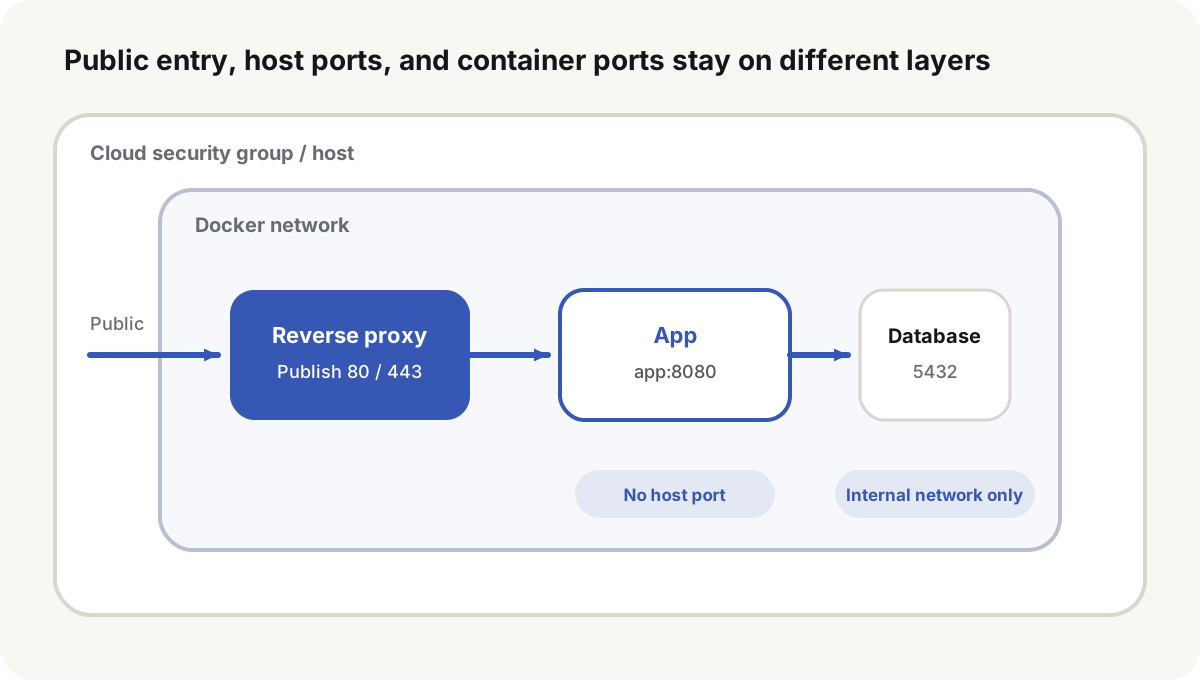
How to expose Docker ports at each network layer
| Where it is set | Example | What it means |
|---|---|---|
| App process listen | 0.0.0.0:8080 | Accept 8080 on every interface in this container |
| App process listen | 127.0.0.1:8080 | Accept 8080 only on this container’s loopback |
| Docker port publish | 127.0.0.1:8080:8080 | Host-local processes can reach container 8080 on host 8080 |
| Docker port publish | 0.0.0.0:8080:8080 | Every IPv4 address on the host publishes 8080; the public internet may reach it |
| Compose internal access | http://app:8080 | A peer on the same network uses the service name and the container port |
The two uses of 0.0.0.0 are not the same action. Listening on every interface inside the container lets a proxy on the same Docker network connect. Publishing the port onto every host interface widens the host entry.
The loopback-publish row assumes Docker Engine 28.0.0 or later and the default NAT bridge. Older releases let other hosts on the same Layer 2 network reach a port published to localhost; see moby/moby#45610(opens in a new tab). Direct routing or routed gateway mode can still make the container address reachable from outside. After an Engine upgrade, probe sensitive ports from another network.
Keep the app on the Compose network
Only the proxy needs public host ports. The app and the database do not need ports:
services:
  proxy:
    image: caddy:2
    ports:
      - "80:80"
      - "443:443"
      - "443:443/udp"
    networks: [web]

  app:
    image: example/app:1.4.2
    expose:
      - "8080"
    networks: [web, data]

  postgres:
    image: postgres:18-alpine
    expose:
      - "5432"
    networks: [data]

networks:
  web:
  data:
    internal: true
Compose expose records container ports. It does not publish them to the host. The Compose services reference(opens in a new tab) also notes that a port already declared in the image remains visible to peers on the network even when expose is omitted. Services on the same network still reach the port the process actually listens on. The proxy uses app:8080. Postgres joins only data, so it is not on the proxy network.
The app process still has to listen on 0.0.0.0:8080 inside its container. If it listens only on 127.0.0.1, the proxy container’s connection is refused. Compose networking(opens in a new tab) uses the container port for service-to-service traffic; the host port is only for access from outside that network.
Publish to 127.0.0.1 when the proxy runs on the host
When Caddy or Nginx runs as a host systemd service, publish the app only on the host loopback:
services:
  app:
    image: example/app:1.4.2
    ports:
      - "127.0.0.1:8080:8080"
The host proxy connects to 127.0.0.1:8080. The public internet should see only the proxy’s 80/443. Do not leave a debug mapping of 8080:8080 in place. With no host address, Docker publishes to every host address.
Docker’s port publishing(opens in a new tab) page states that publishing is insecure by default: the port is available to the Docker host and to the outside world. Binding 127.0.0.1 or ::1 keeps that published port on the host. The Compose ports short syntax repeats the same default: omit the host IP and Docker binds 0.0.0.0, which can bypass host firewall rules(opens in a new tab).
Firewalls and security groups sit in front of published ports
| Host port | Role |
|---|---|
| 80/tcp | HTTP redirects and HTTP-01 certificate challenges |
| 443/tcp | HTTPS |
| 443/udp | HTTP/3, when that protocol is in use |
| 22/tcp | SSH, with a source limit, keys, and a separate admin policy |
Databases, Redis, app ports, and admin panels should not be published to the public internet. The cloud security group decides whether traffic can reach the host. The host firewall decides what the host and its forward path accept. Docker also installs its own NAT and filter rules.
Docker’s packet filtering(opens in a new tab) page records the UFW clash: published-port traffic is diverted in the nat table before the INPUT and OUTPUT chains UFW uses. ufw status showing deny does not prove a container port is unreachable. On the iptables backend, extra container filters belong in DOCKER-USER(opens in a new tab), which Docker processes before its own DOCKER rules.
Verify the container, the host, and the public network
Read the host listeners and the Docker mapping:
ss -lntup
docker compose ps
docker inspect "$(docker compose ps -q app)" \
  --format '{{json .NetworkSettings.Ports}}'
From the proxy network, confirm the service name and the container port:
docker compose exec proxy getent hosts app
docker compose exec proxy curl -fsS http://app:8080/healthz
From another machine or another network, check the public entry:
nc -vz example.com 80
nc -vz example.com 443
nc -vz example.com 8080
80 and 443 should connect. 8080 should not. A failed scan can be the local carrier or the scanner path. A successful connect is enough to prove the port is exposed. Recheck important ports from at least one real external network.
Failures map to the wrong listen, bind, or service name
| Symptom | Cause | Fix |
|---|---|---|
Proxy is refused at app:8080 | App listens only on the container loopback | Listen on 0.0.0.0:8080 in the app |
| Host proxy cannot reach the app | App has no host port | Publish 127.0.0.1:8080:8080 |
| Database accepts a public connection | 5432:5432 is published on every address | Remove ports; keep the Compose network |
| UFW denies the port and it still answers | Docker forwarded the packet first | Tighten the publish address and add Docker filter-chain rules |
Container-to-container localhost fails | localhost is the current container | Use the target service name and container port |
| Proxy returns 502 after recreate | Proxy stored the old container IP | Use the Compose service name |
After a network change, recreate the containers and reboot the host once as a check. An old container, a leftover NAT rule, or a manual forward can make the first test pass and fail after restart.
How to expose Docker ports on a public site: publish 80/443 on the proxy, keep app and database ports off the host’s public addresses, and confirm 8080 fails from another network. The next host/container boundary is data, file ownership, and secrets across rebuilds.