How to configure Docker volume permissions starts with a numeric UID and GID match, not a matching username. Put database files and other container-generated state on a named volume, bind-mount host-managed config read-only, and grant each secret only to the service that reads it as a file. Recreate the container to prove the mount. Restore a backup in a separate environment to prove the backup.
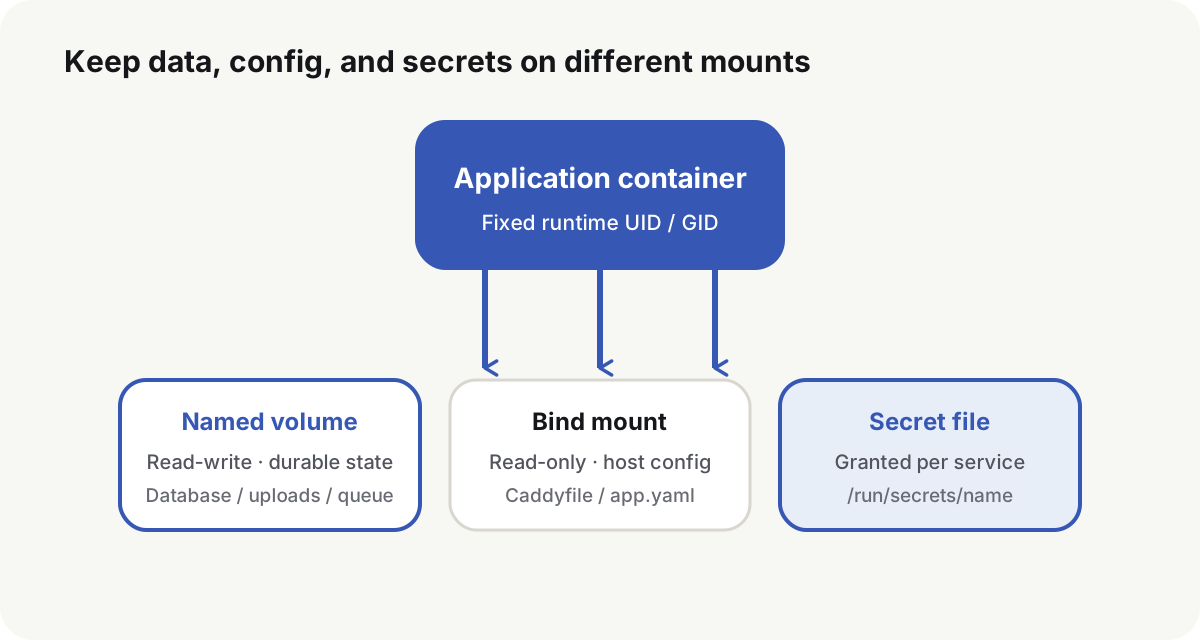
Choose a named volume, bind mount, or tmpfs
| Type | What belongs there | Why | Main risk |
|---|---|---|---|
| Named volume | Databases, queues, application state | Docker manages the lifecycle; the path is not tied to one host layout | Host backup and migration must name the volume and its driver |
| Bind mount | Caddyfile, explicit data directories, host scripts | The path is visible to existing backup and permission tools | The host path, owner, and SELinux or AppArmor labels all have to match |
| tmpfs | Short-lived sensitive files or fast scratch data that must not persist | Nothing is written to durable disk | A restart drops the files; the size counts against container memory |
Docker storage(opens in a new tab) treats volumes(opens in a new tab) as the default for data a container generates. Bind mounts(opens in a new tab) are for files the host already owns. tmpfs(opens in a new tab) stays in host memory and is gone when the container stops. The image writable layer is the wrong place for runtime data: deleting the container deletes that layer.
Split state, config, and secrets in Compose
services:
  app:
    image: example/app:1.4.2
    environment:
      APP_CONFIG: /etc/example/app.yaml
      DB_PASSWORD_FILE: /run/secrets/db_password
    volumes:
      - app_data:/var/lib/example
      - ./config/app.yaml:/etc/example/app.yaml:ro
    secrets:
      - db_password

secrets:
  db_password:
    file: ./secrets/db_password

volumes:
  app_data:
The config file is read-only. Runtime state goes to the named volume. The database password is granted only to the service that reads DB_PASSWORD_FILE. Do not bind-mount the whole project tree into a production container. Do not treat the host Docker socket as a convenience mount. Only trusted users should control the Docker daemon(opens in a new tab), which requires root unless you opt into rootless mode.
Inspect the mount Docker actually attached
docker inspect app \
  --format '{{range .Mounts}}{{printf "%s\t%s\t%s\t%s\n" .Type .Source .Destination .Mode}}{{end}}'
The data directory Source must be the expected volume or host path. Config and secret destinations must match the Compose file. Mounts that must be read-only should show ro. The backup job has to read that same source, not a second directory Docker created on the side.
If the image declares VOLUME or a Compose path is wrong, Docker can create an anonymous volume(opens in a new tab). The application still starts. The backup job then copies a different, empty directory, and the gap shows up only after a failure.
Docker volume permissions follow the runtime UID and GID
Look at the image user and the directory the process actually writes:
docker inspect app --format 'user={{.Config.User}}'
docker compose exec app id
docker compose exec app sh -c 'namei -l /var/lib/example && touch /var/lib/example/.write-test'
The numeric UID and GID are what the filesystem checks. A username that exists on both the host and the container is not the same identity. For a bind mount, set the host owner before the container starts:
sudo install -d -o 10001 -g 10001 -m 0750 /srv/example/data
A new named volume can inherit ownership from the image directory Docker copies in on first use. After that, set ownership in the image entrypoint or a one-shot init task. Do not let the application recursively chown a large data directory on every start. That delays startup and can rewrite shared files.
Mount Compose secrets as files, not environment variables
Compose secrets(opens in a new tab) become available only after a service lists them. Compose then mounts the file at /run/secrets/<name>. Official MySQL and Postgres images, and other images that follow the _FILE convention, read the secret from that path instead of from an ordinary environment variable.
docker compose exec app sh -c '
  test -r /run/secrets/db_password
  stat -c "%a %u:%g %n" /run/secrets/db_password
'
For a file: source, Compose bind-mounts the host file. uid, gid, and mode on the service are ignored(opens in a new tab) in that case. Compose does not encrypt the host file, rotate it, or record who read it. Swarm secrets(opens in a new tab) encrypt in transit and at rest; that is a different control plane. When you need encryption, rotation, and audit, use Vault, a cloud KMS or Secret Manager, or an equivalent system.
Keep the secret file out of Git, the image, build args, and public artifacts. Restrict the host directory to the operators who must read it. Grant the secret only to the service that consumes it. Do not print it in logs, error pages, or health checks. Rotation needs a defined reload and invalidation step.
Back up a database with a consistent method
Docker can tar a volume(opens in a new tab) from a helper container. That copies files. A running PostgreSQL or MySQL data directory can still have unflushed pages, so the archive may not restore.
Use the database’s own logical backup, physical backup, or a snapshot the vendor supports. PostgreSQL pg_dump(opens in a new tab) can export a consistent dump while the database is in use:
docker compose exec -T postgres \
  pg_dump -U app -d app --format=custom \
  > backup.dump
Restore into a separate database. pg_restore --exit-on-error(opens in a new tab) stops at the first SQL error:
pg_restore --list backup.dump >/dev/null
pg_restore --clean --if-exists --no-owner --exit-on-error \
  --dbname=postgresql://restore_user@restore-host/restore_db \
  backup.dump
Then have the application read the key tables, log in, or run a core query. Record the backup time, database version, file size, and checksum. Do not restore onto the live production volume.
Recreate the container, then restore in a separate environment
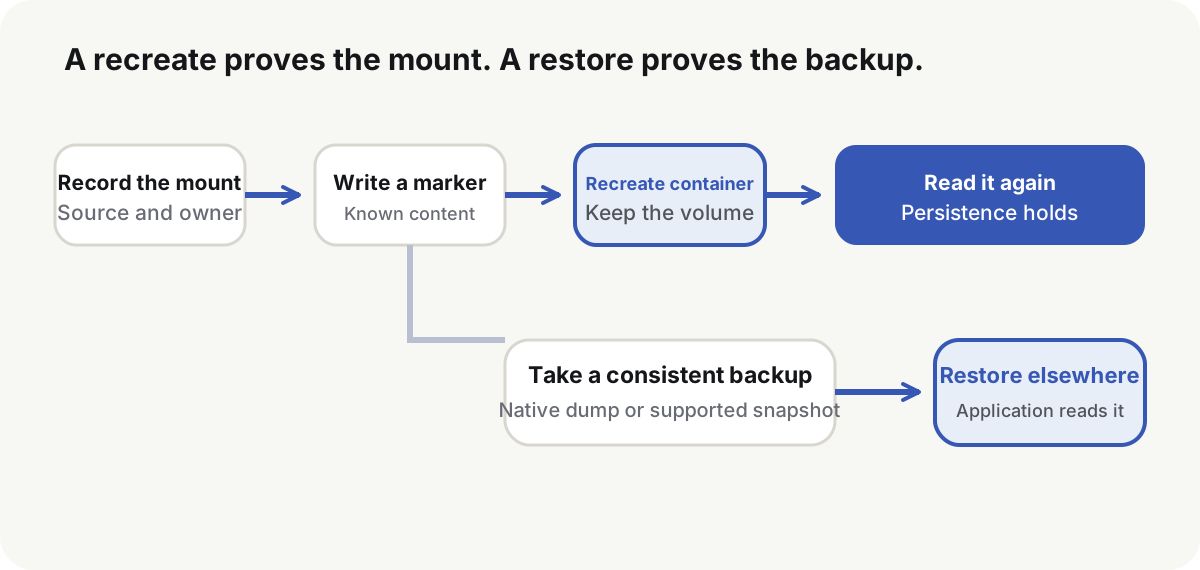
Write a marker, force a recreate, and read the marker again:
docker compose exec app sh -c 'printf persistence-probe > /var/lib/example/probe.txt'
docker compose up -d --force-recreate app
docker compose exec app cat /var/lib/example/probe.txt
Before a migration, stop writes or take a consistent backup the application supports. Record the volume driver, UID/GID, destination path, and application version. Restore data and permissions first, then start the application. Do not let an empty database initialize itself and then overwrite those files.
docker compose down(opens in a new tab) does not remove named volumes. docker compose down -v removes named volumes declared in the Compose file and anonymous volumes attached to containers. Keep -v out of ordinary stop and release scripts.
Should I use a Docker named volume or a bind mount? Put container-generated state on a named volume. Bind-mount host-managed files. Choose by who owns the files and how they are backed up.
Can I fix Permission denied with chmod 777? No. Match the runtime UID/GID, the mount owner, parent execute bits, the read-only flag, and any security-module label, then grant the smallest mode that works.
Do Docker Compose secrets encrypt passwords? Plain Compose secrets hand a host file to granted services. They do not encrypt, rotate, or audit that file.
Does copying a Docker volume directory restore a database? Not by itself. Use a consistent database backup and restore it in a separate environment.
How do I know data survives a container recreate? Reading the original files after a recreate only proves the mount. A backup is usable for disaster recovery only after an independent restore succeeds.
When docker volume permissions match the runtime user, a recreate still shows the marker and an independent restore still serves the application. Image identity, published ports, and restart policy are the next production controls.