What happens when you type a URL in the browser is a sequence of hops, not a round trip to one origin. The request usually travels through DNS, a TCP or QUIC connection, TLS, a CDN or reverse proxy, and only then the application. The HTML that comes back is not the end; the browser still fetches styles, scripts, fonts, and images. MDN’s account of how the web works(opens in a new tab) lists DNS, the HTTP request, the server response, and the browser assembling the page as consecutive stages.
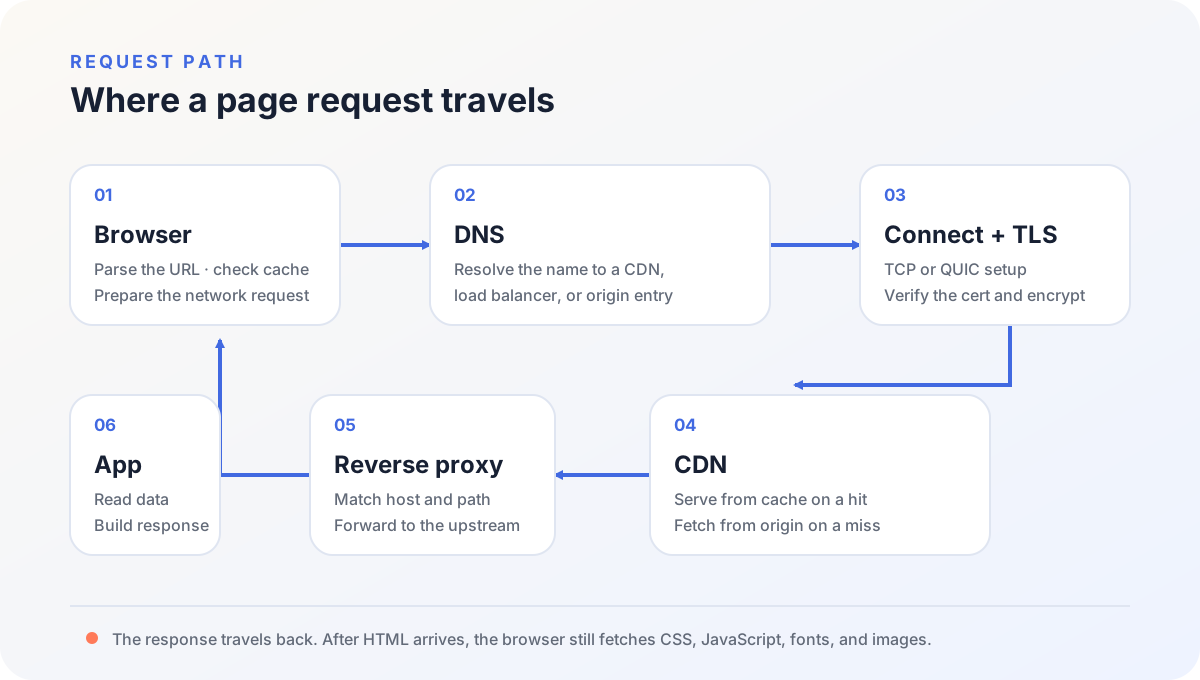
What happens when you type a URL in the browser
https://example.com/posts/guide/?from=search#step-2 splits into:
httpsselects the protocol and the default port;example.comis the hostname that must resolve;/posts/guide/is the path the server receives;from=searchis a query string that can change CDN cache keys and application logic;#step-2stays in the browser and is not sent with the HTTP request(opens in a new tab).
The browser also checks DNS answers it already has, existing connections, the HTTP cache, a Service Worker, and HSTS. Reloading a page does not mean the whole chain runs again.
DNS finds an entry, not necessarily the origin
When the machine has no usable cache, the system resolver queries recursive DNS. Recursive DNS walks root, TLD, and authoritative servers only when it has no cache of its own.
The zone may return A or AAAA addresses, or a CNAME toward a CDN. The browser connects to the address that resolution finally yields. It does not see origin hosts and internal networks behind that entry. On Cloudflare, a proxied record answers with an anycast address(opens in a new tab) instead of the origin IP in the DNS table.
dig +short example.com NS
dig +short www.example.com CNAME
dig +short www.example.com A
dig +short www.example.com AAAA
A local proxy or a custom resolver can synthesize an address. When the answer looks wrong, query a public resolver, or walk the authoritative chain:
dig @1.1.1.1 example.com A
dig +trace example.com
HTTPS still needs a TLS handshake
HTTP/1.1 and HTTP/2 usually run over TCP. HTTP/3 uses QUIC(opens in a new tab) over UDP, and QUIC folds TLS into its own handshake(opens in a new tab). After the entry address is known, HTTP/1.1 and HTTP/2 open TCP and then complete TLS. HTTP/3 opens QUIC, so there is no separate TCP handshake before encryption.
The browser checks that the certificate covers the current hostname, that it has not expired, and that the chain is trusted, then agrees on encryption and the application protocol. A name mismatch happens before the request reaches the application, so application logs often have no matching record.
curl -sS -o /dev/null \
  -w 'http=%{http_version} code=%{http_code} remote=%{remote_ip}\n' \
  https://example.com/

openssl s_client -connect example.com:443 \
  -servername example.com </dev/null
-servername sends the hostname as SNI so the entry can select the certificate for that name. Connecting to an IP without SNI often yields the wrong certificate on a shared HTTPS entry.
A CDN and a reverse proxy are not the same job
A CDN sits closer to the visitor. On a cache hit, the edge can return the object; on a miss, it fetches from origin. A CNAME is not proof the edge served this response. Request the same URL twice:
curl -sS -D - -o /dev/null https://cdn.example.com/path/image.webp
curl -sS -D - -o /dev/null https://cdn.example.com/path/image.webp
CF-Cache-Status on Cloudflare, plus Age, ETag, and Cache-Control, show whether the object came from the expected origin, whether it is cacheable, and whether the second request hit. Cloudflare documents HIT, MISS, EXPIRED, REVALIDATED, and BYPASS on CF-Cache-Status(opens in a new tab). A CNAME only proves DNS points at the CDN.
An origin reverse proxy usually sits at the origin entry. It matches host and path, forwards to the correct application port, and handles HTTPS, redirects, compression, WebSockets, and access logs. Caddy’s reverse_proxy(opens in a new tab) always sends the request upstream or returns an error. A 502 is more usefully checked from the proxy’s network to the upstream, not with curl localhost on the host.
Cloudflare’s edge is itself a reverse proxy in front of origin. The origin reverse proxy is a later hop that still has to reach the application process.
HTML is not a finished page
The application may still read a cache, a database, object storage, or a third-party API. After HTML reaches the browser, the browser builds the DOM, fetches remaining files, computes layout, runs script, and paints. MDN’s rendering overview(opens in a new tab) treats that assembly as a separate stage after the files arrive.
Time to first byte and time until the page is usable are different measurements. web.dev defines TTFB(opens in a new tab) as the time from starting navigation until the first byte of a response, including redirects, Service Worker startup, DNS, connection and TLS, and waiting for that first byte.
- Slow first byte: the stall is more likely in the network, a CDN origin fetch, the reverse proxy, the application, or the database.
- Normal first byte, page still unusable: the stall is more likely payload size, request count, JavaScript on the main thread, or rendering.
Split page time with curl
curl -sS -o /dev/null \
  -w $'dns=%{time_namelookup}\nconnect=%{time_connect}\ntls=%{time_appconnect}\nttfb=%{time_starttransfer}\ntotal=%{time_total}\n' \
  https://example.com/
These fields are elapsed time from the start of the transfer. Subtract adjacent values to see how long one interval took. Exact meanings come from curl’s --write-out variables(opens in a new tab): time_namelookup ends when name resolution finishes, time_connect when TCP connect finishes, time_appconnect when the TLS handshake finishes, time_starttransfer when the first response byte is about to move, time_total when the transfer ends. Connection reuse, a proxy, and HTTP/3 change which stages appear and how they are timed.
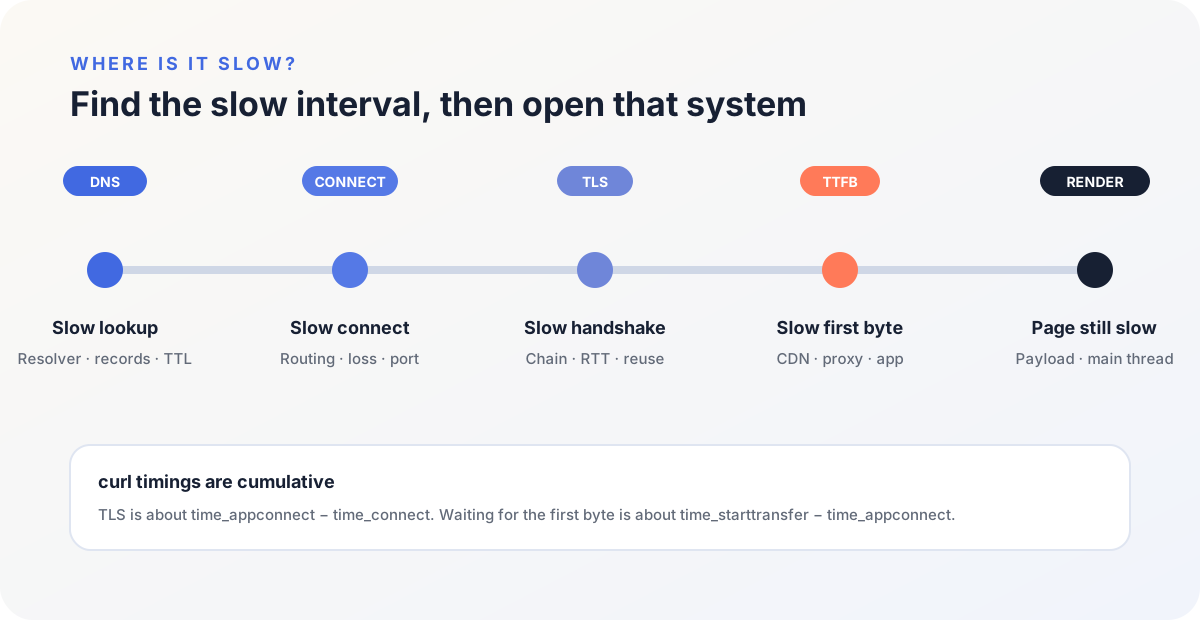
| Slow interval | Approximate calculation | Inspect first |
|---|---|---|
| DNS | time_namelookup | Resolver, authoritative DNS, records, and TTL |
| TCP connect | time_connect - time_namelookup | Routing, loss, entry region, and port |
| TLS | time_appconnect - time_connect | Certificate chain, round trips, and session reuse |
| Waiting for first byte | time_starttransfer - time_appconnect | CDN origin fetch, proxy, application, and database |
| Downloading the body | time_total - time_starttransfer | Payload size, bandwidth, and compression |
Narrow the hop from the error
| Symptom | Inspect first |
|---|---|
| Name not found, resolution failure | NS, A/AAAA, CNAME, and local DNS |
| Connection refused or timed out | Entry address, port, firewall, and security group |
| Certificate name or expiry error | DNS target, SNI, and the entry certificate |
| Static files flip between old and new | CDN cache key, TTL, Age, and ETag |
| 502 | Network and port from reverse proxy to upstream |
| 504 | Upstream work time, proxy timeout, and slow queries |
| Normal TTFB, page still slow | Browser Network and Performance panels |
Inspect DNS before the connection, the certificate before the CDN, and the proxy before the application. If the handshake never finished, database logs are unrelated to this failure.
Keep the final DNS answer, the client interval timings, and the same request in the edge and application logs. A browser error page or a single ping cannot locate the layer.
What happens first when you type a URL in the browser? The browser parses the URL and checks local DNS, existing connections, and HTTP cache. Only if it must resolve again does it ask the system resolver for the hostname’s entry address.
After DNS, does the browser connect to the origin? Not necessarily. DNS may point the name at a CDN, load balancer, or reverse proxy. The client connects to the address that resolution finally yields; that entry decides whether to reach origin.
Is a TLS handshake the same thing as HTTPS? The TLS handshake authenticates the server, agrees on algorithms, and establishes keys. HTTP rides that encrypted connection afterward. HTTPS names the combination.
Does high TTFB always mean the backend is slow? No. TTFB includes DNS, connect, TLS, CDN origin fetches, proxy wait, and application work. Split the intervals, then compare edge logs with application logs.
How can I tell whether a request went through a CDN? Check the CNAME, then the real GET response for CDN cache headers, Age, and ETag. A correct CNAME only proves DNS points at the CDN, not that this file was already in cache.
What happens when you type a URL in the browser ends at a named hop. Keep the DNS answer, the curl timings, and the same request in the edge and application logs. The next failure is read from those three records, not from a ping.