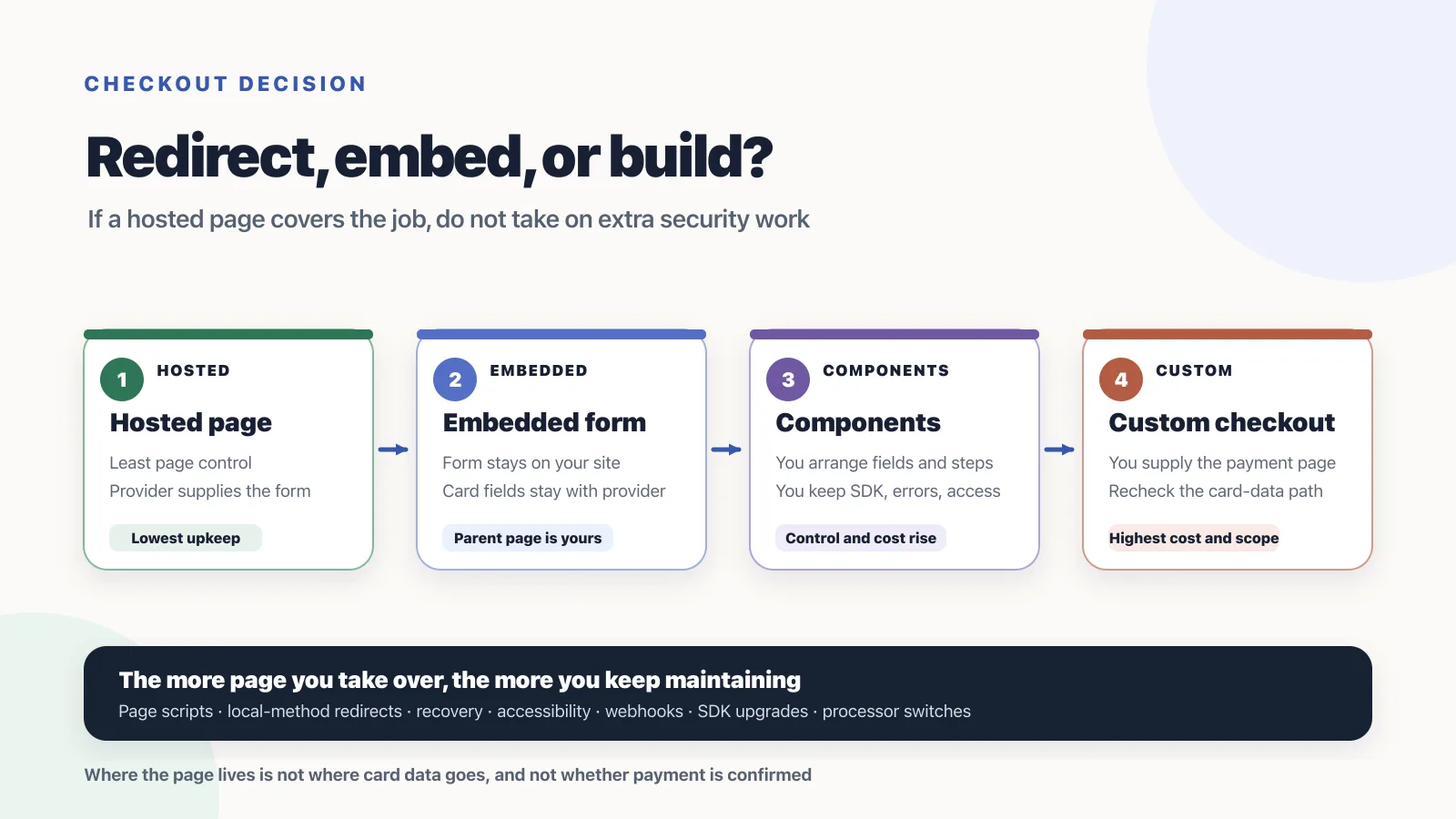
RouteNest put the Pro payment form on the pricing page. A Dutch buyer chose iDEAL, and the browser still left for the bank. After the buyer authorized and came back, membership did not turn on, because the payment webhook had not arrived. Nothing was broken: where the form lives, whether the payment leaves the page, and whether payment is confirmed are three different jobs.
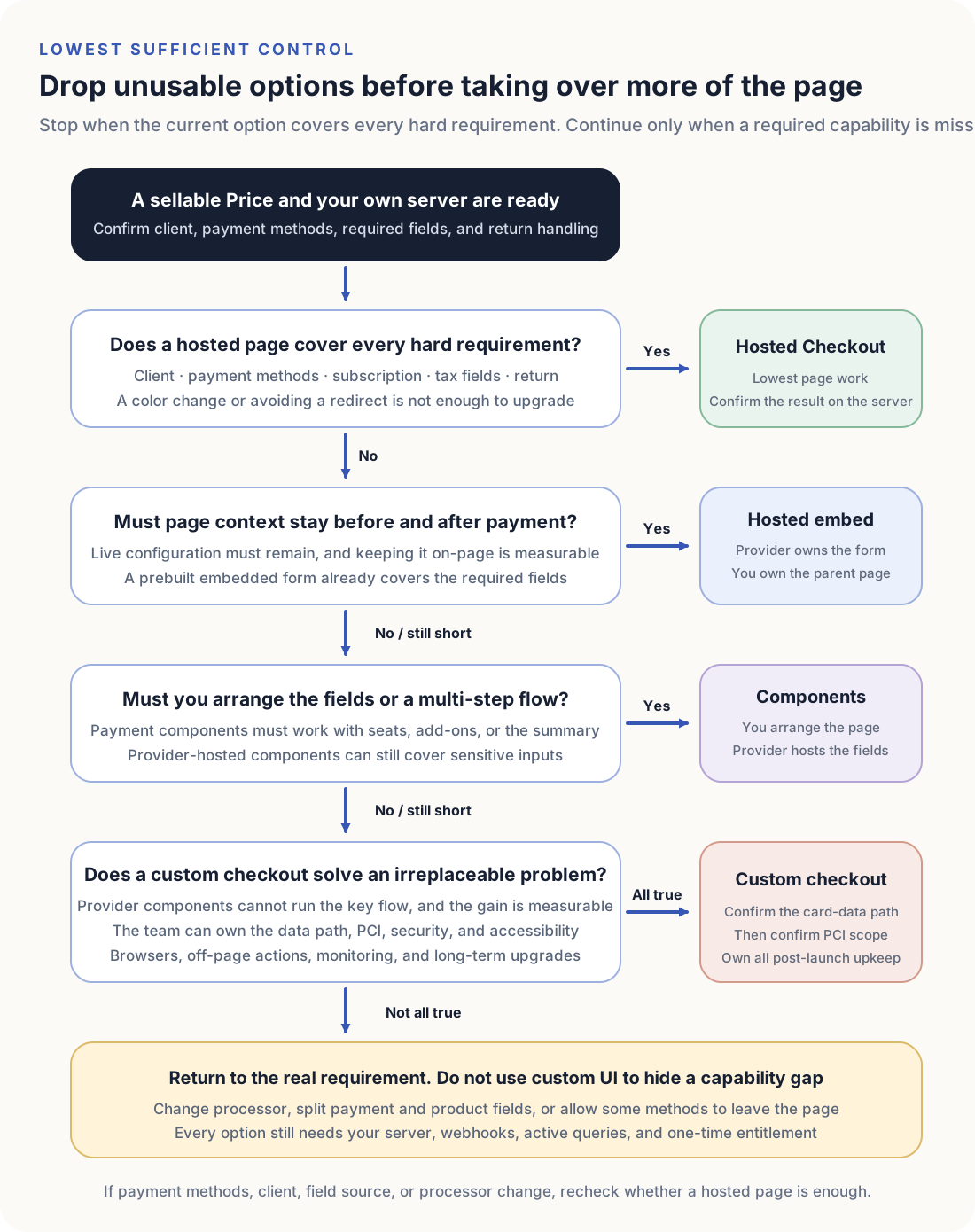
If the provider’s full checkout page already covers the required payment methods and fields, start with hosted checkout. Keep a hosted embedded form only when the product configuration before payment cannot be abandoned. Split into hosted components when a prebuilt form cannot hold seats, add-ons, or a live quote. Generating the card number field in your own page jumps the security and compliance work; that is usually the wrong starting point for SaaS.
Before the page design, the payment account has to work and the price has to be sellable. If Product, Plan, Price, and the processor price still share one record, finish catalog modeling first. If the seller, product, or settlement account still has no usable processor, finish eligibility first. RouteNest, amounts, and the business scenes are synthetic; they do not describe a live merchant.
Start with who provides the payment page and the card fields
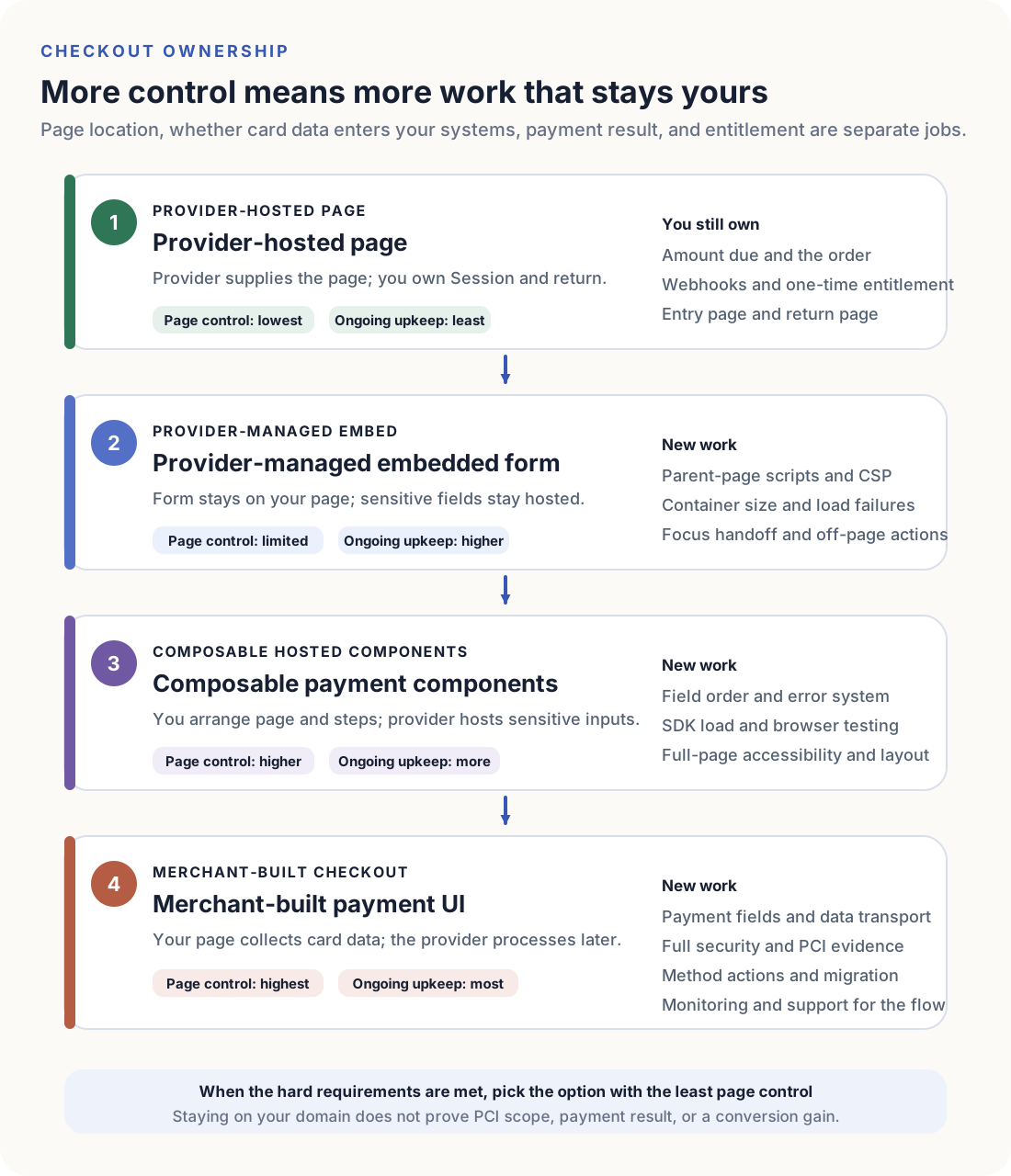
Hosted checkout vs embedded checkout is not a question of whether the form “looks on-site.” Four jobs have different owners: who provides the payment page, whether card data enters the merchant system, who confirms the payment result, and who grants entitlement. Taking over more of the page also takes over more work: page scripts, Content-Security-Policy, browser behavior, accessibility, recovery, SDK upgrades, and a processor switch.
| Surface | Who provides the payment page | Typical card-data path | What you still own | Typical extra work |
|---|---|---|---|---|
| Provider-hosted page | Complete payment page on the provider origin | Card number stays with the provider | Amount due, order, webhook, return | Least page work |
| Provider-managed embed | Provider form on your page | Sensitive fields still come from the provider | Parent page, container, CSP, return | Parent-page scripts, size, load failures, off-page actions |
| Composable hosted components | You arrange fields and steps; the provider hosts sensitive inputs | Card number still stays with the provider | Field order, error system, page a11y | SDK, browsers, responsive layout, component upgrades |
| Merchant-built checkout | Your page elements collect card data | Recheck whether card data enters your systems | Payment fields, data transport, PCI evidence | Highest security, monitoring, and migration cost |
Stripe currently lists Checkout as Full page, Embedded form, and Elements. Full page can redirect to a Stripe-hosted page or embed Stripe’s complete page on the merchant site. Embedded form is still marked Public preview. Stripe Checkout(opens in a new tab) puts Full page in the Recommended column. Stripe’s comparison of Embedded Checkout and Stripe-hosted Checkout(opens in a new tab) says both versions support the same payment methods and almost all of the same features; the hosted version still has no built-in success state on Checkout itself.
Airwallex currently lists a pre-built payment page, a pre-built Checkout Element, individual payment Elements, and a Payments API UI. Airwallex Web Checkout(opens in a new tab) currently labels the first three as PCI-DSS SAQ A, and the Payments API UI as a ROC path.
Paddle Overlay Checkout is a complete overlay. The overlay already includes items, totals, and payment options; unlike inline checkout, your page does not render those pieces separately. Paddle Overlay Checkout(opens in a new tab) is the fastest Paddle integration: a few lines of code turn any element into a checkout button, and the buyer does not leave the site.
Adyen currently lists Hosted Checkout, Drop-in, and Components. Adyen Drop-in(opens in a new tab) is a prebuilt checkout UI: adding payment methods usually requires no extra development. Components are used to compose each method into your own UI. Hosted Checkout still redirects the shopper to an Adyen-hosted page; after payment, you show the session outcome on your page.
These names are not four industry-standard products. They are four current snapshots of how much page a merchant takes over. RouteNest only needs to pick the lowest control that still covers the required payment methods and fields.
Hosted checkout vs embedded checkout starts with constraints you cannot drop
If the provider’s full page already covers every hard requirement, stay there. Take over more of the page only when a required capability is missing.
| Constraint | If it is missing | Do not use this as the reason to upgrade |
|---|---|---|
| Required payment methods cannot complete | Drop the option, or allow that method to leave the page | Wanting the form to stay on your domain |
| Web or mobile WebView cannot finish | Drop the option | Preferring a particular layout |
| Subscriptions, setup, or tax fields cannot be collected | Drop the option | Wanting to restyle the form |
| Required business fields cannot be placed or synced | Split payment fields from product fields, or take over more of the page | Putting every field into the payment form |
| Return, cancel, and pending cannot restore the order | Drop the option | Treating the success URL as payment success |
Stripe payment method support(opens in a new tab) varies by product, country, currency, and Checkout mode. Cards, Link, Apple Pay, and Google Pay cover more Checkout and Payment Element combinations; many local methods work only in specific countries and currencies. Adyen Hosted Checkout is faster to integrate, but the comparison with Drop-in and Components(opens in a new tab) currently shows that updating the amount after the session starts, and Apple Pay with your own certificate, are on Drop-in or Components.
On 4 September 2026, Stripe Checkout Studio’s default demo was a $68 Lumario order: card, Link, and Klarna were available, and a CAPTCHA appeared before Pay. Airwallex’s sandbox checkout demo could switch among Hosted Payment Page, Drop-in Element, Card Element, Split Card Element, Apple Pay, Google Pay, and Native API. Those two screens are observations of those demos on that day, not a feature matrix for every merchant.
PCI scope follows the real page and the card data
PCI DSS does not score a product name. It looks at the payment page and the card-data path.
PCI FAQ 1291(opens in a new tab) currently requires every payment-page element delivered to the cardholder browser to originate only and directly from a PCI DSS validated third-party service provider. FAQ 1438(opens in a new tab) treats a standalone page and an iframe embed as payment pages. When the merchant site embeds the payment page in an iframe, all fields and page elements that capture card data must sit inside that iframe to stay eligible for SAQ A. If any element involved in collecting or processing card data is present on, or provided by, the merchant site, the merchant is not eligible for SAQ A.
FAQ 1588(opens in a new tab) currently limits the SAQ A script-eligibility criterion to merchant pages that include a TPSP embedded payment page or form, such as one or more iframes. It does not apply to an HTTP 30x, meta, or JavaScript redirect to the TPSP, or to a fully outsourced payment. For an embed, the merchant currently confirms the page is not susceptible to script attacks in one of two ways: using techniques such as PCI DSS 6.4.3 and 11.6.1, deployed by the merchant or a third party; or obtaining confirmation from the PCI DSS compliant TPSP that, when implemented according to its instructions, the solution includes techniques that protect the merchant payment page from script attacks. FAQ 1604(opens in a new tab) currently says SAQ A still includes ASV external vulnerability scanning, including pages that redirect to a TPSP and pages that include a TPSP iframe.
| What you observe | Do not conclude | Confirm this first |
|---|---|---|
| The form sits on your domain | SAQ A, or a smaller questionnaire | Who supplies every card-capture element, and whether merchant scripts take part |
| The product is named Checkout, Drop-in, or Elements | The same PCI scope | The real page, iframe, and data path |
| The provider says PCI is included | Your questionnaire is done | The current SAQ, the TPSP Attestation of Compliance, and the entity that accepts it |
| You only generate the card number field | This is still an embed | Whether card data enters your page, scripts, or servers |
Airwallex currently maps hosted page, Drop-in, and Elements to SAQ A, and the Payments API UI to ROC. That is Airwallex’s current public grouping, not a PCI SSC conclusion. A self-generated card number field usually leaves SAQ A; do not assume SAQ A-EP either. Direct Post, merchant JavaScript that sends card data, or servers that receive card numbers typically belong to a heavier questionnaire. If a custom UI is required, freeze the data-flow diagram first, then confirm the questionnaire with the acquirer or QSA.
Embedded checkout can still send the buyer to a bank or a wallet
A form on your domain does not mean the payment stays on that page. Many local methods, wallets, and 3D Secure complete on another site or in another app.
Adyen Drop-in(opens in a new tab) still handles extra actions. When action.type is redirect, the shopper goes to another site or app. Stripe Checkout and Payment Element also differ by method: iDEAL, wallets, and 3DS commonly leave the original page. Paddle Overlay keeps the buyer on the site, but PayPal, Apple Pay, Google Pay, and other local methods can still open another window or sheet.
| Payment method | Common extra action | If you ignore it |
|---|---|---|
| Cards with 3DS | Challenge page, app, or extra iframe | The return is treated as a failure, or the pending state is left hanging |
| iDEAL, Pay by Bank, and similar | Bank site or banking app | The embed is blamed, even though the method requires leaving |
| Apple Pay / Google Pay | System sheet or extra domain verification | The method never appears, or it fails in WebView |
| Southeast Asian wallets and QR methods | App, QR code, or poll-for-result | The success page is shown too early, or the wait is abandoned |
If a method must leave the page, write that into the product copy. Do not force every method into one iframe. Hosted Checkout is often clearer here: the buyer already expects to complete payment on another page. An embed has to explain why this method still opens a bank. Custom checkout must handle every extra action itself.
Addresses and product fields cannot all live in the payment form
The payment form is not a dumping ground for every field. Tax, invoices, and risk may need an address. Seats, add-ons, coupon codes, and a live quote belong to the product. Putting them in the same form creates two failures: the payment object cannot store them, or changing a seat count recreates the payment object and loses the card fields.
| Field | Typical owner | If you force it into the payment form |
|---|---|---|
| Amount due, currency, tax | Server, written into Session or Payment | The browser can rewrite the payable amount |
| Card number, CVC | Provider-hosted field | PCI scope expands at once |
| Billing address | Hosted page, or an address component plus your page | Tax and invoices lose their source |
| Seat count, add-ons, coupon | Product configuration, synced to the amount due | A change wipes the card fields, or the amount due goes stale |
| Return URL | Server-set | The browser can send the buyer to the wrong page |
RouteNest’s Pro plan can stay on Hosted Checkout: $24 a month, one Price, no extra configuration. Team needs seat count and add-ons, so the amount due has to change before payment; a prebuilt form usually cannot hold that. Enterprise quotes need a quote number and a billing profile, which should stay on the merchant page; the payment step only takes a server-confirmed amount.
If product fields and payment fields must appear together, split the page: the left side owns configuration, the right side mounts hosted components, and the server writes the latest amount due. Do not let the browser patch the payment object.
Different failures need different recovery
A payment is not only success or failure. Each state has a different owner, and mixing them creates duplicate charges or lost orders.
| What you observe | Typical owner | Recovery |
|---|---|---|
| Payment page or iframe does not render | Your page, CSP, or SDK load | Keep the order; reload the payment container; do not create a new payment |
| Card declined, with a reason | Processor | Keep the order and amount due; let the buyer change the method |
| 3DS or bank completed, buyer did not return | Off-page action | Webhook or an active query confirms; the return page may show processing |
| Buyer canceled or closed the page | Buyer | Close this attempt; keep the order; the server creates the next payment |
| Webhook delayed, return page already open | Processor event | The page queries; entitlement waits for a confirmed result |
| Duplicate click, refresh, or extra tab | Your page | One purchase id; one-time entitlement |
Adyen result codes(opens in a new tab) currently say resultCode tells you the current payment state and can still change; do not use it to update the order system. Pending and Received mean wait for the shopper-facing copy, then wait for the AUTHORISATION webhook. Stripe Checkout fulfillment also says you cannot rely on the landing page alone, because the customer may lose the connection after paying. Custom checkout has to classify these failures itself. Hosted Checkout and hosted embeds usually return a complete enough state; you still map it onto your own purchase, processing, and failed states.
An accessible payment component is not an accessible checkout
A payment SDK can pass WCAG and still leave the checkout unusable. Adyen currently publishes a VPAT for Web Drop-in and Components, and says v5.49.0 or later meets WCAG 2.1 Level AA. Adyen accessibility(opens in a new tab) still asks merchants to upgrade if they need those improvements. Stripe Checkout Studio currently exposes keyboard navigation, screen-reader labels, and color-contrast options. Those statements cover the provider component, not your parent page.
| What must work | Common miss | What to verify |
|---|---|---|
| Keyboard | Focus does not enter the iframe, or never returns after 3DS | Tab, Shift+Tab, and Enter can finish pay, cancel, and return |
| Screen reader | Parent-page title, errors, and processing are not announced | The reader can hear amount due, errors, and the current state |
| Focus | After an extra window or app, focus is lost | Focus lands back on the result or the retry |
| Contrast and motion | Your overlay covers the form, or a loading animation has no stop | The form is still readable; reduced motion is respected |
| Window and WebView | window.opener is missing, or the WebView blocks a method | The required client can finish; otherwise do not offer that method |
The more of the page you take over, the more of this you test. Hosted Checkout still needs an accessible entry and return. An embed also needs the parent page. Custom checkout includes the payment fields themselves.
Returning to the success page does not prove the payment succeeded
The return URL only means the browser came back. Stripe currently requires Checkout fulfillment(opens in a new tab) to use a verified checkout.session.completed webhook; delayed methods also need checkout.session.async_payment_succeeded. The landing page can query so the buyer sees the result, but it cannot be the only switch that grants access. Adyen currently uses resultCode for the shopper-facing state; the order system waits for a webhook, or for a server query of the existing payment object.
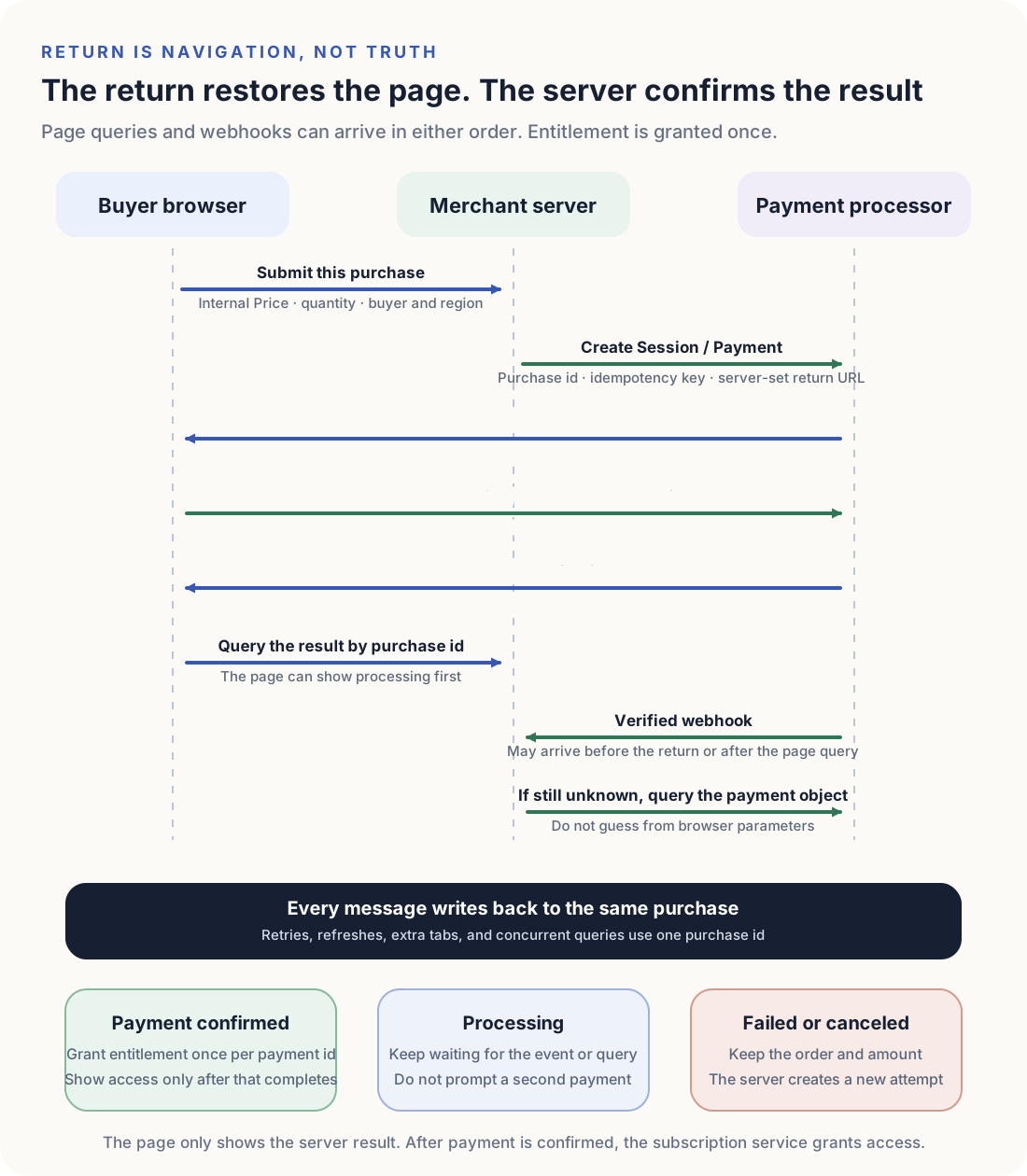
The return URL is created on the server and bound to this purchase. The page may show processing first. Duplicate clicks, refreshes, extra tabs, and concurrent queries write back to the same purchase. After payment is confirmed, the subscription service grants entitlement once per payment id. Access copy appears only after that write succeeds. Processor vs merchant of record only changes who issues the invoice; it does not change this sequence.
Conversion has to be measured on the same purchase
Do not assume that staying on your domain converts better. Compare hosted checkout vs embedded checkout only on the same purchase, the same Price, and the same methods.
| Metric | What it counts | Do not use it this way |
|---|---|---|
| Checkout start | The buyer enters this purchase | Counting a pricing-page view as a start |
| Extra-page hop | Bank, wallet, 3DS, or another window | Treating every hop as a conversion loss |
| Return failure | The buyer does not return, or the return loses the order | Counting it as a payment failure |
| Paid and not activated | Payment is confirmed, entitlement is not granted | Counting it as checkout conversion |
| Paid and activated | Payment confirmed, and this purchase is entitled | Mixing it with other plans or other methods |
If a method must leave the page, count the extra-page hop separately. If entitlement is late, count paid-and-not-activated separately. Changing only the button color, or avoiding a redirect, is not a reason to take over more of the page. Upgrade the UI only when a required method cannot finish, a required field cannot be placed, recovery cannot restore the order, or the same purchase shows a stable conversion gap.
Three SaaS products pick three different checkouts
The same company can keep three checkouts, as long as each one maps to a different Price and a different field set.
| Product | Hard requirements | Lowest option | Do not do this |
|---|---|---|---|
| RouteNest Pro | One Price, cards and iDEAL, no extra configuration | Hosted Checkout | Building an on-site form to look more native |
| RouteNest Team | Seats and add-ons change the amount due; the configuration must stay visible | Hosted components plus a configuration panel | Putting seats into the card iframe |
| RouteNest Enterprise | Quote number, billing profile, and a handoff to sales | Merchant page plus a hosted payment step | Generating card number fields to look like a custom CRM |
Pro can lose the on-site form. After the buyer confirms $24, sending them to the provider page is enough; the return comes back to this purchase. Team cannot lose the configuration: changing seats must keep the amount due and the payment fields in sync, so the left side stays yours and the right side mounts hosted components. Enterprise is not a public self-serve checkout; after the quote is confirmed, the payment step only takes a server-confirmed amount. If a later method, client, or field appears, re-run the same constraints; do not copy another product’s UI.
Upgrades and failures after launch are the real cost
The first integration is not the expensive part. The longer bill is SDK upgrades, browser changes, new payment methods, and incident recovery.
Adyen Web v6(opens in a new tab) currently splits two import styles. Importing all payment methods in one bundle means new methods can be added from account configuration. Importing individual components still requires frontend code changes. onPaymentCompleted no longer fires for failed payments; Cancelled, Error, and Refused go to onPaymentFailed. Stripe Embedded form is still Public preview, and its feature list is not identical to Full page. Airwallex currently asks you to compare Hosted Payment Page, Drop-in, Elements, and Native API in sandbox first.
| Change | Hosted Checkout | Hosted embed / components | Custom checkout |
|---|---|---|---|
| New payment method | Often account configuration plus return testing | May need extra actions, domains, or component imports | You add the action, polling, and failure copy |
| SDK breaking change | Usually no frontend rewrite | You change initialization, events, and styles | You change the data path and the UI together |
| CSP, iframe, or browser change | Entry and return | Parent page, iframe, and third-party scripts | All payment fields and extra windows |
| Incident recovery | Query Session or Payment | Also inspect container load and extra actions | You reconstruct the full path |
If the team cannot own those upgrades, do not take over more of the page. Hosted Checkout leaves the provider to update the payment page. You still keep webhooks, idempotency, and one-time entitlement.
Keep the data you will need if you change the UI or the processor
Changing the page is cheap. Changing the processor is not, unless the order, entitlement, and customer records already live in your system.
Keep the sellable Price, purchase id, amount due, customer id, and entitlement state. Keep payment id only as an external reference. Hosted Checkout, embeds, components, and custom checkout can all be replaced, as long as the next processor can still reconstruct this purchase. If the browser holds the only amount due, or the provider object is the only subscription record, the next UI change has to migrate live orders.
When the checkout can restore this purchase, and webhooks can still grant entitlement once, stop. The next job is to check whether each required payment method can actually finish for this Price, in this region, on this client.