Automatic HTTPS certificate renewal in Caddy is not a cron job. Caddy obtains a certificate, serves HTTPS, redirects HTTP, and renews in the background when the hostname, public DNS, ACME challenge path, and certificate storage all work. A running Caddy process does not prove the next ACME attempt will succeed.
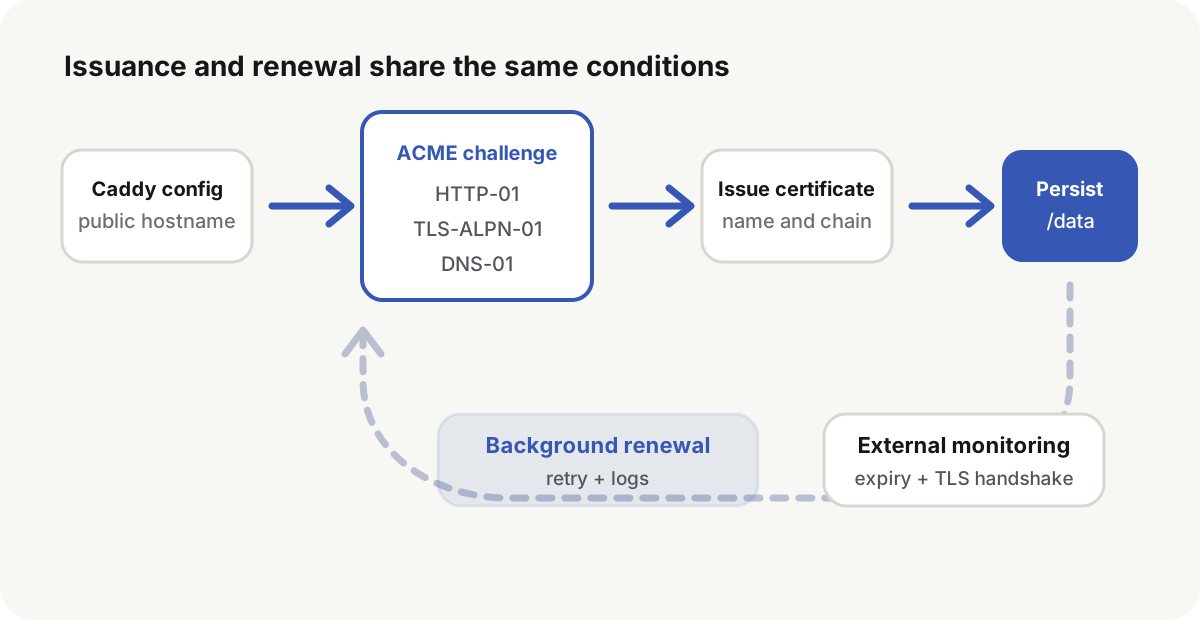
Automatic HTTPS certificate renewal only starts when these conditions hold
Caddy’s Automatic HTTPS documentation(opens in a new tab) requires all of the following at once:
- The config contains a qualifying hostname, not only
:80,:443, or anhttp://address. - The A, AAAA, or CNAME chain ends at the current entry.
- Caddy can bind the challenge ports, or traffic is forwarded to those ports.
- The data directory(opens in a new tab) is writable and still present after a restart or container rebuild.
A minimal Caddyfile is a hostname and an upstream:
example.com {
    reverse_proxy app:8080
}
Caddy then manages the certificate and adds HTTP to HTTPS redirection. Writing the site as http://example.com turns automatic HTTPS off for that site.
ACME challenges follow the public entry, not the local cache
A certificate authority has to see that the requester controls the name. Let’s Encrypt documents three common challenges(opens in a new tab):
| Challenge | Public entry | Use when | Common failure |
|---|---|---|---|
| HTTP-01 | http://name/.well-known/acme-challenge/... on port 80 | Ordinary public sites | Port 80 closed, DNS pointing elsewhere, another proxy answering |
| TLS-ALPN-01 | TLS handshake on port 443 with a specific ALPN | 443 reaches this Caddy instance | Another entry terminates 443, SNI routed to the wrong process |
| DNS-01 | _acme-challenge TXT record | Wildcards, internal sites, closed origin ports | DNS API scope, TXT placement, wrong authoritative zone |
HTTP-01 and TLS-ALPN-01 are on by default. Caddy picks one at random at first, then prefers whichever has been succeeding, and falls back if needed. Wildcard certificates can only be issued with DNS-01. That requires a DNS provider module and narrowly scoped API credentials. Enabling DNS-01 disables the other challenges by default.
The CA reads the address from authoritative DNS, not from the machine’s cache. After a change, query the nameservers themselves:
dig +short example.com NS
dig @ns.example.net example.com A
dig @ns.example.net example.com AAAA
A stale AAAA record is enough to fail validation. If there is no working IPv6 entry, delete the bad AAAA. Do not wait for clients to prefer IPv4.
Persist the Caddy data directory across container rebuilds
Caddy stores certificates, private keys, ACME account material, and renewal state in its data directory. That directory is not a cache. In the official Caddy Docker image(opens in a new tab) the data mount is /data and the config directory is /config. Put the Caddyfile in a directory mounted at /etc/caddy:
services:
  caddy:
    image: caddy:2
    restart: unless-stopped
    cap_add:
      - NET_ADMIN
    ports:
      - "80:80"
      - "443:443"
      - "443:443/udp"
    volumes:
      - ./conf:/etc/caddy
      - caddy_data:/data
      - caddy_config:/config

volumes:
  caddy_data:
  caddy_config:
NET_ADMIN only raises UDP buffer limits for HTTP/3. It is not required for ACME. Ports 80 and 443 must still reach Caddy for HTTP-01 and TLS-ALPN-01. UDP 443 is for HTTP/3.
If several Caddy instances must share certificates, they have to use the same storage backend that can lock and stay consistent. Copying a directory does not give those instances a lock.
Confirm issuance from outside the host
Validate the config, then check DNS, the HTTP redirect, and TLS from outside the service:
caddy validate --config /etc/caddy/Caddyfile

curl -I http://example.com/
curl -I https://example.com/

openssl s_client -connect example.com:443 \
  -servername example.com </dev/null 2>/dev/null \
  | openssl x509 -noout -subject -issuer -dates -ext subjectAltName
Those commands should show:
- HTTP redirects to HTTPS on the same hostname.
- The TLS handshake succeeds and the SAN includes the current name.
- The certificate is unexpired, and the issuer and chain match what is expected.
- HTTPS returns the application, not a default site on the entry.
openssl s_client -status can show whether the server staples OCSP. Renewal monitoring still belongs on expiry time and certificate-management logs. OCSP behavior varies by CA, certificate type, and server settings.
Background renewal still needs an external expiry check
Caddy manages certificates in the background. It renews when remaining lifetime falls below its configured ratio. Default Let’s Encrypt certificates are valid for 90 days(opens in a new tab). Let’s Encrypt recommends renewing when about one third of the lifetime remains(opens in a new tab), and an ACME CA may also send an ARI window. Caddy’s default ratio sits in that band. A browser that opens the site today only proves the current certificate still works.
domain=example.com
expiry="$(
  openssl s_client -connect "${domain}:443" -servername "${domain}" </dev/null 2>/dev/null \
    | openssl x509 -noout -enddate \
    | cut -d= -f2-
)"

openssl s_client -connect "${domain}:443" -servername "${domain}" </dev/null 2>/dev/null \
  | openssl x509 -checkend $((30 * 24 * 60 * 60)) -noout

printf 'certificate_expires=%s\n' "${expiry}"
External monitoring should cover remaining lifetime, Caddy certificate-management errors, external reachability of 80 and 443, and free space plus write permission on the data volume. The alert has to fire before expiry, with enough time to fix DNS, the CA, or permissions. The 30-day checkend window is a monitoring choice for current 90-day lifetimes. If certificate lifetime shortens, move the threshold.
Diagnose failures in ACME order
| Log or symptom | Check first | Recovery |
|---|---|---|
NXDOMAIN or missing authorization records | Spelling, NS, A/AAAA/CNAME | Fix records at the authoritative DNS and wait for that view to stabilize |
| HTTP challenge timeout | Port 80, security group, firewall, port forward | Make public port 80 reach this Caddy, or switch to DNS-01 |
| TLS-ALPN challenge failure | What terminates 443, SNI, and forwarding | The validation handshake must reach the instance that owns the certificate |
| DNS challenge missing TXT | DNS API scope, zone choice, propagation | Query authoritative DNS, then fix credential scope and record placement |
| Repeat issuance after a rebuild | /data not persisted, or ownership changed | Restore the original volume and owner; do not keep creating new volumes |
| CA rate limit | Rapid retries or repeated identical name sets | Stop the failing loop, fix the cause; use staging while testing |
Let’s Encrypt rate limits(opens in a new tab) change. Do not copy a limit number into a deploy script. Automation should read the CA error and any retry time. Caddy retries with backoff. The default issuers are Let’s Encrypt and then ZeroSSL. During Let’s Encrypt retries, Caddy can move to staging(opens in a new tab) so production quota is not the first thing consumed.
First-time ACME setup, or a change of challenge type, belongs on staging:
{
    acme_ca https://acme-staging-v02.api.letsencrypt.org/directory
}

example.com {
    reverse_proxy app:8080
}
After DNS, ports, and storage are correct, switch back to the production CA. Batch config changes into one reload. A reload aborts in-flight ACME work.
Automatic HTTPS certificate renewal is working when a later ACME check can still reach the same challenge path and write a new certificate into the same store. Keep the data volume and watch remaining lifetime from outside the container. A CDN hostname is a second certificate at the edge. Attach it only after that origin handshake is already independently monitored.