Jev AI has had a ridiculous week. jev-ultrafast(opens in a new tab) passed 6,400 GitHub stars less than three days after it was created, while Jev projects for Mac and Android control, coding-agent routing, and code review appeared one after another. Jev(opens in a new tab) is TypeSafe’s model for questions where software can define the possible answers in advance. It returns a choice, score, or probability instead of writing an open-ended response.
What does Jev return instead of text?
A generative model often explains the page or Git diff before answering. Software may need only one action: which button should it click next? Once the model finishes writing, the program still has to extract that action from the response.
Jev gives up that freedom. TypeSafe calls it the first System One model(opens in a new tab). The input can still be text or structured application state, but the program defines the question and its possible answers. Jev returns a typed decision that the program can read directly.
| Type | What the program asks | What Jev returns | Useful for |
|---|---|---|---|
Choice | Which option should it pick? | The selected answer and every option’s probability | Choosing a button, tool, model, or queue |
Score | Where does this item fall on a scale? | A probability for each level and a weighted score | Ranking relevance, severity, or priority |
Noul | Is this statement true? | The probability of “yes” | Checking urgency or whether a rule matches |
Suppose a browser has already reduced the current Google Flights page to three available actions. A minimal Choice request could look like this:
{
  "model": "jev-latest",
  "state": {
    "goal": "Find a one-way flight from Zurich to London on 2026-09-20",
    "page": "Google Flights with empty origin and destination fields",
    "available_actions": ["Fill origin", "Fill destination", "Open date picker"]
  },
  "questions": {
    "next_action": {
      "type": "choice",
      "instructions": "Choose the action to take now",
      "criteria": {
        "Fill origin": "Choose when the origin is empty",
        "Fill destination": "Choose when the origin is set and the destination is empty",
        "Open date picker": "Choose when both origin and destination are set"
      }
    }
  }
}
The TypeSafe API(opens in a new tab) returns the selected action, the probability of every option, and an overall confidence value under next_action. The program can act on that result immediately. If the leading probabilities are too close, it can send the step to a stronger model instead.
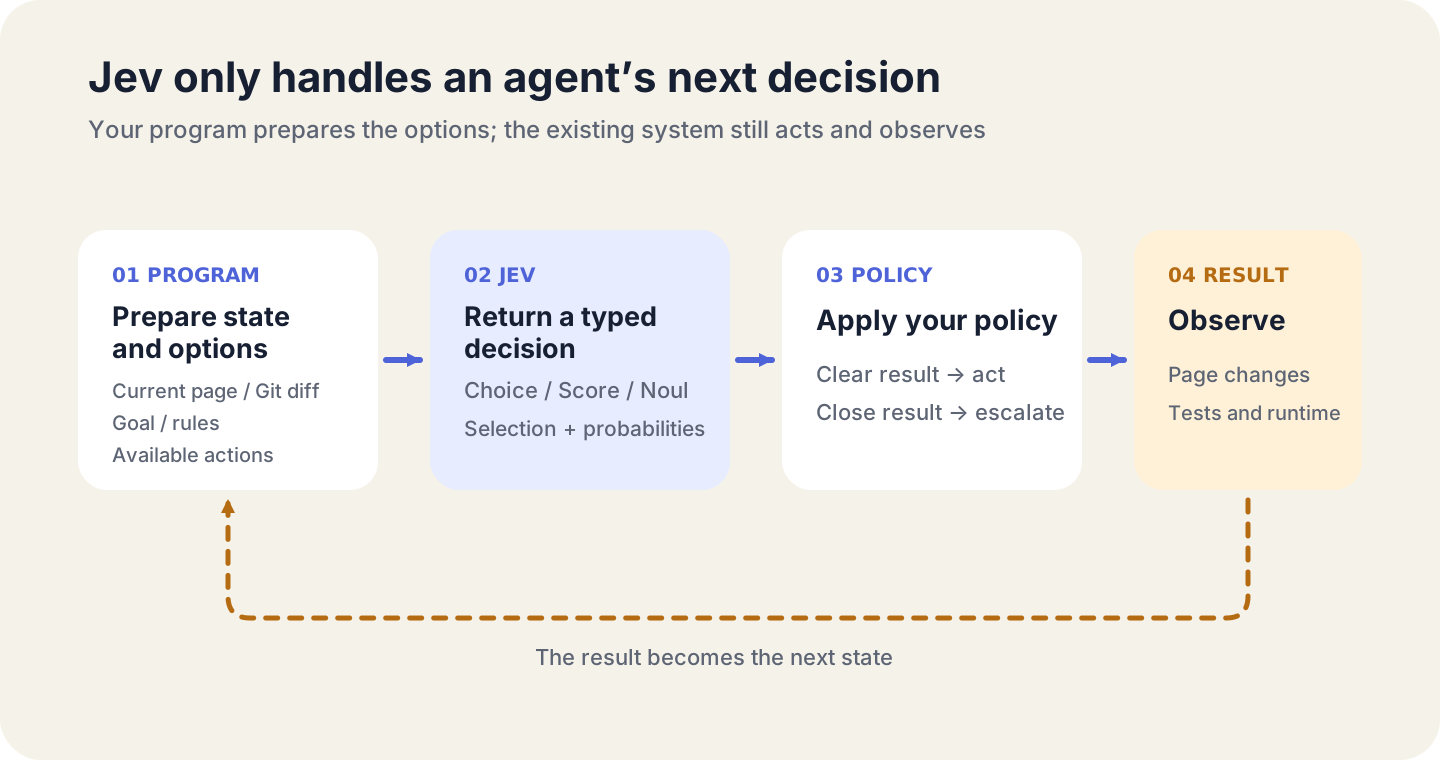
A fixed response type does not make every decision correct. Your program still decides what confidence is high enough to act on, when to escalate, and what to inspect after the action.
How do you start using Jev?
- Open the TypeSafe website(opens in a new tab), select
Join Waitlist, and submit your email address. - The invitation generally arrives the next day. When the
You’re in!email appears, selectCreate your accountto finish registration.

- Sign in to the TypeSafe Console(opens in a new tab) and create an API key.
- Send a
POSTrequest tohttps://api.typesafe.ai/v1/systemone. Put the key in theAuthorization: Bearer <API_KEY>header and submit thestate,model, andquestionsfields shown above. The matching choices, scores, or probabilities come back underanswers.
A flight search in 7 seconds: what Jev skips
browser-use/jev-ultrafast(opens in a new tab) received a one-line task: find a one-way flight from Zurich to London on September 20, 2026, and stop when matching results appear. Starting with its first action, the recording reaches the Google Flights results in 7.1 seconds.
Every time the page changes, jev-ultrafast produces a fresh numbered list of buttons, fields, and menus. Jev chooses both the operation and the target element in one request. It calls a small language model only when TYPE_TEXT needs the actual text to enter. The browser agent does not send a full screenshot to a large model for every step.
The same flight task ran three times, and all three runs reached the matching results page. The median time fell from 9.450 seconds to 7.092 seconds, while browser-protocol calls dropped from 1,092 to 101. The 7.1-second result ends at the search results; it does not include choosing or booking a flight.
The same pattern has reached Mac and Android:
- typesafe-computer-use(opens in a new tab) reads macOS Vision OCR and the accessibility tree, then asks Jev to choose a click, scroll, or text action. A separate small language model is called only for free-form text entry.
- mobile-jev(opens in a new tab) controls a real Android device through Mobilerun. Its Uber demo takes about 21 seconds and nine actions to reach the payment-method screen without placing an order. Text input reuses phrases already present in the goal, so it does not need another generative model.
All three projects are fast for the same reason. The browser, OCR layer, accessibility tree, or device API turns the interface into a bounded list of actions before Jev sees it. Jev cannot choose an action that the list never included, no matter how quickly it decides.
What does Jev pick inside a coding agent?
Jev still does not write code. It answers two smaller questions inside an existing workflow: which model should handle this turn, and which part of a Git diff deserves a closer look?
jev-router(opens in a new tab) sits in front of Claude Code and Codex. It makes one decision for each new user turn: send a simple task to a fast model, a normal task to a balanced model, or a difficult task to the strongest model. The CLI keeps its existing login, session, tools, and permission prompts. Jev chooses only the model tier.
jev-review(opens in a new tab) applies the same idea to a Git diff. It selects the files and hunks worth reading, then classifies possible accuracy, safety, reliability, compatibility, and test concerns. Those decisions reduce the context a stronger model must read; they do not replace the compiler, static analysis, or project tests.
Jev handles only the middle step in a complete coding workflow:
git diff
  ↓
build, tests, lint, type checking, and static analysis
  ↓
Jev triages files and hunks
  ↓
a stronger model reads the selected context, finds the cause, and edits the code
  ↓
the deterministic checks run again
Editorial review can use the same split. A reference library retrieves comparable headlines, openings, and passages; Jev then checks them in bulk for repetition, over-explanation, or mechanical contrasts.
Every’s Mike Taylor scanned 37 articles with 21 questions per article. Jev made all 777 judgments in 0.7 seconds(opens in a new tab). He then planted seven problems on purpose. Jev found six; a larger model found all seven.
Jev is good at finding where a closer read may pay off, not rewriting the whole article. TypeSafe’s documentation says English is its primary training language. It can process Chinese, Japanese, and Korean, but with lower accuracy. For Chinese copy, Jev can mark suspicious passages by probability; a stronger model still needs the full context, followed by a human read from the headline to the final paragraph.
Jev can slot into an existing Agent Skill workflow: it triages models, diffs, and passages; the coding agent reads the context and makes the change; the compiler, tests, or final read checks the result.
Four practical ways people are using Jev
In the Higgsfield demo, Jev selects source images and video clips. DeepSeek and Higgsfield(opens in a new tab) then turn the selected material into ad creative.
Matthew Berman’s demo(opens in a new tab) analyzes 724 live ads from 37 brands in one run. Jev labels the hook, format, offer, and CTA in each ad, identifies its stage of customer awareness, and checks whether the landing page matches. The 724 ads take about 40 seconds, with a recorded token cost of roughly $0.09. The program then aggregates the decisions into comparable data.
The email demo sorts 300 synthetic business emails into 15 categories. The left side runs jev-latest; the right runs DeepSeek V4.1 Flash. Alongside the category, each email is judged for urgency and whether it can be discarded. When Jev finishes all 300 emails, the recording shows 5,400 judgments, 9.9 seconds, and $0.0366. DeepSeek has processed 10 emails at that point.
Frontend components can become candidates too. Vercel Labs’ JSON Render experiment with Jev(opens in a new tab) is not published to npm yet, so it currently requires a source build. The application registers the components, properties, state bindings, and actions it allows. Jev chooses which elements appear and how they are arranged. JSON Render emits a validatable Spec, then renders it as a page. Jev cannot invent copy, data, or chart types that are absent from the candidate set.
Jev is closed source. What can you run locally?
You can run alternatives, but not the official Jev model. TypeSafe has not released its model weights. The two current local experiments are SemIf and jevlike: one applies the same input and output pattern to open models, while the other trains a model on your own data.
SemIf(opens in a new tab), previously called OpenJev, preserves Jev’s input and output shape but uses open models such as Qwen3.5 4B and MiniCPM5 2B. It reads the candidate logits directly and converts them into probabilities. The repository supports NVIDIA GPUs, Apple Silicon, and WebGPU.
jevlike(opens in a new tab) takes the training route. Each example contains some context, a changing number of text options, and the correct answer. A small model scores every candidate in one pass. The repository includes synthetic menus, Wikispeedia clicks, Doom, and chess examples, and it can be adapted to train a minimal dynamic-candidate model on your own data.
Popular open-source projects built around Jev
jev-ultrafast and SemIf are the easiest projects to try directly. Most of the others are still demonstrations, experiments, or directories of related work.
| Project | GitHub stars | What Jev does | What it is useful for now |
|---|---|---|---|
| jev-ultrafast(opens in a new tab) | About 6.4K | Chooses the browser’s next action | Running a browser agent |
| SemIf(opens in a new tab) | About 1.7K | Uses a local model to judge changing candidates | Trying the Jev input/output pattern locally |
| jevlike(opens in a new tab) | About 930 | Trains a dynamic-candidate selector | Learning from or training a small model |
| jev-trader(opens in a new tab) | About 990 | Chooses buy, sell, or hold | Seeing Jev inside a trading bot |
| awesome-jev-by-typesafe(opens in a new tab) | About 560 | Collects patterns, prompts, and examples | Finding more projects and use cases |
| jev-review(opens in a new tab) | About 300 | Selects files and hunks from a Git diff | Trying code-review triage |
| typesafe-computer-use(opens in a new tab) | About 380 | Chooses the next macOS action | Running a Mac control experiment |
| mobile-jev(opens in a new tab) | About 180 | Chooses the next Android action | Controlling a real Android device |
| jev-router(opens in a new tab) | About 170 | Chooses models for Claude Code and Codex | Trying coding-agent model routing |
jev-trader(opens in a new tab) shows why this capability is so tempting. On every new Monad block, Jev chooses whether to buy, sell, or keep waiting based on the current market state. The project uses a mock model by default and stays in dry-run mode when no private key is configured.
For more examples, browse awesome-jev-by-typesafe(opens in a new tab) and awesome-jev(opens in a new tab). Both repositories collect related projects, prompts, and patterns; neither is an application you can run by itself. The vlad-terin/jev-browser repository currently returns 404 and is no longer installable.
Official Jev pricing is based on input tokens; output is free. On September 19, 2026, the model page(opens in a new tab) listed $0.042 per million input tokens, a 64K context window, and jev-latest pointing to jev-1.13.0. You can use the jev-latest alias in an integration and check the model page for the current version and price.
When should you use Jev?
One question separates a good Jev task from a poor one: can the program list a sufficiently complete set of possible answers before it calls the model?
If it can, and the same decision repeats often, Jev is a good fit. Choosing an element on a page, routing a request to a model, and deciding whether a diff hunk needs more review all have that shape. The program can keep every candidate’s probability, then act or escalate according to its own policy.
If the candidates cannot be listed, keep the generative model. Writing an explanation, proposing a fix, generating code, or discovering a cause outside the known options all require open-ended generation. If ordinary code can calculate the answer exactly, use ordinary code instead. Format validation, type checking, hash comparison, and permission rules do not need an AI guess.
Jev is fast because it does one less thing: it does not generate the answer. It decides which next move the agent should take. Once the answer space is bounded, latency and cost fall with it, and software can consume the result directly.
To see what else people are building, browse Jevable(opens in a new tab). It collects games, forms, code-review tools, semantic search, browser agents, and other Jev projects with links to the original demos.