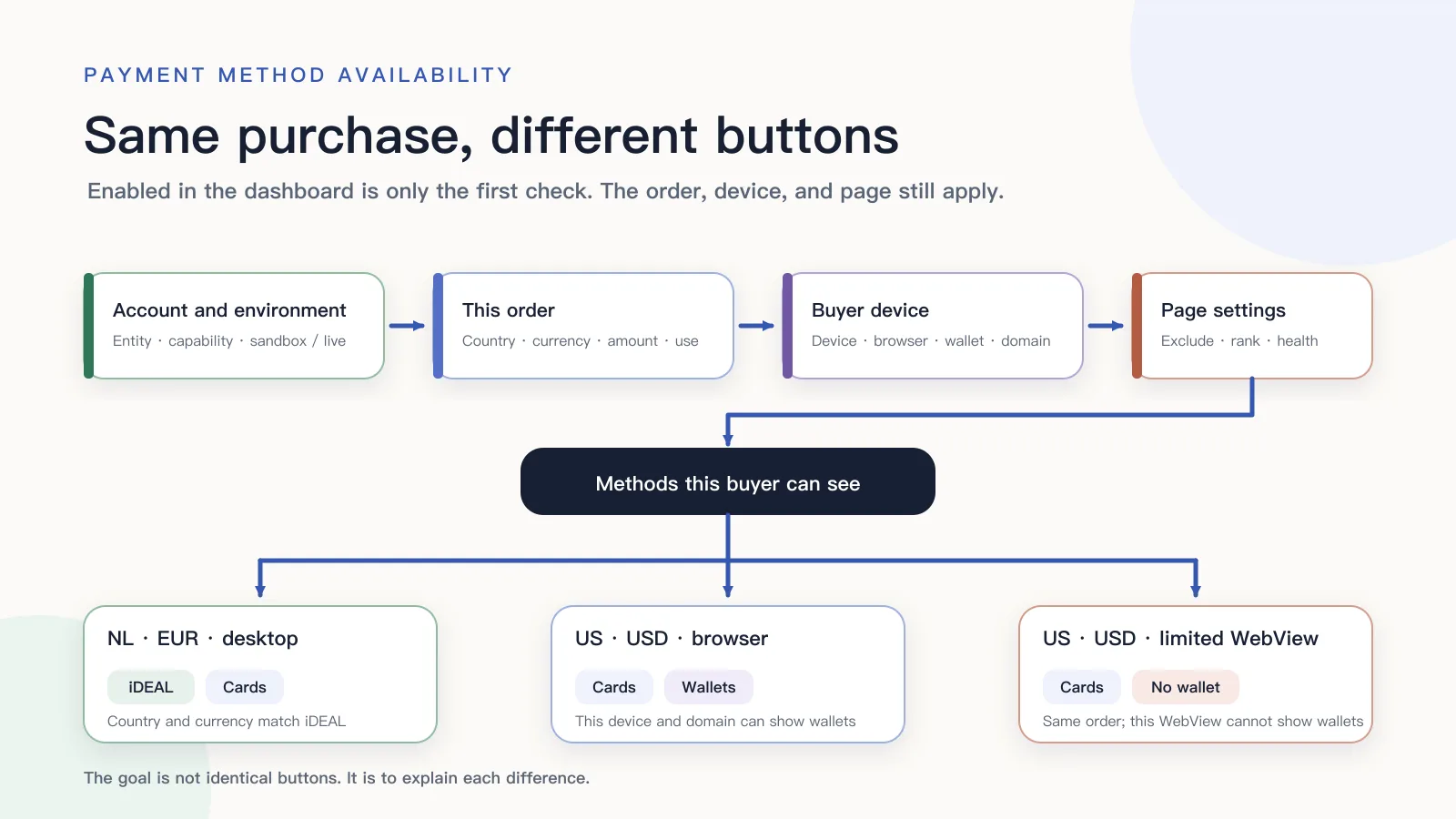
RouteNest’s Pro monthly checkout produced three results. A Dutch buyer paying in EUR on desktop saw iDEAL and cards. A US buyer paying in USD saw cards plus Apple Pay or Google Pay. The same US buyer opening the page from a limited in-app WebView lost the wallet buttons. Why payment methods not showing at checkout for one customer, while another still sees them: each method has to pass the current account, this order, the buyer’s device, and this page’s settings. Change one of those, and the list can change.
The job is not to force every buyer onto the same row of buttons. It is to find where the target method disappeared: the server never returned it, this order excluded it, the browser cannot display it, the button moved under More, or the buyer clicked and the payment then failed. RouteNest and the three buyers are a synthetic case, not a live merchant. If the checkout surface itself is still undecided, finish that choice before diagnosing the method list.
Why payment methods not showing after you enable them
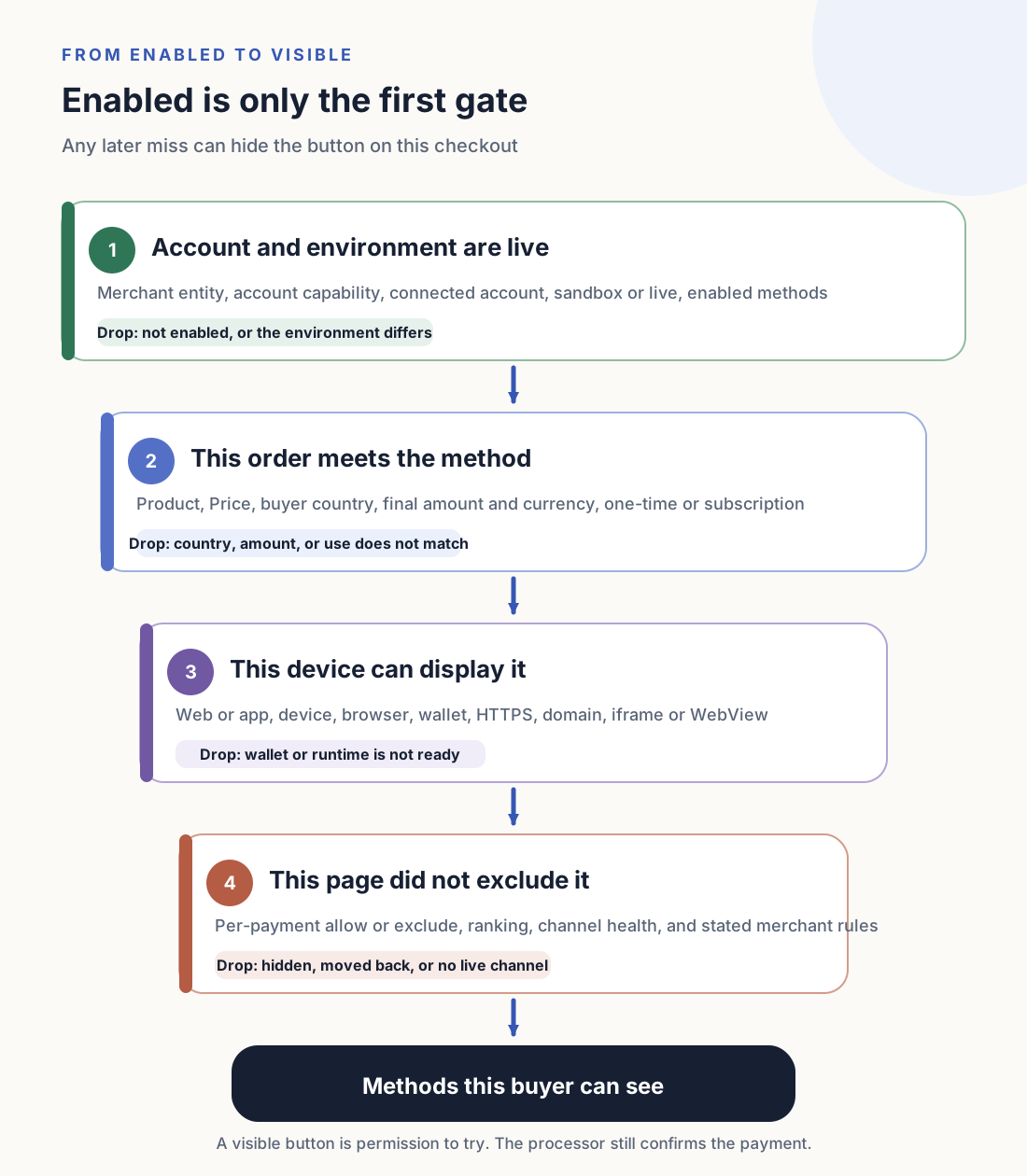
Turning a method on in the dashboard only means it can enter later checks. For it to appear on this page, the account environment, the order, the buyer’s device, and this page’s settings still have to pass.
| Where to check | The condition this request actually used | Where it can drop out | Passing here still does not prove |
|---|---|---|---|
| Account and environment | Processor, merchant entity, account capability, connected account, sandbox or live, enabled configuration | The current account cannot offer it, test and live differ, or a connected account is ineligible | The buyer’s device can display it |
| This order | Product, Price, final amount, currency, buyer country, one-time payment or subscription | Country, currency, amount, or payment use does not match | The wallet and browser are ready |
| Buyer device | Web or app, device, browser, wallet, HTTPS, domain, iframe or WebView | This device cannot show the button, or cannot finish an external payment action | The buyer will succeed after submit |
| This page’s settings | Per-payment allow or exclude, display rules, ranking, channel health, and stated merchant policy | A method that was eligible is hidden, moved back, or temporarily removed | The cause is the buyer’s risk profile |
Stripe’s dynamic payment methods documentation(opens in a new tab) lists Dashboard settings, the account’s registered country, currency, the final amount including tax and discounts, the customer’s country, API capabilities, per-payment exclusions, display rules, and experiments. On Connect with Direct Charges or on_behalf_of, the connected account’s settings can decide the available methods. Adyen’s /paymentMethods request(opens in a new tab) returns methods from amount, country, and currency; channel, allowedPaymentMethods, and blockedPaymentMethods can restrict the result further. Airwallex’s payment method catalog(opens in a new tab) lists shopper location, business location, presentment currency, supported features, and integration type together. The field names differ. None of them can answer what this page will show from a global catalog alone.
Button placement can change as well. Stripe currently ranks eligible methods by relevance; rules and experiments can change that order. When Express Checkout runs out of space, some buttons move into an overflow menu. A method that left the first screen is not turned off. A server that never returned it is not the same problem as a frontend that did not put it on the first screen.
Change one condition at a time
If two tests change Price, tax, discount, currency, buyer country, and browser together, different lists cannot locate a cause. Copy the same test purchase. Keep the internal purchase id, merchant account, environment, Price, final amount, currency, and payment use fixed. Then change only the condition under test. For country, change only the buyer country the server sends. For wallets, change only the device or browser.
A country test cannot be a VPN session. “The buyer is in the Netherlands” may come from a server-submitted country, a billing address, account profile, or a signal the processor keeps. IP is only one possible input. Confirm which country value this integration sends, and what happens when that value is missing. A request without a country only proves this call lacked information. It does not prove the buyer is unsupported.
Each test should reconstruct at least these facts: purchase id, sandbox or live, merchant or connected account, Price, final amount and currency, one-time or subscription use, the buyer country the server actually used, and which methods the interface returned. Browser model and version, device, WebView, page domain, and wallet state explain client differences. API secrets, full payment details, wallet tokens, and details that would help bypass risk controls do not belong in logs or support tickets.
Country, currency, amount, and payment use have to match together
“The user is in the Netherlands” may mean the IP is in the Netherlands, the account profile says Netherlands, the billing address is in the Netherlands, or the server only sent countryCode=NL to the processor. Those values have no cross-processor priority. The merchant system should say where this request’s country value came from, and write the adopted value and its source into the diagnosis record. Frontend parameters should not overwrite the country fact already on the order.
Merchant account country decides whether the merchant can offer the method. Buyer country decides whether the payer is in range. Currency and the final amount decide whether this transaction meets the method. Stripe’s payment method support table(opens in a new tab) lists Business location, Customer country, and Currencies as separate columns; iDEAL is EUR for customers in the Netherlands, ACH Direct Debit is USD for customers in the United States. Adyen’s troubleshooting note(opens in a new tab) states that countryCode in the request affects local methods: with countryCode=NL, iDEAL can appear and Giropay will not. Methods such as Klarna also require the shopper country and the payment currency to match.
Use the amount after tax, discounts, and quantity, not the catalog starting price. Stripe currently uses that final amount, including tax and discounts, to decide available methods. Individual methods can also have their own minimums and maximums.
Payment use can exclude a method on its own. Saving a payment instrument for later, manual capture, a one-time purchase, and a subscription’s first charge need different capabilities. A method that can complete a one-time payment does not automatically support the current subscription. Stripe’s documentation lists methods that do not support setup_future_usage, and methods that do not support capture_method: manual.
Wallet buttons still need the device, browser, and domain
After Apple Pay and Google Pay pass account and order checks, the current browser still decides whether they can appear. Stripe’s Express Checkout(opens in a new tab) requirements include: the method is enabled, and the current browser and currency are supported. In the default behavior, wallets such as Google Pay also depend on whether the buyer has set up the wallet. Stripe also states that setting a wallet to always cannot force it onto an unsupported platform or currency.
The wallet page must use HTTPS. The domain that actually shows the button has to be registered in test and in live separately. www.example.com, checkout.example.com, and a test subdomain are different hostnames. When an iframe origin differs from the top-level page, both domains and allow="payment" still have to satisfy the browser and the processor. Stripe’s wallet testing notes(opens in a new tab) also list wallet-detection permissions, private windows, device compatibility, biometrics, and region conditions.
An in-app WebView cannot be inferred from a normal browser. Stripe currently gives wallets different WebView support: some methods are not supported, some need the host app to provide Payment Request, and some cannot rely on a pop-up. If the SDK exposes an available-methods event, treat that event as the source of truth. When the current environment fails the condition, show cards or another method that can complete. Do not draw a wallet button that cannot finish payment.
A card value in the interface also does not mean the page must show Apple Pay and Google Pay. Wallets can sit on top of card capability, then the SDK decides from device, browser, and wallet state. Server-side card permission and which wallet this client can show are separate checks.
A new button order is not a missing payment method
Basic eligibility only answers whether this transaction may try the method. The page can still reorder it by amount, buyer location, merchant rules, experiments, or channel health, or hide it for a while. After the buyer clicks Pay, the processor or issuer can still require authentication or decline. Those three cases happen before display, during layout, and after submit. One screenshot cannot attribute all of them to risk or a channel outage.
If the merchant’s own system adjusts buttons before display from regional policy, recent failures, or channel health, save the rule version, the inputs it used, the methods before and after the change, and a reason code that does not expose internal thresholds. The buyer only needs the next action that is still possible, such as choosing another method that is available now or contacting support. Internal thresholds, hit features, and details that would help evade the control should not appear on the page.
When the method appeared and submit then returned a risk, authentication, or channel decline, follow the original Payment and Attempt: a unified failure class, a non-sensitive processor reference, and the webhook or lookup result. Rewriting a submit failure as “this button should never have shown” can hide a method that is still valid for other buyers.
Why three buyers see different payment methods
RouteNest sells Pro monthly through embedded checkout. The three rows are a synthetic walk-through of how conditions change the page. They do not mean any live account has these methods enabled.
| This purchase | Why these methods remained | What the page showed | What this result can prove |
|---|---|---|---|
Dutch buyer, NL, EUR, desktop web, subscription first charge; the current account and flow already offer iDEAL | Account, buyer country, EUR, and payment use all match, and the browser can complete a bank redirect | iDEAL and cards; wallets still depend on the device | iDEAL works for this set of conditions, not for USD, another country, or a different subscription flow |
US buyer, US, USD, a supported ordinary browser, wallet already set up on this device and passing the availability check | iDEAL drops on buyer country or currency; cards and the current wallets pass | Cards and wallets; order may change | The different list comes from this order and device, not from a special permission on the Dutch buyer |
| The same US buyer, the same USD purchase, switched to an in-app WebView that lacks the required capability | The server-returned methods did not change; wallets are unavailable in this WebView | Cards can still be typed; wallet buttons do not appear | Fix the host capability or use a supported browser; do not change country or force the button |
When comparing the second and third rows, change only the client. Merchant account, Product, Price, amount, currency, and payment use stay the same. If the second row also becomes a one-time purchase, and the third row also moves to a live account, the difference can no longer be attributed to use, environment, or WebView. Extra screenshots cannot repair mixed conditions.
Find the step where the method disappeared
| What the buyer sees | Check first | Information that can locate the issue | What to do |
|---|---|---|---|
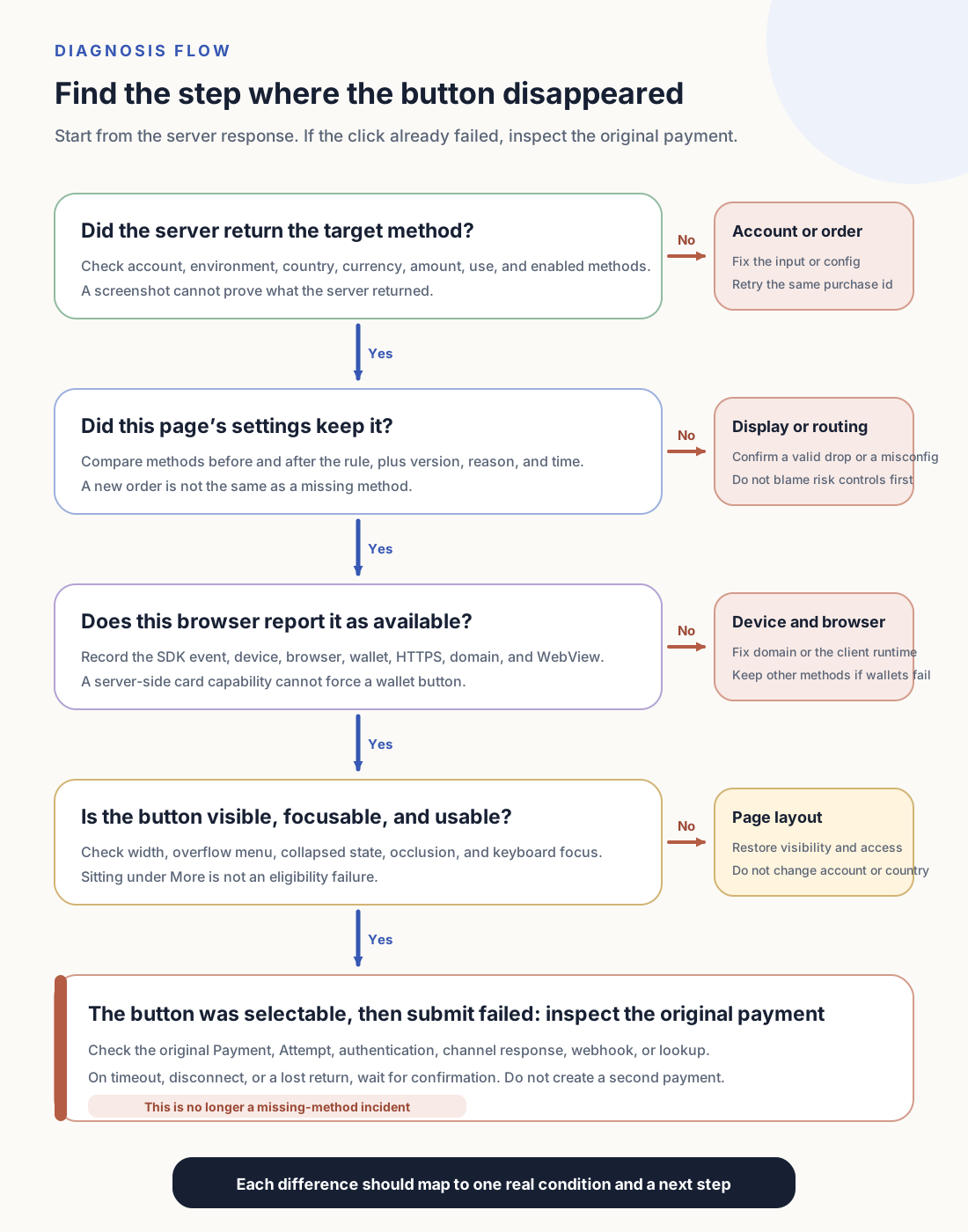
| The server never returned the target method | Account, environment, and this order | Actual account, sandbox or live, final amount and currency, buyer country, payment use, enabled configuration, and any exclusion reason that can be obtained | Fix the wrong input or configuration, then request again with the same purchase id |
| The server returned it, then merchant settings hid it or moved it back | Display rules, routing, or channel-health settings | Rule and configuration version, methods before and after the change, a generic reason code, and the time | Change settings only with evidence of a misconfig; a valid exclusion should offer the buyer another method |
| The server returned the target method, the frontend did not show it | SDK, browser, domain, or wallet environment | SDK available-methods event, browser version, current domain, HTTPS, wallet, and WebView capability | Fix domain registration or the client environment; do not force a button that remains unsupported |
| The button sits under More or a collapsed region | Page layout and dynamic ranking | Container width, overflow menu, collapsed state, occlusion, and keyboard focus | Make the entry discoverable and focusable; do not report a position change as unavailable |
| The button can be selected, then submit fails | Payment execution, authentication, or risk handling | Original Payment or Attempt, unified failure class, non-sensitive channel reference, webhook or lookup result | Continue the original payment; do not rewrite this method’s display conditions from a submit failure |
| The page has no payment methods at all | Account, order, or merchant settings | How many methods remained at each step, where the list first became empty, configuration version, and any known reason | Stop creating payments until at least one complete method is available again |
“This transaction has no iDEAL,” “the page has no iDEAL button,” and “iDEAL was clicked and did not pay” are three problems. The first starts at the server return, the second at the browser and layout, the third at the original payment. Support tickets should keep the buyer’s original symptom. Do not rewrite it first as a vague “channel unavailable.”
Processors do not always return a reason for every excluded method. Some interfaces only return methods that are currently usable. In that case, “the response has no iDEAL” is a known observation, not a root cause. Merchant-owned filters can record the input, where the method count dropped, and a stable reason code. Processor-internal filters keep the request identifier and non-sensitive conditions, then confirm with a one-variable replay, an official troubleshooting tool, or a support channel. When there is still no basis, record “the processor did not return it, reason unconfirmed.” Do not invent an explanation from IP, a profile, or one failure. Stripe’s missing payment methods tool(opens in a new tab) is one such entry.
Confirm the previous payment before offering another method
If the buyer has not created a payment, has not left for a bank, and has not sent a request to the processor, a method that fails the current conditions can be replaced by other eligible options. Product, Price, amount due, and purchase id stay. The buyer only changes the payment instrument. A new order is not required.
Once a Payment exists, an external redirect has started, or the request has been handed to the processor, a timeout, disconnect, or lost return can leave the result unknown. Sending the same charge to another processor does not cancel the first action. Use the original Payment, idempotency key, webhook, or a server lookup to confirm success, failure, or still processing. Create a new Attempt for the same purchase id only after the original payment has failed, been canceled, or produced no charge, and only if another method is still available.
Page copy has to match that state. “This method is unavailable now. You can pay by card.” fits a payment that has not started, or one that has already failed. “Confirming the previous payment. Do not pay again.” fits an unknown result. Putting both states into “Please retry” turns a UI recovery into a double-charge risk.
Which changes invalidate the last result
One passing test only means that set of conditions held. Changing the merchant entity or a connected account changes account eligibility. Moving from sandbox to live changes enabled methods, domain registration, and keys. A new Price changes currency, amount, and subscription use. Manual capture, saving a payment instrument for later, or a new promotion changes the required capability. Changing domain, iframe, SDK, browser, or WebView changes wallet display. Processor support, display rules, and channel health keep moving.
After those changes, keep one test purchase with explicit conditions and confirm, in order: what the server returned, what this page’s settings removed or moved, what the SDK reported in this browser, and which payment object submit created. Dutch EUR showing iDEAL, a US browser showing wallets, and a limited WebView hiding wallets do not need to be forced into one list if each result follows its conditions. Only the same conditions, repeated, still producing unexplained differences, should move into configuration propagation, an SDK regression, or a runtime failure.
Once each buyer’s method list has an explanation, the next job is moving that configuration from sandbox to live: recheck live keys, Price, webhooks, domains, and return URLs, then complete the first real order with a method the processor allows. Designing “which methods to show” and “which processor to send after the buyer selects one” as two long-lived decisions is a separate piece of work.