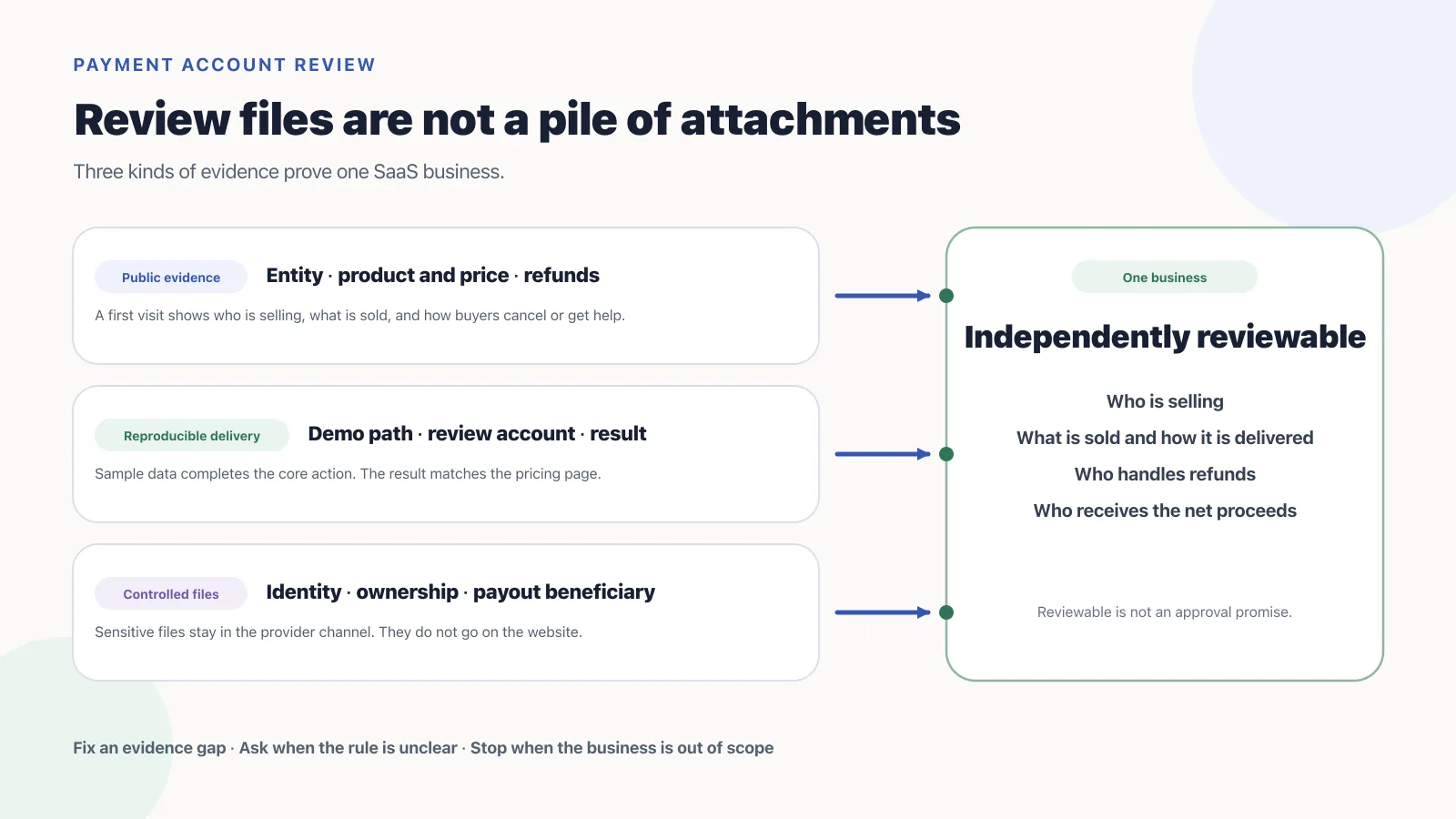
A payment processor application is rejected when a reviewer cannot independently match who is selling, through which domain, what the buyer receives after payment, who handles cancellation or refunds, and who receives the net proceeds. Genuine files still fail when those facts point at different businesses.
The application names Northstar Labs, Inc.. The site footer only shows the product name RouteNest. The pricing page sells a USD 19 monthly auto-renewing subscription, while the refund page still describes a one-time download. The product is behind login and the reviewer has no account. The payout account still names the founder personally. Each of those statements can be true. Together they do not say who sells what, how it is delivered, or where the money goes.
Do not add more attachments after a refusal or a request for changes. Repairable cases are the ones where the provider still cannot confirm the seller, the product, delivery after payment, refunds, and the payout beneficiary. If the entity, region, or product is outside the provider’s support, extra pages will not turn “out of scope” into “eligible.” If you still have not chosen whether you are the seller of record, that gap is a provider-model decision, not a missing file. A later closure after live charges is a different job: read the closure email and the dashboard banner. This page is for onboarding refusals and requests for more evidence.
Why a payment processor application still fails when every file is genuine
Reviewers check one sale: contracting entity → domain it controls → product sold → payment terms → actual delivery → refunds and support → payout beneficiary. If any two nodes contradict each other, they cannot assign responsibility for chargebacks, refunds, regulatory questions, or payouts.
Stripe account verification(opens in a new tab) treats the person who opened the account, the business, website ownership, and beneficial owners as different checks. Bank-account ownership is a further, separate proof. Paddle account verification(opens in a new tab) runs domain, business, and identity in stages. Lemon Squeezy store activation(opens in a new tab) combines KYC/KYB with product scope. Creem account review(opens in a new tab) also requires a live product, visible prices and policies, a matching support email, and an accessible site. The entry points differ. The question does not: can a stranger corroborate the business without taking the applicant’s word for it.
More files help only when they answer the missing fact. A registration certificate does not prove the product is deliverable. A product video does not prove the company controls the domain. A domain email does not prove the bank account belongs to the contracting entity. Repeating unrelated evidence does not close the gap and can slow the next round.
Write the application as one sentence before you change the site: Northstar Labs, Inc., a Delaware corporation operating in the United States, sells its own scheduling SaaS through routenest.example to small teams in the US and the EU at USD 19 per workspace per month with automatic renewal, and settles net proceeds to a company USD account in the same legal name. If entity, operating location, product, buyers, price, or payouts still need a later decision, the matching file has no stable answer.
Turn review feedback into facts you can prove
A review email may state only a result. Do not guess an internal score. Split the original wording into facts the provider has not confirmed, then choose a public URL, a controlled file, or a reproducible product state.
| What the note usually means | Fact still unproven | Fitting evidence | Ready for another look when |
|---|---|---|---|
| Cannot confirm the business or the site | Whether the applicant controls the selling domain, and how the brand relates to the legal entity | Entity language in the terms, a same-domain contact address, and any domain-control step the provider names; company files stay in the private channel | Legal name, brand, domain, and application point at one another |
| Product is unclear or not ready | What the buyer purchases, when they receive it, and whether the core function actually works | Public product and pricing pages, a demo, and a review account when login is required | A reviewer can reproduce core delivery from the entry point without a verbal tour |
| Policies are missing or contradict each other | Who is responsible for renewal, cancellation, refunds, disputes, and support | Terms, privacy, refund and cancellation copy, and a reachable support path | Every page describes the same product, price, and responsibility |
| Business or payout details do not match | Whether the signatory, beneficial owners, and bank beneficiary meet the current account rules | Registration, ownership, identity, and bank files in the provider’s named upload | Required fields agree, and no private file is hosted on the public site |
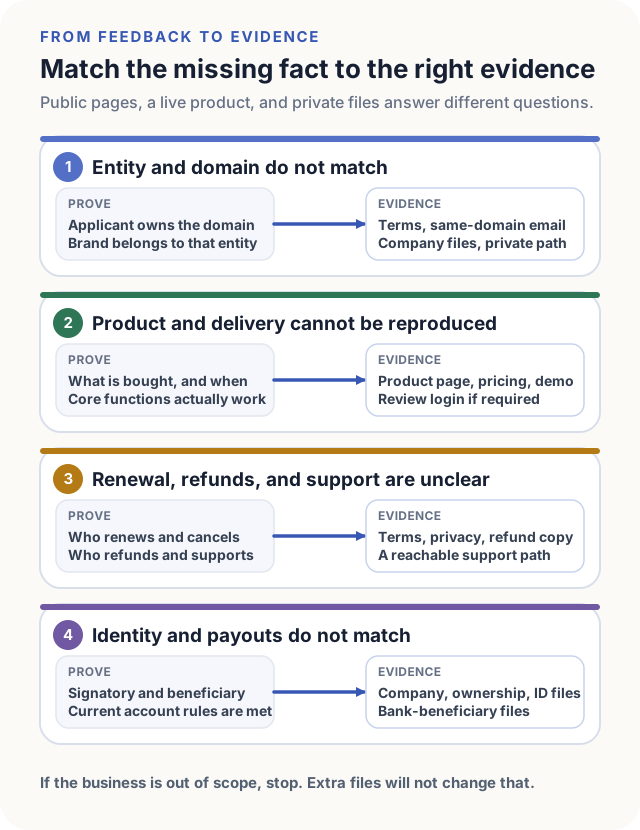
“Cannot confirm” is not “add one more page.” If the site clearly sells a prohibited product, or the entity and payout path are unsupported, the problem is scope, not evidence. Stop that candidate. Do not hide the business behind vaguer copy.
The legal entity is whatever the registration files and the provider account say. The site only explains how the brand relates to that company. Delivery is whatever a running product can show; a demo only walks the reviewer through the entry. The payout beneficiary is whatever bank file the provider accepts; a marketing page cannot replace it. When the company name, product terms, or receiving account change, update every place the application, site, demo, and bank files repeat that fact.
Four providers check the same business and ask for different files
All four check whether the business is real and in scope. They differ on stage, files, and how the dashboard shows the result. One provider’s approval conditions do not transfer.
| Provider | Current public checks | Easy-to-misuse boundary |
|---|---|---|
| Stripe | Business name and product or service description must match the account(opens in a new tab); the site must load without a password; support, refund, dispute, and applicable cancellation details are required by the time you start selling | A passing website does not mean business, bank, or product-risk checks are done; Stripe may still verify domain control and account details |
| Paddle | The domain page(opens in a new tab) must show product, price, delivery, terms, refunds, privacy, entity name, and HTTPS; business identification and key-person identity follow | A pricing screenshot is allowed when the public price page is not live; that is not a pass for an unfinished product; test accounts, product ownership, reseller rights, or processing history are requested only for the matching business |
| Lemon Squeezy | Store activation(opens in a new tab) includes a business and customer questionnaire, KYC/KYB, identity, and product scope; it mainly accepts digitally fulfilled goods, software, and SaaS | Test mode is for preparation, not live charges; you can resubmit after a mistake or a business change, and the store is reviewed again |
| Creem | Account review(opens in a new tab) requires a live product, visible prices and policies, a matching support email, an accessible site, and no fake reviews or user counts; AI image or video products must also use the Moderation API | Changes requested can be fixed and sent back; Rejected currently has no re-review button; those two results are not the same as “add a page” |
When Stripe cannot confirm domain control, it asks through a Dashboard form for a domain email, a visible email on the site, or an explanation of why the site cannot be edited(opens in a new tab). That step proves control. It does not replace business or bank checks. Paddle business identification(opens in a new tab) may request registration and ownership files. Identity verification(opens in a new tab) covers key people. If the business has no last-three-month processing history, Paddle says it will take that fact into account rather than demand history that does not exist.
Creem lists maintenance mode, password protection, Cloudflare bot walls, and regional blocks as reasons a site looks unreachable on re-review(opens in a new tab). After a fix, the change still has to be live. If public docs do not cover the current entity, product, and payout combination, keep it as “needs a written answer from the provider.” Do not infer the answer from another provider’s approval.
A first visit should show who sells what
The home page does not need to read like a statute. A reviewer who is not logged in should still be able to answer three questions: what RouteNest is, who operates it, and what USD 19 buys. A brand name that differs from the company name is not a conflict if the terms or footer state that RouteNest is operated by Northstar Labs, Inc., and the application uses the same relationship.
The product page should name the intended users, the core result, what is actually delivered, and obvious limits. If a “team scheduling product” also sells human rostering consulting, say separately how the software subscription and the human work are delivered. Do not leave the reviewer to guess whether the main SKU is software or a service. Paddle domain review(opens in a new tab) asks you to submit only domains related to products sold through Paddle; mixing unrelated products raises buyer confusion and chargeback risk.
The pricing page should state currency, billing unit, term, whether renewal is automatic, trial conditions, and when access ends after cancellation. Enterprise quotes can omit a public fixed amount, but they still need to say what is charged and what is delivered, and you should keep any price file the provider asks for. Copy behind maintenance mode, a regional block, a bot wall, or a login wall cannot be reviewed, however accurate it is.
Terms, privacy, and refunds must describe the same sale
Terms say who provides the product, what rights the buyer gets, and how a subscription ends. Privacy says who processes which data, for what purpose, and how to make contact. Refund and cancellation copy say how the plan in the application is handled, on what timeline, and through which channel. If the three files keep different company names, product shapes, or billing models, one sale has been split into conflicting businesses.
Do not copy a refund policy from another SaaS or from the provider’s marketing site. With a Merchant of Record, separate the software vendor’s support promise from the platform’s buyer terms, mandatory consumer rights, and refund authority. Lemon Squeezy lets sellers set their own refund policy and still reserves the right to refund within 60 days of a sale to avoid chargebacks(opens in a new tab). Writing “no refunds under any circumstances” does not override that authority or local law.
The support path has to reach a person. Creem currently requires a reachable support email on the site and on receipts, and it treats a mismatch between Business Details and the site email as a common reason for changes. Email, company name, product name, and the refund entry should use one stable identity, not a different version on the application, the site, and the receipt.
A product demo has to show what payment delivers
A demo video can help a reviewer understand features. It does not by itself prove the current version works. Reviewers need to see a buyer register or sign in, reach the core function, complete one representative action, and get a result that matches the pricing page. For RouteNest that path can be: open a sample workspace, import a week of shifts, generate a roster, then use the export that the paid plan unlocks. The reviewer should see what was entered, what was produced, how long it took, and how the page reports a failure.
Sample data is fine. Fake customer counts, reviews, or transactions are not. Creem requires the product to be live before production charges; unfinished work stays in Test Mode. Lemon Squeezy also lets you build products and test payments before activation. Paddle accepts a price screenshot when public pricing is not up yet; that still does not mean every unfinished product will pass domain and business review.
A video can mark the entry and the expected result. If the provider wants an interactive check, or the function sits behind login, still provide a reachable review account. The video, the account, and the public pages must show the same product. Do not film a complete version and leave the review account on a placeholder.
A review account only needs the access the reviewer uses
A review account is an inspection door, not a production credential. It should open an isolated sample workspace, use only core buyer features, and stay out of team members, live customer data, billing, API keys, the admin console, and payout settings. The sample data should be enough to finish the demo path without looking like real customers or live charges.
Put the entry URL, username, temporary password, required setup, and expected result in the same provider email or dashboard reply. If the provider cannot use the product’s existing MFA, ask which review method it allows. Do not turn authentication off for the whole product. Keep the account valid through the expected review window; do not rotate the password in that window; revoke it when review ends and inspect access logs.
Send credentials only to the recipient or dashboard entry the provider named. Do not put them on a public page, in a shared screenshot, or on a wide CC list. Reviewers do not need to become admins to confirm what a buyer receives. If a feature is admin-only, decide whether it is actually part of the buyer delivery.
Entity and payout files stay in the provider channel
The site publishes the legal entity name and a contact path. It does not publish director IDs, home addresses, cap tables, or bank letters. Paddle business identification(opens in a new tab) may ask for a government registration document and an ownership breakdown that lists people and entities with more than 25% ownership. Identity verification(opens in a new tab) may then collect ID, proof of address, and a liveness check through Paddle’s partner. Stripe bank-account ownership checks(opens in a new tab) require the legal owner name and account number on the bank file to match the Stripe account for that business type; a statement, voided check, or bank letter is the usual proof.
Submit original files that meet the provider’s completeness rules. Do not cover required fields. In public examples, team threads, or outside collaboration, use copies that cannot restore personal or account data: names, addresses, registration numbers, account numbers, QR codes, and file metadata. After an upload link or a request email arrives, confirm the source and purpose in the Dashboard or the official notice before sending KYC or KYB files to a lookalike form.
An approved account that cannot add a matching payout account is still not a usable payment path. A personal beneficiary does not become a company account because the person is a founder. That only holds when the provider explicitly allows that entity, country, and payout method. If it does not, the state is a payout block, not “charge first and settle later.”
How one SaaS application became independently reviewable
RouteNest is operated by Northstar Labs, Inc. in the United States. It sells its own scheduling SaaS to small teams in the US and the EU. It does not host third-party sellers or collect funds for someone else. Each workspace auto-renews at USD 19 a month. After payment, buyers immediately get scheduling and export. Net proceeds go to a company USD bank account in the same legal name. Those six inputs stay fixed so pages and attachments share one baseline.
| Review object | Before the repair | Reviewable state |
|---|---|---|
| Entity and brand | The form is Northstar Labs, Inc.; the site only says RouteNest | Terms and footer state that RouteNest is operated by that company; support uses @routenest.example |
| Product and price | The home page says “help teams move faster”; the USD 19 term sits behind login | Public pages name scheduling, export, per-workspace monthly billing, automatic renewal, and when access ends after cancellation |
| Buyers and model | The form says global customers; the site never says it is B2B; the product looks like a multi-party marketplace | The product page serves small US and EU teams; users manage only their own company’s shifts; no third-party sales or money movement |
| Policies | The refund page still describes a one-time file download; terms use an old product name | Terms, privacy, refunds, and cancellation point at the same company, subscription, and support path |
| Delivery | There is only a promo video; the app needs an invite code | A dedicated review account opens a sample workspace and can reproduce rostering and paid export from shift input |
| Payouts | The dashboard names the company; the bank beneficiary is a person | The account is company-named; if the provider cannot pay that path, the application stays blocked instead of going live |
The repair is not longer pages. It is that any entry points at the same fact. From the company name, terms lead to the brand and domain. From price, the product can be delivered. From the dashboard entity, the bank file names the beneficiary. If any of those still needs “please trust that this is the same person or product,” the business is not independently reviewable.
A review reply should let the reviewer finish the check
A long founding story buries the review question. Reply in the order of the provider’s note: what changed, where the evidence is, and what the reviewer will see after opening it. For ID and bank files, say they were uploaded through the named entry. Do not repeat sensitive fields in email.
Subject: Review response — RouteNest / Account ID acct_example

We addressed the points in your review message:

1. Business and domain
   Northstar Labs, Inc. operates RouteNest.
   The relationship is now shown at https://routenest.example/terms
   and in the site footer. The contact address is support@routenest.example.

2. Product, pricing and fulfillment
   The USD 19 monthly workspace plan, automatic renewal, cancellation timing
   and delivered features are shown at https://routenest.example/pricing.
   Reviewer access was provided through the credential channel in your request.
   The sample workspace opens directly to the scheduling and export flow.

3. Policies
   Terms, Privacy, Refund and Cancellation pages now refer to the same company,
   product and subscription. Direct URLs:
   https://routenest.example/terms
   https://routenest.example/privacy
   https://routenest.example/refunds
   https://routenest.example/cancellation

4. Private verification
   Business registration and company bank-beneficiary evidence were uploaded
   through the Dashboard request. No sensitive documents are hosted publicly.
Replace Account ID, Store ID, ticket numbers, and URLs with the values on the current application. Do not attach unrelated products, other accounts, or unfinished promises in the same message. If the note is unclear, quote the original sentence and ask one question that can be answered plainly, such as whether the provider needs domain-control proof or a clearer brand-to-entity relationship.
Three review results need three responses
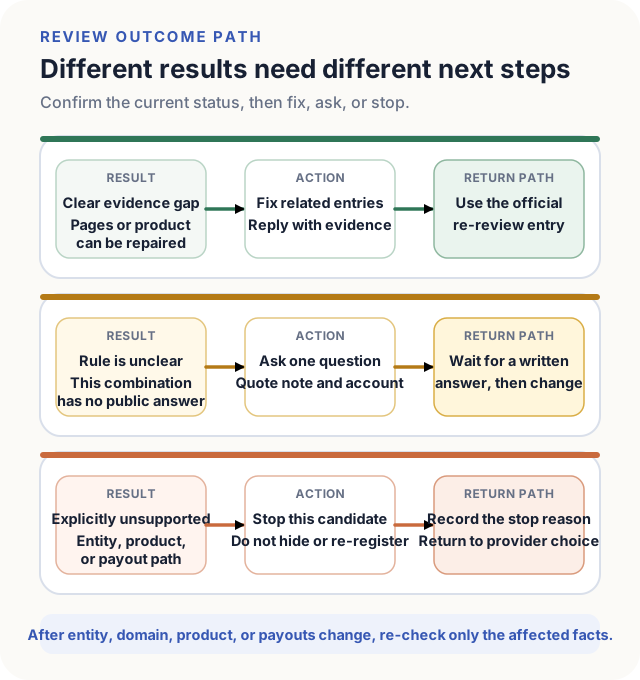
Fixable means the provider named a gap a reviewer can re-check: an unreachable page, missing policies, a mismatched email, or a demo that will not open. Repair every related entry, then use the official re-review path. Creem Changes requested can request another review from Balance → Payout Account. Rejected currently has no such button. Creem’s re-review guide(opens in a new tab) also requires the change to be live.
Needs a provider answer applies when the note does not say whether the missing piece is domain control, the company relationship, or product scope, or when public docs do not cover the current entity and payout combination. Reply with the account or Store ID, quote the original note, state the current facts, and ask one question that can produce a clear answer. Do not rewrite the site, change the entity, and change the payout account in the same round. You will not know which change moved the result.
Out of scope means the product is prohibited, the entity or region cannot contract, or there is no payout method the provider allows. Stop the candidate and return to provider choice. A vaguer product name, deleted feature copy, or a second account with the same business will not change the substance.
When entity, domain, product, pricing, delivery, or the payout account changes, the old review does not travel with it. Stripe prohibits inaccurate or misleading identity and business information and requires prompt notice of changes(opens in a new tab). Paddle’s terms(opens in a new tab) require supplier and product information to stay current and ask for at least thirty days’ written notice of a material change. Lemon Squeezy identity guidance(opens in a new tab) says a new store or a significant account change can trigger another verification. Re-check the public pages, private files, and account settings that hold the fact that moved.
After the provider has opened live charges, use this already-corroborated set of entity, domain, product, refund, and payout facts to model products, plans, and prices. While the account is pending, waiting for changes, rejected, or payout-blocked, keep catalog objects and checkout in test mode. Get a clear review result before creating live prices and a live checkout.