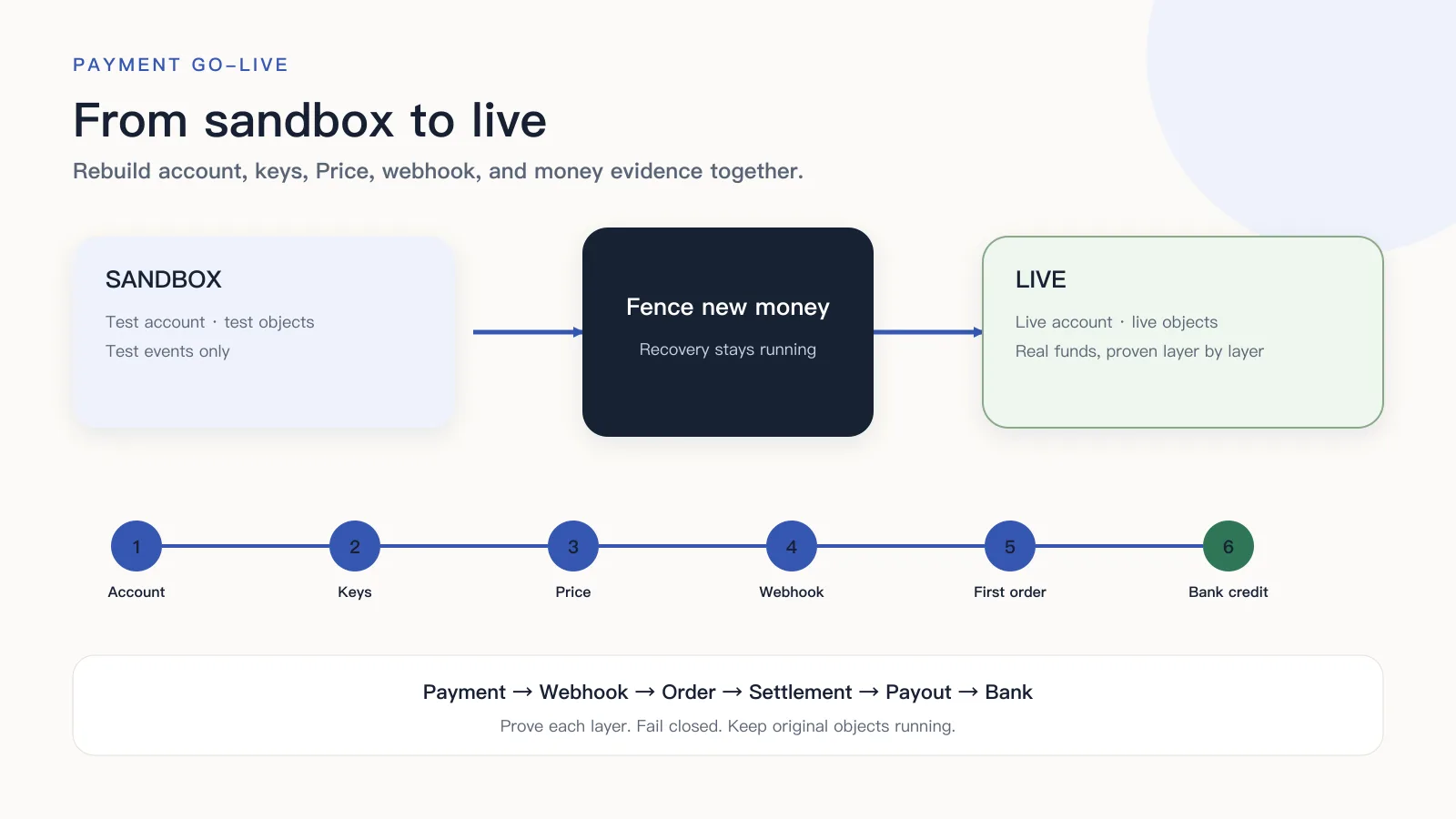
The checkout page already uses a live key, but the subscription still cites a test Price. After the customer pays, the production webhook fails signature checks because it still uses the sandbox secret. Mixed config does not fail together: some errors stop before payment, others wait until money has moved, then order, entitlements, and finance stop in different states.
The cutover order is: fence entries that create captures and refunds; attach account, keys, Price, webhook, domain, workers, and finance to live together; use read-only requests, test events, and return-URL checks to catch environment errors; then open the first real order under provider rules. If that first order fails, close new transactions. Webhooks, lookups, and reconciliation keep running.
RouteNest is a fictional SaaS. The Pro monthly plan is not a live merchant. If checkout surface, catalog, or payment methods are still undecided, finish hosted versus embedded checkout, Product, Plan, and Price modeling, and payment-method diagnosis before configuring live.
Going live with payments is more than replacing an API key
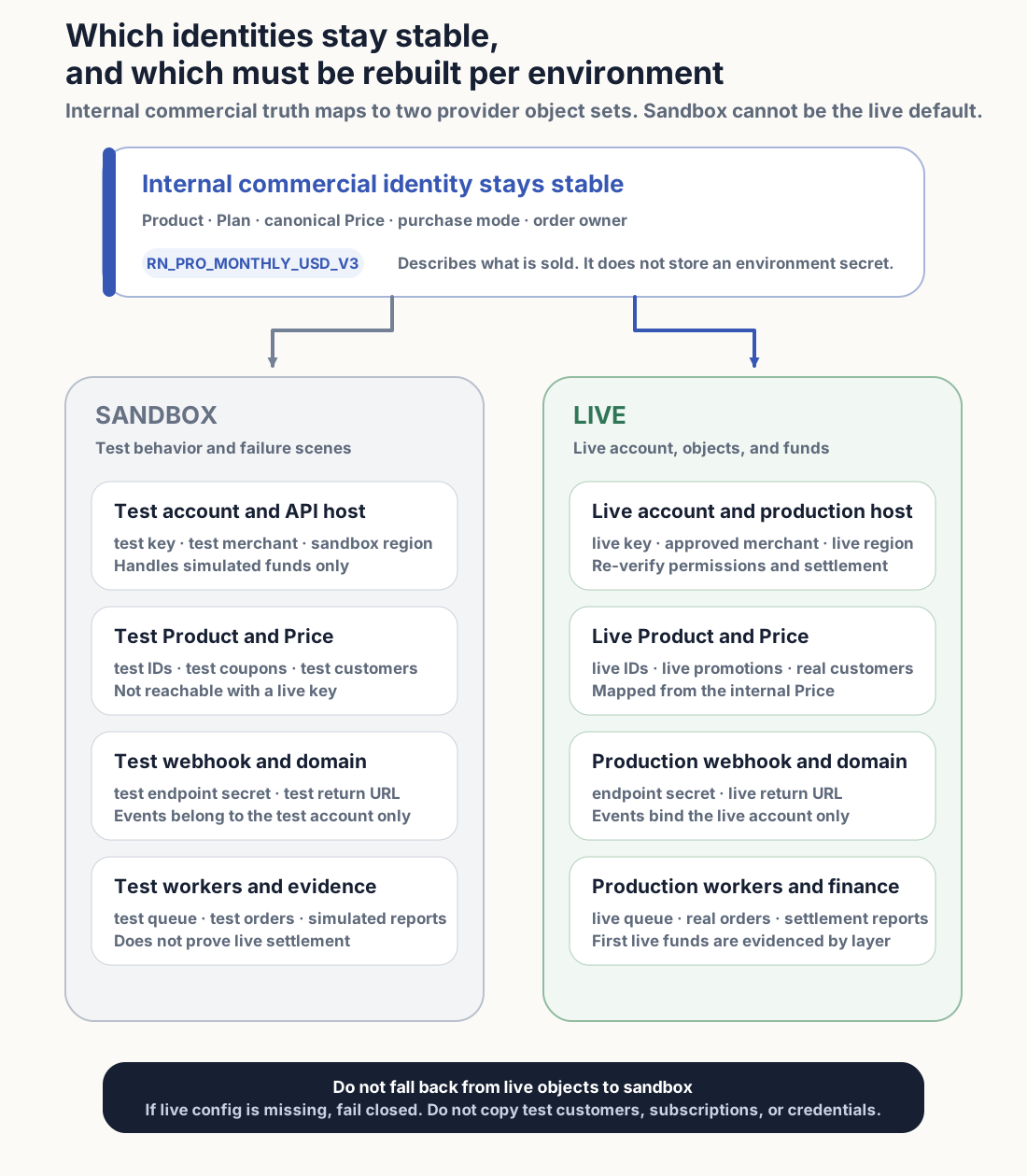
An API key only chooses which provider identity one request uses. Product, Price, Customer, subscription, webhook, and settlement account belong to their own environment. Changing the key does not move them from test to live.
So replacing the key is not enough. Account, Price, webhook, workers, and settlement all have to switch to live. Any layer left in sandbox can hide until after a customer pays.
| Layer | What sandbox uses | What live must rebuild |
|---|---|---|
| Account and network | Test account, sandbox host | Activated merchant account, production host, target payment capability |
| Identity and secrets | Test key, test endpoint signing material | Public key, least-privilege server key, production webhook secret |
| Catalog and pricing | Test Product, Price, coupon | Live objects, plus internal-catalog mappings to live IDs |
| Client entry | Test domain, return URLs, wallet registration | Live HTTPS domain, return URL, deep link, wallet domain |
| Events and recovery | Test webhook, queue, and workers | Production endpoint, event subscriptions, durable receive, retry, and reconciliation |
| Downstream and finance | Test orders, mail, simulated reports | Live orders, subscriptions, entitlements, mail, report access, and settlement account |
Stripe testing(opens in a new tab) cannot access live objects from test, and client key, server key, and webhook signing material(opens in a new tab) are configured separately. Adyen go-live(opens in a new tab) does not copy finance, risk, API, and webhook settings from test into the live Customer Area. Airwallex(opens in a new tab) also rebuilds live credentials and webhooks.
Open only one payment combination for the first order
The first live order should prove one combination: one country, one currency, one method, one client, one Price. RouteNest’s first window is United States, USD, card, web, Pro monthly. EUR, wallets, annual billing, and the mobile app stay closed until that path has a real payment.
A combination is not a dashboard toggle. Server, Price mapping, webhook events, workers, and finance reports all have to serve that same combination. Opening “cards” while the live Price is still annual, or while the webhook only subscribed to test events, is still mixed config.
Record the server version, web build, config revision, live Price ID, webhook URL and event set, consumer version, and live merchant account before opening the entry. A single “went live at” timestamp cannot later say which revision the first order used.
Rebuild live Prices and keep three kinds of keys apart
Test Product and Price IDs usually cannot be charged with a live key. Create or copy matching objects in the live account, store the IDs the provider returns, and map the internal Price to sandbox and live separately. Do not write LIVE_PRICE_ID || TEST_PRICE_ID. Do not let the client choose which merchant account the server uses.
Keep three identities apart: a publishable client key in the browser; a least-privilege server key in a secret manager; a webhook secret used only to verify a named production endpoint. If a live secret appears in logs, frontend builds, tickets, or docs, revoke it and issue a new one. Deleting the leaked text does not undo the leak.
Environment, account, API host, the three keys, and catalog mappings ship in one config version. The gateway reads that version and refuses to start if a required value is missing.
During cutover, pause new money; keep webhooks and lookups running
Checkout, renewals, merchant-initiated captures, and refunds create new money actions and should pause. Webhook receive, queue consume, original-object lookup, refund sync, outbox delivery, order progress, and finance checks finish existing work and must keep running. Stopping both sides leaves captured orders and late events with no recovery path.
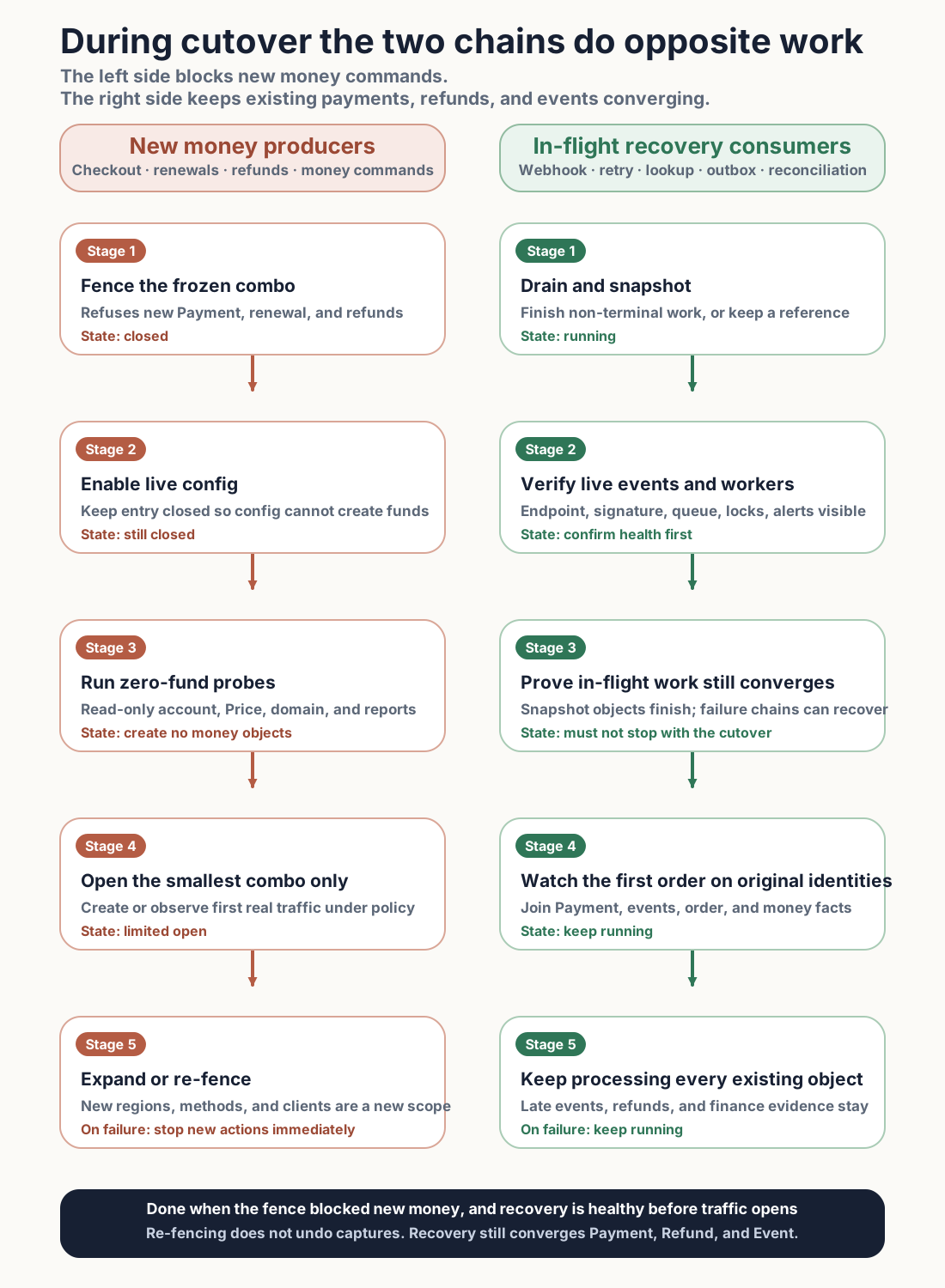
Close new checkout, renewal, refund, and background money commands on the server for this config. Hiding the buy button is not enough: schedulers and admin APIs can still create captures. Every entry refuses new commands under the same account, Price, market, and client conditions.
Then list unfinished Order, Payment, Attempt, Refund, provider operations, webhook events, outbox, and queue jobs. Finish what can reach a terminal state in the window. Record last state, stable ids, and owners for the rest.
Pause a consumer only if it cannot switch config while running. Before pause, either drain pending and in-flight work or record each job so recovery can continue on the original ids.
After config is live, start paused consumers first. Confirm the queue is not backing up or holding stale locks, the latest job succeeded, and failure counts are not still rising. Then reopen checkout. Opening traffic before the webhook worker starts can collect a first payment with no job to move it onto order and entitlements.
Walk the production path without charging anyone
While purchase stays closed, most environment errors can still be found. Zero-fund checks cannot prove a real payment will be approved. They can prove live account, Price, client, domain, webhook, and workers attach to the same environment.
Live account and Price must answer read-only requests
Use the production server identity for provider-allowed read-only calls. Returned account, contracting entity, environment, region, and payment capability must match the first-order combo. Logs keep request ids and redacted results, not keys.
Then read live Product and Price through the internal mapping and compare amount, currency, interval, tax, and status. If the live account cannot find the object, stop. Do not create a same-named Price as a patch, and do not fall back to a test ID.
Client, domain, and return URLs may only cite production config
The browser should show only identifiers allowed in public. Server keys, webhook secrets, and full payment data must not enter JavaScript, URLs, browser storage, or frontend logs.
The webhook has to reach the queue and the order consumer
Send a provider test event to the live endpoint. Signature verification, persistence, enqueue, and the order consumer should all be observable. HTTP 200 is not “order paid.”
Logs, mail, and finance entry exist before the first order
On-call needs request logs, webhook deliveries, queue depth, payment failures, duplicate entitlements, duplicate mail, and downstream delay, plus who owns each. Finance needs read-only access to transaction reports, currency, timezone, settlement account, and differences.
SPF, DKIM, DMARC, sending identity, templates, and bounce handling can be checked first. A test message only proves delivery config. Receipt, order, and provision mail that cite the right business objects wait for the first legitimate order.
Do not treat “small live charge then refund” as a universal test
Some providers require a nominal live transaction. Some forbid manufacturing live test orders with real payment data. A refund is also not the default wrap-up of a test payment: it creates a new money record, can create fees, and shows a real refund to the cardholder.
| Current provider rule | How to verify in live | What one result cannot prove |
|---|---|---|
| Stripe Payments(opens in a new tab) | Cover success, decline, 3DS, async, and refund in sandbox; complete config and zero-fund checks in live; then watch the first real customer | Do not manufacture a live test with staff or real cards; first-order success does not prove bank credit |
| Airwallex Online Payments(opens in a new tab) | Rebuild live keys, risk, and webhooks; if that product requires a real card and a nominal amount, query PaymentIntent and confirm webhook 200 | One card payment does not represent other currencies, methods, or subscription Prices |
| Adyen Online Payments(opens in a new tab) | Configure live account, finance, risk, API, and webhook independently; verify each method and the applicable decline, refund, 3DS, and capture | One method does not represent all methods; real operations create fees and need refund funds |
| Unclear product rules | Confirm product, account, region, method, and current official source; until then only zero-fund checks, with new transactions closed | Do not infer live-test permission from another product at the same company or another provider |
Before the first live payment, read the target product’s current official rule again. Region, integration, account contract, and method can change the requirement.
If a provider allows a nominal amount, define payer, amount, count, window, fees, and stop conditions first. A refund still needs its own business reason and approval. If the provider forbids manufactured live tests, wait for the first customer who actually intends to buy, then check the production path.
How RouteNest opens the first order
RouteNest uses RN_PRO_MONTHLY_USD_V3 for 19.00 USD monthly. After read-only requests find the live account and Price, the live domain can return, the webhook reaches a worker, and mail and report entry open, the buy entry still only allows US web cards.
Before opening, record server version, web build, config revision, live Price ID, webhook URL and events, consumer version, and live merchant account. Also set observation window, max order count, and stop conditions. Environment mismatch, wrong amount, duplicate capture, unhandled webhook, double entitlement, or unclear money owner closes this buy entry immediately. First-order success does not open EUR, wallets, annual billing, or the mobile app.
- Keep buy, renewal, and refund entries closed. Save current versions, observation window, stop conditions, and in-flight objects.
- Confirm webhook, retry, lookup, outbox, and order consumers are running. Missing any recovery job stops the cutover.
- If the provider clearly allows a nominal live verification, run one internally approved, separately labeled small payment. It only verifies the account, keys, webhook, and booking path for that transaction type. It does not verify RouteNest’s Pro monthly Price. Skip it when the rule forbids it or is unclear.
- Open
United States + USD + card + web + Pro monthly. The first order comes from real purchase intent. The server generates 19.00 USD from the internal Price. It does not accept a client amount or a provider Price ID. - Save Order No, Payment No, Attempt No, provider references, and config revision. The return page queries by Order No and stays “confirming.” It does not grant entitlements from
success=true. - A trusted sync response, a signed webhook, or a controlled lookup all update the same Payment. After Payment succeeds, Order, Subscription, and Entitlement each update once. Repeated events must not create another order, subscription, or entitlement.
- In the observation window, check event delay, queue, payment failures, duplicate entitlements, duplicate mail, and finance entry. Expand region, method, currency, or client only when order, payment, and events all resolve to the versions recorded before opening.
| Layer | What should be found | What cannot replace it |
|---|---|---|
| Business purchase | Internal Price, amount, currency, and version | A Price ID or label in the browser |
| Payment/Attempt | Owning Order and status source | Return page or client callback |
| Provider/Webhook | Live account, money object, request, and signed event | HTTP 2xx or a console screenshot |
| Money transaction | Amount and currency of the unique succeeded Charge/Capture | Payment succeeded alone |
| Downstream | Order, Subscription, Entitlement each ran once | Any successful email |
From purchase to downstream delivery, each layer keeps live-environment object numbers and redacted records. If a layer has no number, go back to that layer’s original object. Do not substitute success from the layer above or below.
After capture succeeds, confirm order, mail, and refunds separately
When Payment succeeds, order, subscription, and entitlement can still be processing. If any of those fail, keep the original Payment and event id and retry that consumer. Do not ask the customer to pay again. Do not mark order or entitlement succeeded by hand.
Provider receipt, order mail, and provision mail map to capture, order, and entitlement, and may be sent by three systems. Check sending domain, merchant name, amount, currency, support entry, and business numbers. Mail delivery only proves the mail job finished. It cannot rewrite Payment or Entitlement.
Live refunds handle real customer refunds, or a production verification the provider explicitly requires and the merchant already approved. Creating a refund stores Refund No, original Payment, amount, currency, request identity, and provider reference.
accepted, pending, or processing still mean in progress. After a signed webhook or lookup returns success, check the refund transaction, cumulative refund amount, and Order/Subscription handling.
If a refund request times out, the connection drops, or the result is unknown, stop further refunds on that Payment and look up along the original Refund No and provider reference. A new request key can create a second refund. If platform and provider states conflict, humans confirm the actual money result before compensation. Do not overwrite either side’s terminal state.
Payment succeeded is not money in the bank
Payment can succeed in seconds. Settlement and bank credit can take days. Before the first order, confirm report access, currency, timezone, receiving account, and lookup entry. After a real transaction, follow provider money detail, Settlement, Payout, and bank statement.
If the expected settlement day passed and the report still has no transaction, or the expected payout day passed and the bank has no credit, do not expand traffic. Payment ops checks provider transactions and payouts. Finance checks settlement reports and bank statements. Both continue along the same Payment or Payout reference.
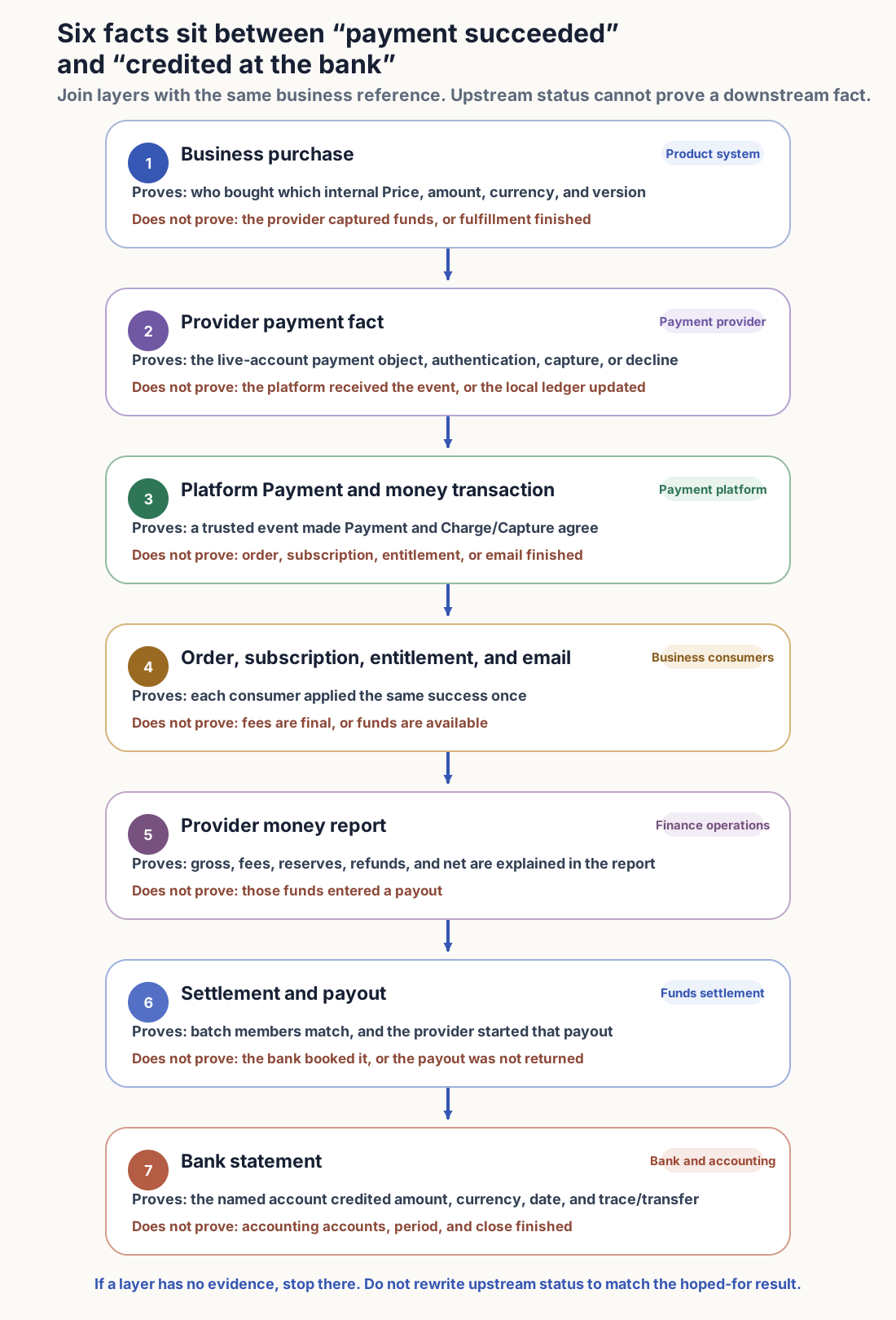
Suppose gross is 100.00 USD, the money report shows 3.20 USD fees and 10.00 USD reserve. Then 100.00 - 3.20 - 10.00 = 86.80 USD. The 3.20 and 10.00 are worked examples, not a provider’s rate. Refunds, disputes, FX, tax, and reserve release can enter other settlement batches.
| Where the money sits | What the example can show | What is confirmed now | What comes next |
|---|---|---|---|
| Payment/Charge | 100.00 USD succeeded | The provider confirmed payment | Fee and settlement detail |
| Provider money detail | Gross 100.00, fee 3.20, reserve 10.00 | Net can be explained as 86.80 | Owning Settlement/Payout |
| Settlement | Batch includes that money detail | Batch members and net can be checked | Whether payout has started |
| Payout | Payout includes the batch or explains account balance | The provider started a transfer | Bank booking or return |
| Bank statement | Account, currency, amount, date, and reference match | The named account was credited | Accounting close |
Automatic payouts often combine many payments, refunds, and fees into one bank credit. Do not search by a single payment amount. Use Payout, Transfer, or bank trace references to match account, currency, amount, and date. See Stripe payout reconciliation(opens in a new tab), Adyen settlement reconciliation(opens in a new tab), and Airwallex settlement report(opens in a new tab).
Where the money chain breaks, continue from the previous layer’s reference. Payment succeeded but no money-report line: check provider finance activity. Payout succeeded but no bank credit: use the payout reference for bank processing or return. Changing Payment status will not invent the missing money record.
On failure, close new transactions; keep recovery jobs
Code and config can roll back. Authorizations, captures, refunds, webhooks, and disputes already created do not disappear. On a stop-the-line fault, close new checkout, renewal, refund, and background money commands for the affected combo. Webhooks, retries, lookups, refund sync, outbox, order compensation, and finance checks keep processing old objects.
| What the page or system shows | Stop immediately | Keep, and how to recover |
|---|---|---|
| Client uses a live key, server still uses a test key | New checkout for that client | Keep the failed request; fix the whole environment, then rerun zero-fund checks |
| Live Price missing or amount mismatch | That product entry | Rebuild the live mapping from the internal Price; do not create a same-named object as a patch |
| Paid, but production webhook signature fails | New purchases that depend on events | Keep original event, Payment, inbox, and worker; rotate the secret, then replay the original event |
| Return succeeded, Payment still unknown | Paying again | Keep original Payment and Attempt and look up; the page stays “confirming” |
| Payment succeeded, downstream unfinished | New purchases of the affected product | Retry downstream from the original succeeded event; do not capture again |
| Refund result unknown or sides conflict | New refunds on the same Payment | Look up along original Refund and provider reference; do not resend with a new request key |
| Report, payout, or bank credit missing | Expanding traffic | Keep payments and finance objects already established; continue from the missing layer |
| Duplicate capture, wrong amount, or wrong merchant owner | All affected money actions | Keep original objects, size the impact, compensate after approval |
If one recovery job is still granting entitlements twice or writing the wrong status, pause only that queue, job type, product, and provider. Other recovery jobs keep running. Taking the whole payment system down leaves captured orders, late events, and in-flight refunds unfinished.
When Price, webhook, or the receiving account changes, retest from the change
A new provider, merchant account, Product/Price, currency, tax, or promotion starts with contracting entity and amount. A change to method, country, client, domain, return URL, SDK, webhook, or secret walks interaction and event handling again. A change to workers, ledger consumers, report timezone, or bank account reruns recovery jobs and money outflow.
After a Price revision, recheck mapping, page amount, order snapshot, and first purchase. After rotating a webhook secret, resend a test event, confirm consumers, then revoke the old secret. After a settlement-account change, rematch reports, payouts, and bank statements. Credits into the old account do not prove the new account works.
From RouteNest’s first order, Order No should reach Payment, a unique capture, a signed webhook, subscription, entitlement, and mail. After settlement, use Payment or Payout references in money reports and the bank statement.
After the first order, check that Order, Payment, Attempt, and money transactions can find each other. After the first settlement batch, start reconciliation from Payment and Payout references. A second provider or a migration of existing subscriptions waits until lookup, difference handling, and recovery have one entry. Do not pack those changes into the same window as first-order launch.