A Docker Compose blue-green deployment on one server starts the candidate, waits until the app is ready, validates and switches the Caddy upstream, proves the public hostname, drains old connections, then stops the old version. Do not delete the old container before the candidate is taking traffic.
That sequence can shrink the unavailable window. The host, disk, Docker daemon, and shared database are still single points of failure, so measure the window instead of calling the result zero downtime.
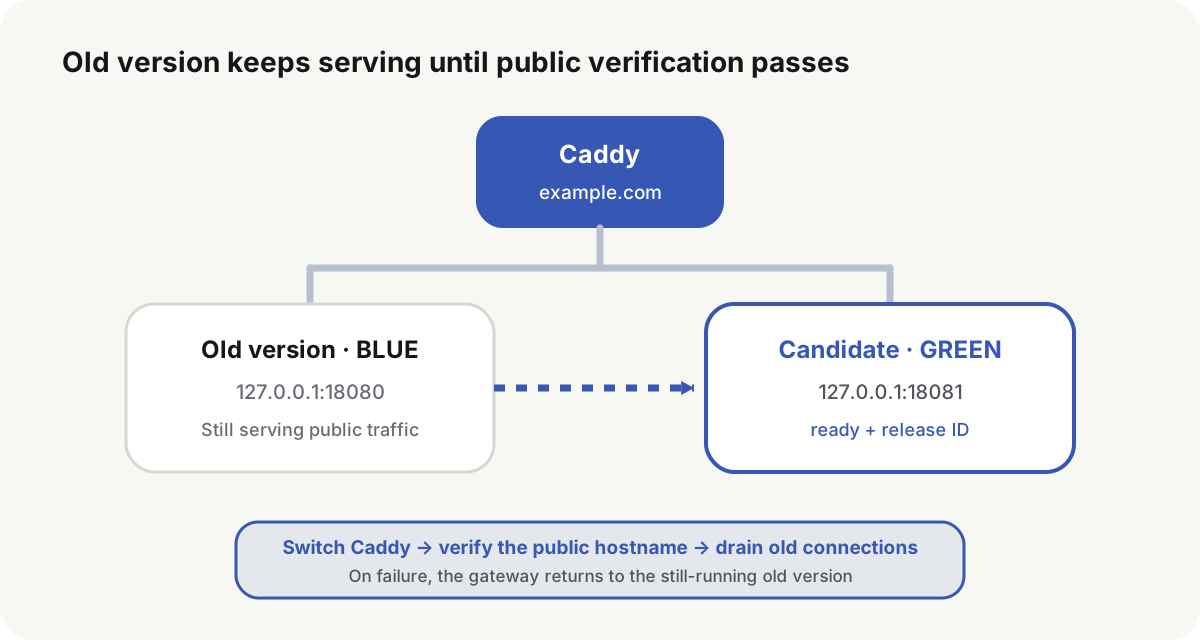
Docker Compose blue-green only works under these constraints
Run two app instances on one host only when the service meets all of these conditions:
- The HTTP app is mostly stateless, and uploads live in shared object storage or a compatible volume.
- Database changes allow old and new binaries to run at the same time.
- The host has CPU, memory, and ports for both app instances.
- Caddy, Nginx, or another entry point can validate a config and reload it without dropping the process.
- The app exposes a side-effect-free readiness endpoint and a release ID.
The host, disk, Docker daemon, and shared database remain single points of failure even when two app instances are running. If the change needs a host reboot or an incompatible database migration, schedule a maintenance window.
Give each release an immutable directory
Keep release files, shared data, and the entry config apart:
/opt/webapp/
├── releases/
│   ├── 20260903-201500-a1b2c3d/
│   │   ├── compose.yaml
│   │   ├── .env
│   │   └── release.json
│   └── 20260902-184000-91e0f2a/
├── shared/
│   └── data/
└── state/
    ├── active-release
    └── deployment.lock

/etc/caddy/sites/
├── webapp.caddy
└── webapp-upstream.caddy
release.json stores the git commit, image digest, config version, and build time. After a release directory is written, leave it unchanged. A later change gets a new release ID.
{
  "release_id": "20260903-201500-a1b2c3d",
  "commit": "<40-character-git-commit-id>",
  "image": "registry.example.com/webapp:1.8@sha256:<64-character-digest>"
}
Take a host lock when the deploy starts so two pipelines cannot switch the same entry:
exec 9>/opt/webapp/state/deployment.lock
flock -n 9 || {
  printf '%s\n' 'another release is already running' >&2
  exit 1
}
CI concurrency limits still belong in the pipeline. The host lock blocks a manual command, a second pipeline, or a retry from operating the same service at the same time.
Run blue and green as separate Compose projects
The Compose file treats project name, host port, and image as deploy inputs:
services:
  app:
    image: ${APP_IMAGE:?APP_IMAGE is required}
    restart: unless-stopped
    ports:
      - "127.0.0.1:${APP_HOST_PORT:?APP_HOST_PORT is required}:8080"
    environment:
      RELEASE_ID: ${RELEASE_ID:?RELEASE_ID is required}
    volumes:
      - /opt/webapp/shared/data:/var/lib/webapp
    healthcheck:
      test: ["CMD", "/usr/local/bin/healthcheck"]
      interval: 5s
      timeout: 3s
      retries: 12
      start_period: 20s
    stop_grace_period: 45s
The live version uses COMPOSE_PROJECT_NAME=webapp-blue and port 18080. The candidate uses webapp-green and 18081. The two project names must differ, or Compose treats the candidate as a recreate of the live service.
Candidate environment:
COMPOSE_PROJECT_NAME=webapp-green
APP_HOST_PORT=18081
RELEASE_ID=20260903-201500-a1b2c3d
APP_IMAGE=registry.example.com/webapp:1.8@sha256:<64-character-digest>
Compose project names(opens in a new tab) come from -p, COMPOSE_PROJECT_NAME, the Compose name: field, or the directory basename. Pick the name explicitly so two releases never share one project.
If the host cannot run both instances, stop the old instance and start the new one in place. Record the expected downtime, and have the entry return a maintenance page or 503. That path cannot warm the candidate first, so it is not a blue-green switch.
Readiness has to prove the app can take traffic
The health endpoint should confirm that initialization finished, routes are mounted, and critical dependencies are in an acceptable state. Do not run expensive queries or writes on every probe.
GET /readyz

HTTP/1.1 200 OK
Content-Type: application/json

{"status":"ready","release":"20260903-201500-a1b2c3d"}
Docker healthcheck can call a script inside the container. The host still has to hit the real loopback port:
docker compose --env-file candidate.env up -d --wait --wait-timeout 120
docker compose --env-file candidate.env ps
curl -fsS http://127.0.0.1:18081/readyz
curl -fsS http://127.0.0.1:18081/version
Docker Compose up --wait(opens in a new tab) waits until services are running or healthy and implies detached mode. Healthy only reflects the probe defined in Compose. It does not replace a small smoke path for login, reads, writes, or a critical API.
Warm caches, templates, and connection pools on the loopback address. If warmup fails, stop the candidate project. The public entry still points at the old version.
Keep the Caddy upstream in its own file
The site file imports a separate upstream file:
example.com {
    import /etc/caddy/sites/webapp-upstream.caddy
}
Current upstream file:
reverse_proxy 127.0.0.1:18080
Write a candidate file in the same directory, then replace:
upstream_file=/etc/caddy/sites/webapp-upstream.caddy
candidate_file="${upstream_file}.candidate"
backup_file="${upstream_file}.previous"

printf '%s\n' 'reverse_proxy 127.0.0.1:18081' \
  | sudo tee "$candidate_file" >/dev/null
sudo cp "$upstream_file" "$backup_file"
sudo mv "$candidate_file" "$upstream_file"
mv is an atomic replace only when source and target sit on the same filesystem. A tempfile in /tmp moved into /etc can cross filesystems and lose that guarantee.
Nginx can use the same pattern with an upstream file and nginx -t before reload. Traefik can flip routing without this file, but the public proof and drain steps still apply.
Validate the Caddyfile, then reload
if ! sudo caddy validate \
  --config /etc/caddy/Caddyfile \
  --adapter caddyfile; then
  sudo mv "$backup_file" "$upstream_file"
  exit 1
fi

if ! sudo systemctl reload caddy; then
  sudo mv "$backup_file" "$upstream_file"
  sudo systemctl reload caddy
  exit 1
fi
Caddy’s production notes(opens in a new tab) treat reload as a graceful config change. Stopping and starting the process is a different action and causes downtime. If the new config fails to load, Caddy keeps the last working config. The script still restores the on-disk upstream so the next restart does not load a file that never became active.
caddy validate(opens in a new tab) deserializes the config and provisions modules without starting them. A successful reload only proves Caddy accepted the file. It does not prove DNS, TLS, Host routing, and the candidate app form a working public path.
Prove the public hostname, not just loopback
Right after the switch:
curl --fail --silent --show-error \
  --connect-timeout 5 \
  --max-time 15 \
  https://example.com/readyz

curl --fail --silent --show-error \
  --connect-timeout 5 \
  --max-time 15 \
  https://example.com/version
The returned release must equal the candidate RELEASE_ID. A request to 127.0.0.1:18081 cannot see a certificate problem, a Host routing miss, a broken Caddy import, or a CDN origin that still points at the old version.
If public proof fails, restore the previous upstream, validate, reload, and confirm the old version is public again:
sudo mv "$backup_file" "$upstream_file"
sudo caddy validate --config /etc/caddy/Caddyfile --adapter caddyfile
sudo systemctl reload caddy
curl -fsS https://example.com/version
After the old version is public again, keep the candidate container and its logs. Deleting a failed candidate throws away startup logs, environment drift, and health state.
Drain old connections after a successful switch
After Caddy reloads, new requests that follow the new config go to the candidate upstream. Connections, HTTP requests, or long streams that already exist may still finish on the old instance. A public release ID proves the new entry is live. It does not prove the old instance has no in-flight work.
Wait at least as long as the app’s normal request timeout and common long requests. WebSockets, SSE, and large uploads need their own policy. Caddy can keep WebSockets and other streams open across a reload with stream_close_delay(opens in a new tab); that only delays closing the proxy stream. The app still has to drain its own in-flight work.
When the app receives the stop signal it should stop accepting new work, wait for in-flight requests, and exit inside stop_grace_period. Compose waits that long after SIGTERM (or stop_signal) before SIGKILL; the default is 10 seconds(opens in a new tab).
During drain, watch:
docker stats --no-stream
docker compose --env-file active.env logs --since 2m app
ss -ntp | grep ':18080' || true
ss is a connection-level signal. A closed socket does not mean the app finished its work, and an open socket does not always mean a live business request. If the app exposes in-flight request counts, active jobs, or graceful-shutdown metrics, use those metrics and access logs first, then use the connection list to find long-lived sockets.
When public requests keep succeeding and error rate plus latency look normal, update the current-release pointer atomically, then stop the old project:
active_file=/opt/webapp/state/active-release
active_candidate="${active_file}.candidate"

printf '%s\n' '20260903-201500-a1b2c3d' \
  | sudo tee "$active_candidate" >/dev/null
sudo mv "$active_candidate" "$active_file"
docker compose --env-file active.env stop app
Write the current pointer, public proof, and old-instance stop result into the same release record, then prune older releases by retention count. The current release and the latest rollback release must not be deleted in the same cleanup. If the process must resume after a crash or reboot, persist those facts first so a later recovery job can abort the candidate, restore the old upstream, or finish a switch that already passed public proof.
Database and local state decide whether you can roll back
The entry config can point back at the old upstream. Whether the app can roll back depends on the current schema. Before the candidate goes live, the schema must work for both binaries. After a dropped column, a changed meaning, or an irreversible transform, an old container may start and still read the wrong data.
Split the change as expand, migrate, then contract. After contract, the rollback set is the app that already understands the new schema, not an old image that will misread it.
If the app writes local files, both instances need the same compatible data layer or an explicit migration. SQLite, embedded indexes, and directories that cannot be opened twice usually cannot start two instances. Those apps need a maintenance window, or the backup, upgrade, and restore path the software already provides.
Write the switch result into the release record
| Fact | Why it is stored |
|---|---|
| Candidate image, commit, and release ID | The next deploy has to name what became live |
| Final Compose config and candidate health | A later retry can tell startup failure from switch failure |
| Caddy upstream before and after, plus validate results | Disk and the running config can be compared |
| Loopback and public release IDs | Public proof is not assumed from loopback |
| Drain duration, error rate, and app logs | Connection lists are not the only drain evidence |
| Current version, previous version, and schema range | Rollback is limited to a compatible binary |
The next release reads the old version from that record. After a host interrupt, the recovery program uses the same facts to decide whether to stop the candidate, restore the entry, or complete a switch that already passed verification.
Common questions
Can Docker Compose do a zero-downtime deploy on one server?
A mostly stateless app can keep the unavailable time short. The host, Docker, and shared database are still single points. Measure the window, and confirm the old version can return if the switch fails.
Is docker compose up --wait enough?
No. Also check business readiness, the release ID, critical dependencies, and the public hostname.
Why keep the old version and the candidate running together?
The candidate can start and warm up before it takes traffic. If the switch fails, the entry can return immediately to the old version that is still running.
Does a failed Caddy reload take the site down?
With validate and reload, a bad config does not replace the running config. Restore the on-disk file anyway, so a later process restart does not load the bad file.
When can the old container stop?
After public proof succeeds and connections have drained. Keep the old image and config until the observation window ends, and only while the database still works with that binary.