Cache-Control for static assets cannot be one header copied onto every path. Fingerprinted CSS, JavaScript, and fonts can stay cached for a year. HTML has to revalidate so it can pick up new URLs. Images that keep the same filename can stay cached only for as long as outdated bytes are acceptable. Responses that carry account or payment data must not enter a shared cache.
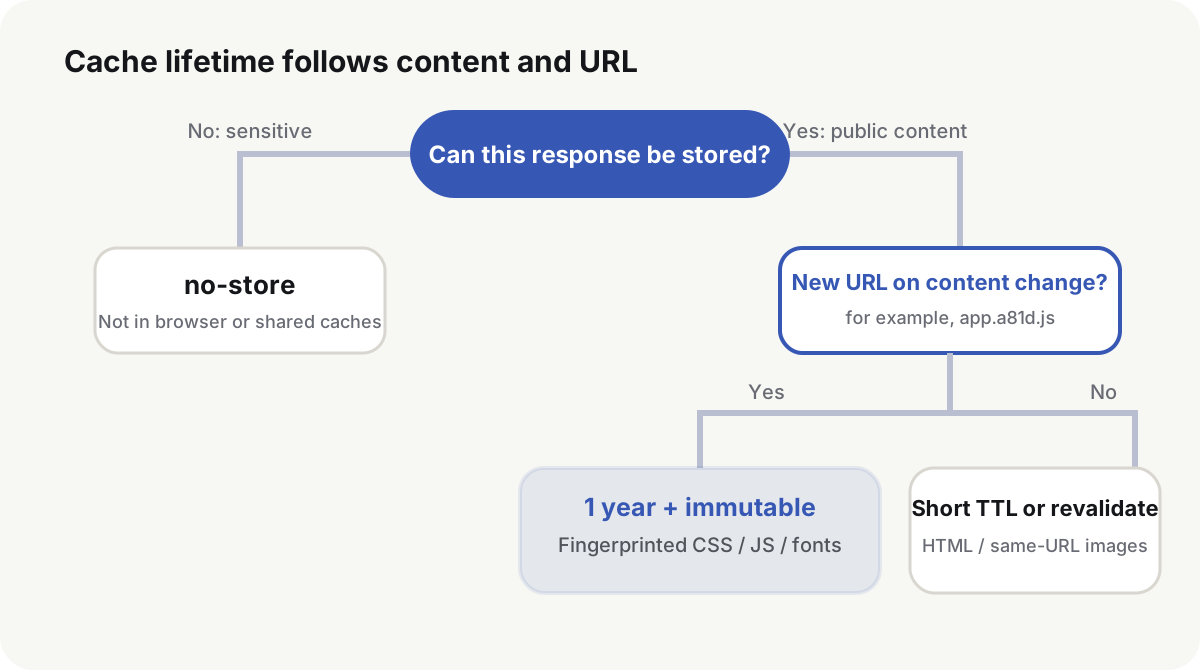
Cache-Control for static assets starts from whether the URL changes
| Resource | When the URL changes | Usual policy | Publish requirement |
|---|---|---|---|
| HTML | The address stays; the document changes | no-cache or a short max-age | Revalidate or expire in time for the next release |
| Fingerprinted CSS, JS, and fonts | The filename changes with the bytes | public, max-age=31536000, immutable | HTML must reference the new URL |
| Unversioned images and PDFs | The same address may be overwritten | Short cache plus ETag | Purge that URL or change the URL after a replace |
| Public API responses | Business semantics decide | Explicit public or private, s-maxage, and Vary | The cache key must cover every response difference |
| Sensitive or one-time responses | Reuse is not allowed | no-store | The CDN must not cache them either |
app.4f81c9a2.js can be treated as immutable only because a content change produces a new filename. A directory named /assets/ does not prove that every file inside it is immutable.
Cache-Control decides who may store the response and when it is fresh
RFC 9111(opens in a new tab) defines HTTP cache semantics. immutable is the extra response directive in RFC 8246(opens in a new tab). The common directives do different jobs:
public: a shared cache may store the responseprivate: only a private cache may store it, so a CDN shared cache should notmax-age=N: the response stays fresh for N secondss-maxage=N: overridesmax-agefor shared caches and leaves the browser lifetime unchangedno-cache: the response may be stored, but every reuse must revalidateno-store: do not store the responseimmutable: while the response is fresh, a reload should not send a conditional request
no-cache is not “do not cache”. HTML with no-cache can keep the body, then send ETag or Last-Modified on the next visit. If the document is unchanged, the origin returns 304 Not Modified and skips the full page.
ETag confirms whether the content changed
The origin returns:
Cache-Control: no-cache
ETag: "page-a81d"
The next request can send:
If-None-Match: "page-a81d"
Unchanged content returns 304 Not Modified. Changed content returns a new 200 response and a new ETag. ETag does not replace Cache-Control. Without Cache-Control, browsers, proxies, and CDNs may still apply different heuristic freshness(opens in a new tab).
MDN’s HTTP caching guide(opens in a new tab) recommends cache busting for versioned static files: put the content change into the URL. Release and rollback then do not wait on purge speed.
File fingerprints turn an update into a new URL
Publish in this order:
- Build
app.<hash>.css,app.<hash>.js, and versioned font files. - Upload the new files and keep the previous ones.
- Publish HTML that references the new URLs.
- Check the new HTML, the new files, and their content hashes.
- Delete old files only after the rollback window ends.
Deleting the old files before the HTML changes makes cached HTML request a 404. Overwriting the same filename leaves browsers and edge nodes holding the previous bytes until every TTL expires.
Split CDN TTL from browser TTL
A CDN may follow origin Cache-Control or override TTL in its dashboard. On Cloudflare, Origin Cache Control(opens in a new tab) is on by default for Free, Pro, and Business plans, so origin max-age and s-maxage set edge freshness unless a Cache Rule or Browser Cache TTL(opens in a new tab) overrides them. Cloudflare does not cache HTML or JSON by default; those responses need a Cache Rule before s-maxage can take effect at the edge. immutable is proxied to browsers and does not change Cloudflare’s own cache decision.
When you configure origin and CDN cache together, decide three lifetimes separately:
- how long a browser may reuse the object
- how long an edge node may reuse it
- whether an expired edge object revalidates or downloads the full body again
Public JSON that updates often can use:
Cache-Control: public, max-age=60, s-maxage=600
ETag: "catalog-9f3c"
Browsers revalidate after one minute. A shared cache may serve the same object for ten minutes once that response is eligible. If the body changes with Accept-Encoding, language, or origin, set Vary or an explicit CDN cache key. A missing key field sends one user’s or one encoding’s response to the next request.
Set Cache-Control by path in Caddy
These rules assume filenames under /assets/ include a content hash. Do not use immutable if the build can overwrite the same path:
example.com {
    root * /srv/site
    encode zstd gzip

    header Cache-Control "no-cache"

    @immutable path /assets/*
    header @immutable Cache-Control "public, max-age=31536000, immutable" {
        match status 2xx
    }

    @media path /images/* /downloads/*
    header @media Cache-Control "public, max-age=86400" {
        match status 2xx
    }

    file_server
}
A 404 or redirect must not inherit a one-year cache because the path matched. After the config reload, request a 200, a 404, and a redirect and read Cache-Control on each status.
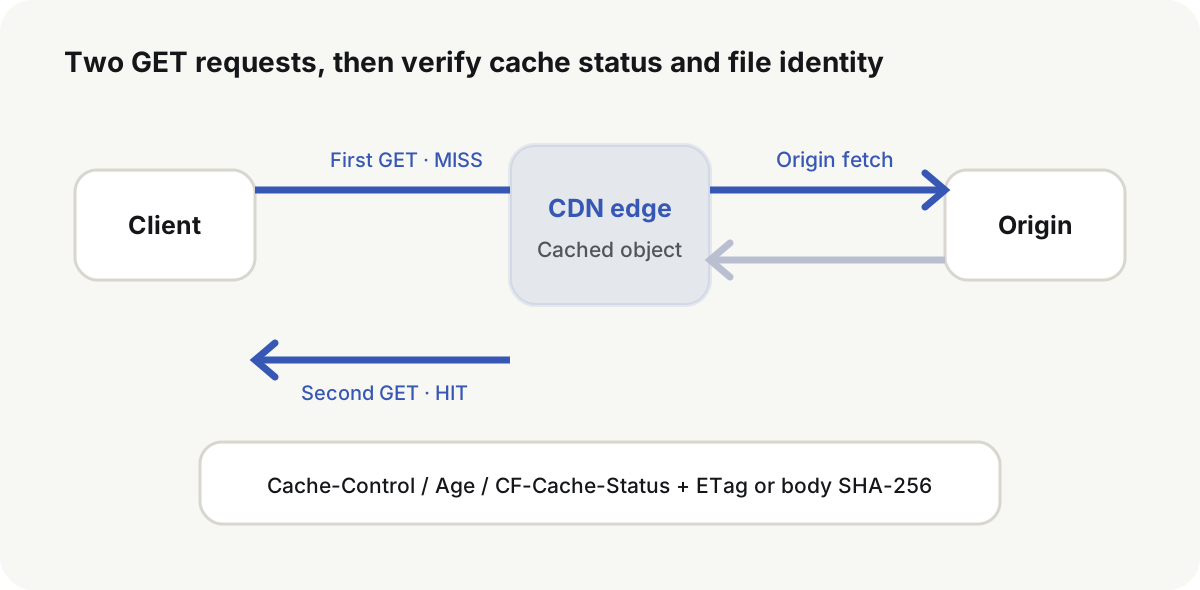
Prove the cache with two GET requests
HEAD may follow different rules. Send at least two GET requests, then compare headers and bodies:
url=https://cdn.example.com/assets/app.4f81c9a2.js

curl -sS -D /tmp/first.headers -o /tmp/first.body "${url}"
curl -sS -D /tmp/second.headers -o /tmp/second.body "${url}"

grep -Ei '^(cache-control|age|etag|last-modified|x-cache|cf-cache-status):' \
  /tmp/first.headers /tmp/second.headers
sha256sum /tmp/first.body /tmp/second.body
On macOS, replace sha256sum with shasum -a 256. The two body hashes should match, Cache-Control should contain the intended directives, the second response should show a growing Age or a vendor HIT such as Cloudflare CF-Cache-Status: HIT, and the ETag should match the origin object. HIT(opens in a new tab) only means that edge reused some object.
Locate stale content layer by layer
| Symptom | Likely layer | How to tell | What to do |
|---|---|---|---|
| Only this browser shows the old file | Browser cache or a service worker | Private window, Disable cache, or the SW list | Change the cache policy or the worker version |
| Different regions see different versions | CDN edge | Compare Age, ETag, and body hash | Purge that exact URL and inspect edge rules |
| The CDN keeps fetching origin | The response is uncacheable or the key is too fine | Read Cache-Control, Set-Cookie, Vary, and CF-Cache-Status | Fix origin headers and the cache key |
| A purge helps, then the old file returns | Origins disagree | Fetch each origin and compare hashes | Unify the artifact, then purge the edge |
| The new page’s assets 404 | Publish order, or old files already deleted | Read the URLs actually present in HTML | Upload the files again and keep the previous version longer |
A purge is for a misconfigured header or an in-place replace. A normal release still depends on immutable URLs. A purge API cannot force every browser to drop a copy that is still fresh.
Frequently asked questions
Can all static assets be cached for a year?
No. Only files whose URL changes when the content changes are safe with a one-year cache and immutable. HTML and same-name replacements need a short cache or revalidation.
What is the difference between no-cache and no-store?
no-cache allows storage and requires revalidation before reuse. no-store forbids storage. Ordinary HTML uses the former. Sensitive responses use the latter.
Do I still need Cache-Control if I have an ETag?
Yes. Cache-Control decides storage and freshness. ETag only validates the content version after that window.
Does a CDN HIT mean users received the new file?
No. Confirm that the URL, ETag, or body hash belong to the current release, and that the browser or a service worker is not still holding the previous address.
What is the most reliable way to update static assets?
Write the content hash into the filename, upload the new files first, publish HTML that points at the new URLs, and keep the previous files until the rollback window ends.
If the page is still slow after those headers check out, split the wait into DNS, connection, TTFB, download, and render instead of raising TTL again.