When you migrate a website to a new domain, each live old URL should take one permanent hop to the matching new URL, including the path and any query string that still belongs to the page. Canonical tags, internal links, sitemaps, structured data, and analytics on the new host must already name the new domain.
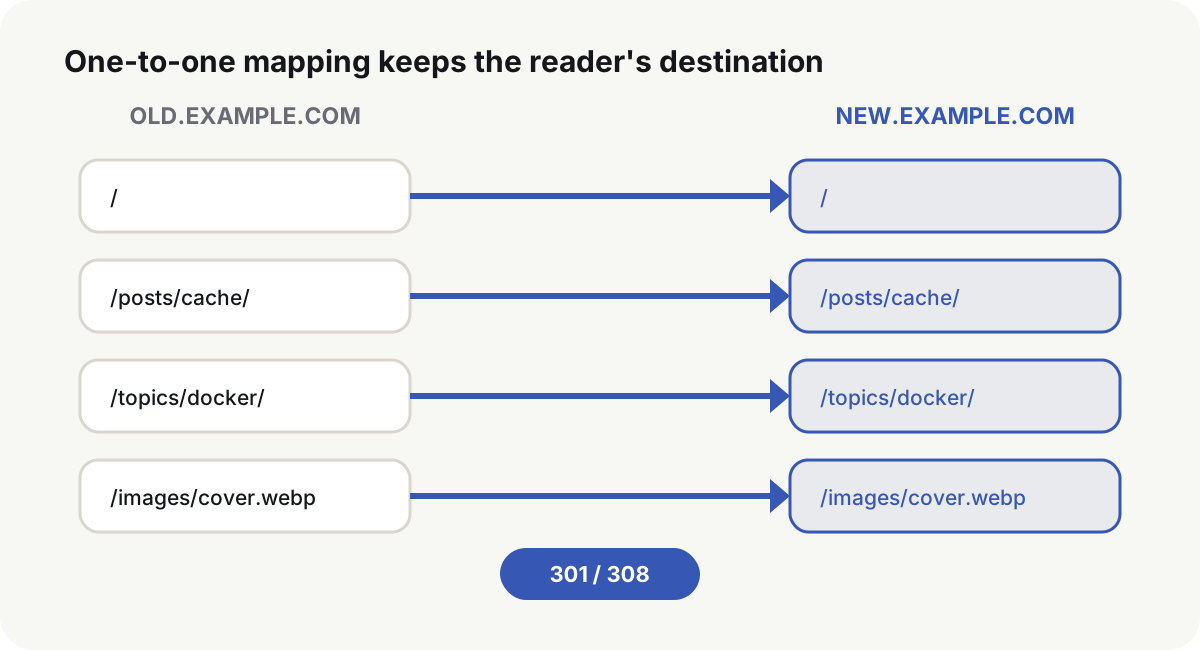
Build a one-to-one URL map before the cutover
Export old URLs from the sitemap, access logs, Search Console, backlinks, and the database. Then give each address one destination:
| Old URL state | Destination |
|---|---|
| Same content, new host only | Keep the full path and send a permanent redirect |
| Path also changes | Map to the closest page that still finishes the same task |
| Several pages merge | Hop to the merged page that can still complete the original job |
| Content is gone for good | Return 404 or 410 |
| An asset is still referenced | Keep the file or map it to the same file on the new host |
Do not send every old URL to the new homepage. A reader who opens an old article needs that article. Search engines use the same relationship to move page signals.
Prepare the new host before you migrate a website to a new domain
The new host needs working DNS, a valid certificate, and the same core pages and assets as the old site. Its canonical tags, internal links, and structured data must already use the new domain. The XML sitemap should list only new URLs. Both hosts need their own Search Console property. Analytics, ads, OAuth, payment callbacks, webhooks, CORS, and mail templates have to name the new host before the cutover, or those flows keep posting to a domain that now only redirects.
Do not flip the old domain onto an unfinished new site. Test on a preview host or a Host-header mapping so two indexable hosts are not serving the same content for long.
Use 301 or 308 as a single-hop permanent redirect
RFC 9110(opens in a new tab) treats 301 and 308 as permanent redirects. Historical clients may turn a 301 after POST into GET; 308 requires the follow-up request to keep the original method and body.
Public GET and HEAD pages should use 301. Search Console Change of Address samples 301 on old pages before it accepts the move, so the public page map should return 301. APIs, form posts, and other entries that must keep the method should use 308, on a separate rule set the tool will not sample. Once a code is chosen, keep it stable across the CDN, gateway, and origin so the hop does not become 301 then 302 then 308.
A Caddy host that preserves path and query looks like this:
new.example.com {
    reverse_proxy app:8080
}

old.example.com, www.old.example.com {
    redir https://new.example.com{uri} 301
}
{uri}(opens in a new tab) includes the path and query. The old names still have to resolve to an entry that can finish TLS and return the hop. Without a current certificate on the old host, the browser reports an HTTPS error and never sees 301.
Point canonical tags and sitemaps at the new host
The new page should declare itself:
<link rel="canonical" href="https://new.example.com/posts/cache-control/">
Replace the old host in navigation, in-body absolute links, Open Graph, RSS, JSON-LD URLs, hreflang pairs, the sitemap listed in robots.txt, mail templates, app config, and third-party callbacks.
A canonical tag is not a redirect. Google treats a permanent redirect as a stronger canonical signal than rel="canonical"(opens in a new tab), and the two have to point the same way:
| Old URL response | What happens |
|---|---|
| 200, canonical to the new host | Readers stay on the old domain; duplicates linger |
| 301 or 308, new page still names the old host as canonical | The hop and the HTML disagree |
| 301 or 308, new page names itself as canonical | The hop and the index target agree |
Verify a single hop and matching content
Sample the home page, an article, a category, a URL with a query string, a 404, and a static asset:
curl -sS -o /dev/null -D - --max-redirs 0 \
  'https://old.example.com/posts/cache-control/?from=email'

curl -sS -o /dev/null -w '%{url_effective} %{http_code} %{num_redirects}\n' \
  -L 'https://old.example.com/posts/cache-control/?from=email'
The first response should be one permanent status and one Location. The second should hop once and land on the matching new page. Then read the final title, canonical, body, and assets so a correct URL is not covering the default home page.
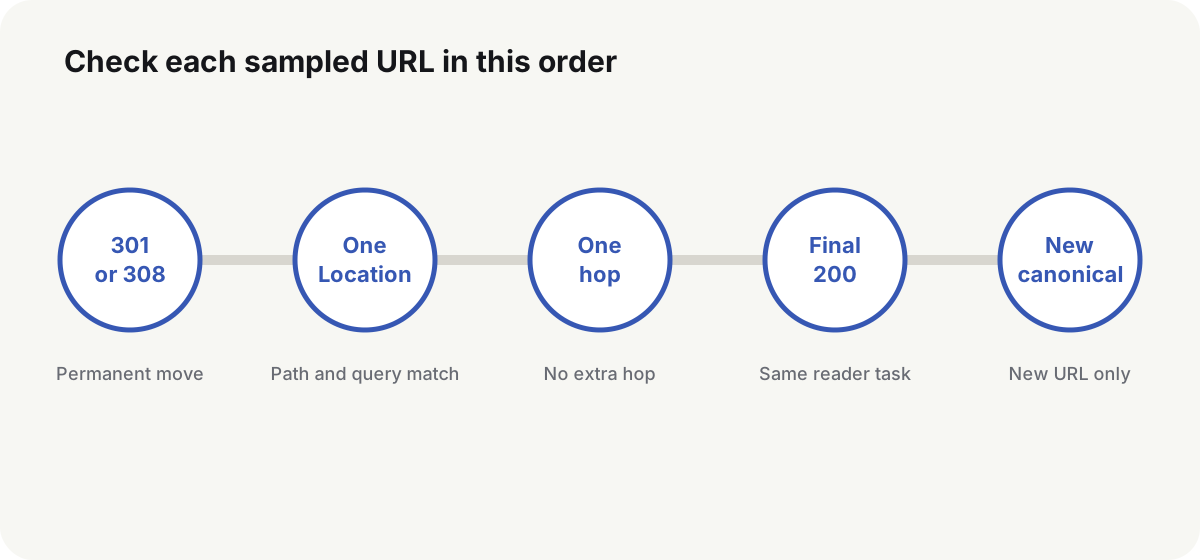
Fail the release unless the first hop is this Location:
old='https://old.example.com/posts/cache-control/?from=probe'
expected='https://new.example.com/posts/cache-control/?from=probe'

headers="$(mktemp)"
trap 'rm -f "${headers}"' EXIT
curl -sS -o /dev/null -D "${headers}" --max-redirs 0 "${old}"

status="$(awk 'NR == 1 {print $2}' "${headers}")"
location="$(awk 'BEGIN{IGNORECASE=1} /^location:/ {sub(/\r$/, ""); print $2}' "${headers}")"
location_count="$(awk 'BEGIN{IGNORECASE=1} /^location:/ {count++} END {print count + 0}' "${headers}")"

case "${status}" in
  301|308) ;;
  *) exit 1 ;;
esac
test "${location_count}" -eq 1
test "${location}" = "${expected}"
Submit the Search Console Change of Address
Google’s site-move documentation(opens in a new tab) asks for the URL map and permanent redirects first, then a new sitemap, then monitoring on both hosts. The Change of Address tool(opens in a new tab) is for a move from one domain or subdomain to another. Verify ownership of both properties with the same Google account, and confirm that old pages already return 301.
The tool does not replace redirects. It does not apply to a handful of path changes, HTTP to HTTPS, or www versus non-www on the same domain. It also does not move subdomains automatically: submit each old host variant you have verified, including www and non-www even if those names were unused. The pre-move check samples 301s; the supported property types and entry points are whatever Search Console shows on the day you submit.
Watch crawl, index, and leftover old URLs
Old-host crawl should fall while new-host crawl and index rise. An old URL that still returns 200, a temporary redirect, or a chain is an unfinished hop. Canonical tags, sitemaps, and internal links on the new host should not still name the old domain. Search traffic, backlink targets, 404s, certificates, and the redirect service are the early warning signs.
Google’s site-move guidance is to keep the redirects as long as possible, generally at least a year, so signals and inbound links can finish moving. Search Console shows a Change of Address as in progress for 180 days; that window is not a delete date for the hops. An old URL that still receives backlinks, bookmarks, mail, or clients should keep the correct Location.
If the new host is broken, repair it in place when you can. Bouncing between the two domains for a few hours creates new chains, canonical fights, and index churn. A true rollback restores the full old site and the old canonicals, not just one proxy rule.
After you migrate a website to a new domain, keep sampling those hops while leftover old links still arrive. Do not take the old certificate down because the first 301 looked clean.
Common questions
Should I use 301 or 308 when I migrate a website to a new domain?
Ordinary GET sites use 301. Change of Address also samples 301 on old pages. Independent endpoints that must keep POST or another method and body use 308.
Can I redirect every old URL to the new homepage?
No. Live old URLs should hop to the new URL that still holds the same content or task. URLs with no replacement return 404 or 410.
Do I still need canonical tags after the redirects are on?
Yes. Canonical tags, internal links, structured data, hreflang, and the sitemap on the new host should use only the new domain.
Can I shut down the old certificate once redirects work?
No. The client finishes DNS and TLS on the old name before it can read the redirect. Old DNS, certificates, and the redirect entry have to stay up.
How long should I keep the redirects?
Google’s site-move guidance is generally at least a year. Keep the correct hop for any old link that still has traffic value.